The React Re-render Misconception
You update a single piece of state in your React application, like incrementing a counter, and suddenly your console logs explode. Components you thought were unaffected are suddenly reporting they've rendered. Your immediate thought might be, "Why did half of my React app render again? Isn't this bad for performance?" This is a common misconception. React components are designed to re-render when their inputs change. A render is a fundamental part of React's reconciliation process, not inherently a performance bottleneck. The key is understanding when and why re-renders occur, and distinguishing between necessary and unnecessary ones.
React's core principle is that a component should reflect its current props and state. When state or props change, React re-renders that component to update the UI. This is how declarative UI works. The problem arises when components re-render unnecessarily, causing wasted computation and potentially slowing down your application. However, React is optimized for this. It doesn't immediately update the DOM on every render; instead, it performs a diffing algorithm to determine the most efficient way to update the actual DOM. This means a component rendering doesn't automatically equate to a slow user experience.
Understanding the Cause: State and Props
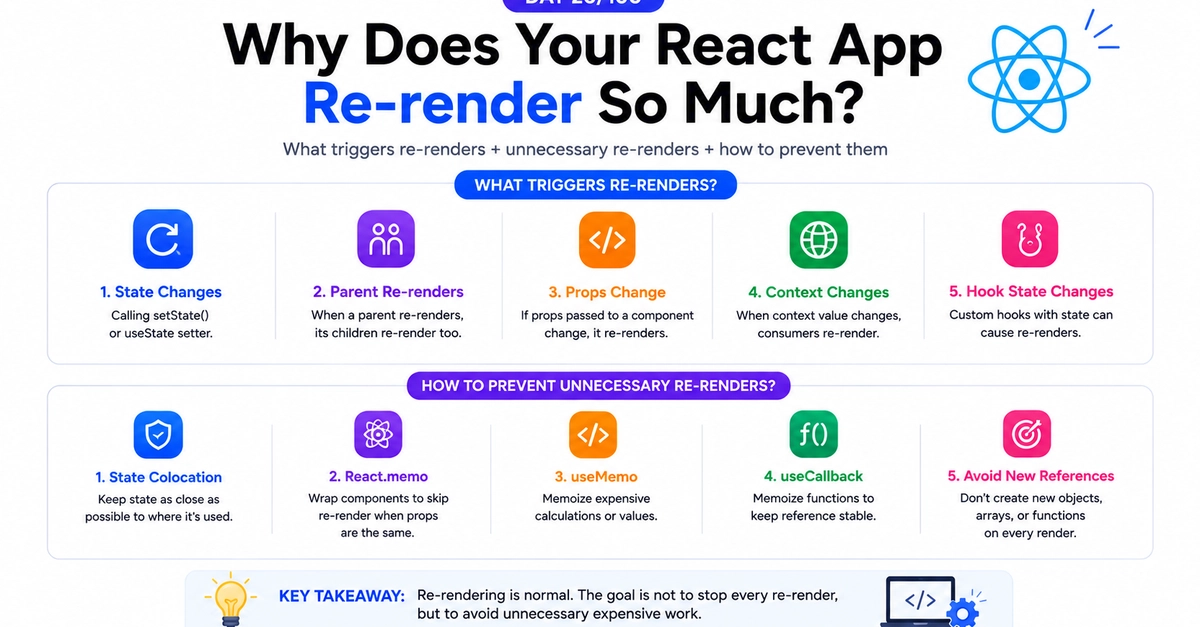
The primary drivers for a React component re-render are changes in its state or props. When you call a state setter function (e.g., setCount(count + 1)), React schedules a re-render for that component and its children. If a parent component re-renders, its children will also re-render by default, even if their props haven't changed. This cascading effect is often where the perceived "excessive" re-renders originate.
Consider a simple counter example. If you have a Button component that increments a counter in its parent App component, and App re-renders, the Button will also re-render. This is expected behavior because Button is a child of App and App's state change triggered the re-render. The misconception is that this child re-render is inherently bad. If the Button component is very simple and its render function is quick, this re-render has negligible impact. The performance issues arise when these re-renders involve complex computations, large lists, or expensive side effects that aren't necessary.
When Re-renders Become a Problem
Unnecessary re-renders become problematic when they lead to:
- Wasted CPU cycles: Components re-executing their render logic without any visual changes.
- Slow UI updates: Especially in large or complex applications, a cascade of unnecessary renders can delay critical UI updates.
- Inefficient resource usage: In web applications, this can manifest as increased battery consumption on mobile devices or slower interactions.
The key to identifying problematic re-renders is to observe when a component re-renders but its output remains identical. This often happens when a parent component passes down new object or array references on every render, even if the contents are the same. For example, passing a new style object or an inline function to a child component can trigger a re-render in that child if it's not memoized correctly.
Optimizing Re-renders: Tools and Techniques
React provides several tools to help optimize performance by preventing unnecessary re-renders:
React.memo
React.memo is a higher-order component (HOC) that memoizes your functional components. It performs a shallow comparison of the component's previous props and new props. If they are the same, React skips re-rendering the component and reuses the last rendered result. This is incredibly effective for components that receive the same props frequently.
For example, if a ProductCard component receives a product object, and the parent component re-renders but the specific product data for that card hasn't changed, React.memo can prevent ProductCard from re-rendering. However, it's crucial to remember that React.memo performs a shallow comparison. If you're passing objects or arrays that are recreated on every parent render, memoization might not work as expected unless you also memoize those props using useMemo or useCallback.

useMemo and useCallback
These hooks are essential for memoizing values and functions, respectively. They help ensure that stable references are passed down to child components, making React.memo more effective.
useCallback: Memoizes a function. It returns a memoized version of the callback that only changes if one of the dependencies has changed. This is vital for passing stable event handlers down to memoized child components.useMemo: Memoizes a computed value. It returns the memoized result of the given function. This is useful for expensive calculations or for creating stable object/array references to pass as props.
Without these, even if you wrap a child component in React.memo, if the parent creates a new function or object on every render and passes it down, the child's props will appear to have changed, defeating the purpose of memoization.
shouldComponentUpdate (Class Components)
For class components, the shouldComponentUpdate lifecycle method provides explicit control over whether a component should re-render in response to prop or state changes. You can implement custom logic here to compare the next props and state with the current ones. If the method returns false, the component will not update. This is the underlying mechanism that React.memo abstracts away for functional components.
The Role of React DevTools
Debugging re-renders is made significantly easier with the React Developer Tools browser extension. The profiler within these tools can highlight which components re-rendered, why they re-rendered (e.g., props changed, state changed), and how much time was spent rendering. This is an invaluable tool for pinpointing performance bottlenecks caused by excessive or unnecessary re-renders. By inspecting the profiler output, you can identify components that re-render frequently without meaningful changes and then apply optimization techniques like React.memo, useCallback, or useMemo.
Conclusion: Render Smarter, Not Harder
Understanding React re-renders is crucial for building performant applications. The key takeaway is that not every re-render is a bug or a performance issue. React is designed to re-render when inputs change. The goal is not to eliminate all re-renders, but to eliminate unnecessary re-renders that don't result in a UI change. By leveraging tools like React.memo, useCallback, useMemo, and the React Developer Tools, you can effectively manage re-renders and ensure your application remains fast and responsive, even as it grows in complexity.