The Persistent macOS Media Key Problem
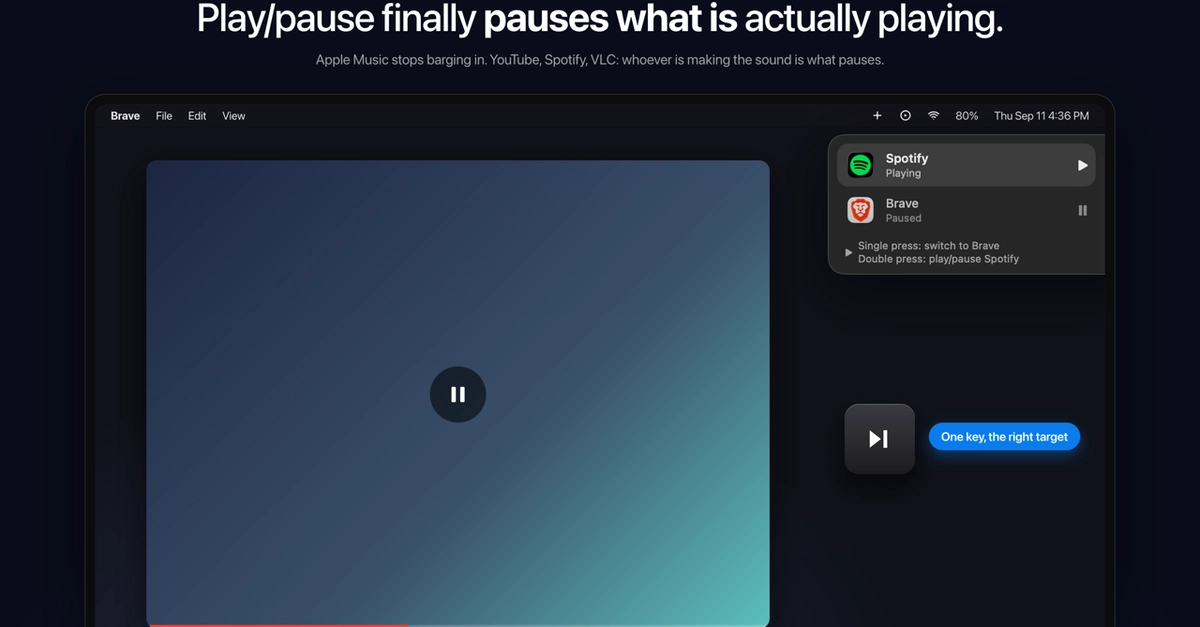
For years, many macOS users have encountered a frustrating quirk: pressing the dedicated play/pause key on their keyboard often fails to control the active media application. Instead, the system might inexplicably launch Apple Music or pause a video playing in a browser tab, even when another application is the true source of audio. This disconnect between user intent and system behavior has been a persistent annoyance.
The underlying issue stems from how macOS manages media key events. The operating system maintains a single "Now Playing" slot, which is controlled by whichever application most recently registered with the MediaRemote framework. Browsers, for example, register when a video starts playing, but they can lose this "Now Playing" status to other applications like Apple Music, even if the browser tab is still active or the other application is not currently playing audio. From an external perspective, it's impossible to discern which application currently holds the media key focus.
This behavior forces users into a manual workaround: stopping the errant application, identifying the correct media source, and then manually controlling playback. This cycle of interruption and correction is not only time-consuming but also breaks the seamless media experience that dedicated keys are designed to provide.
Building a Solution: SmartPause
Frustrated by this recurring issue, developer Yasin Özmeen decided to investigate the root cause. Using macOS's Console application, Özmeen delved into the system's event handling and media frameworks. This investigation led to the creation of SmartPause, a lightweight menu bar application designed to intelligently route media key presses to the application that is actually producing sound.
SmartPause works by monitoring audio output and actively tracking which application is currently the primary audio source. When a play/pause key is pressed, SmartPause intercepts the event and directs it to the identified active media application, effectively bypassing the macOS MediaRemote framework's sometimes erratic allocation of the "Now Playing" slot. This ensures that the media key controls the application the user expects, whether it's a YouTube video in Brave, a podcast in Spotify, or any other audio-playing application.
The development process revealed several complexities in macOS's media key handling. Özmeen identified four key areas that proved particularly time-consuming to unravel:
- Understanding the MediaRemote Framework: Deeply understanding how applications register and de-register for media control is crucial. The framework's state can be dynamic, and applications don't always behave predictably when losing or regaining focus.
- Audio Session Monitoring: Accurately identifying the active audio session requires more than just checking which app is in the foreground. It involves monitoring audio output levels and active playback states across all running applications.
- Event Interception and Routing: macOS's event handling system can be intricate. Intercepting system-wide media key events and then programmatically sending them to a specific application requires careful API usage and an understanding of event propagation.
- Menu Bar Application Development: Building a stable and unobtrusive menu bar application involves understanding macOS's AppKit framework, status bar item management, and background process handling.
The source code for SmartPause is publicly available on GitHub, allowing other developers to examine the implementation, contribute, or adapt it for their own needs. This open-source approach is vital for fostering community-driven solutions to common software frustrations.
The Broader Implications for macOS Users
While SmartPause is a small utility, it addresses a significant usability pain point for a subset of macOS users. The fact that such a tool needed to be built highlights a gap in the operating system's native handling of media keys, particularly in complex multitasking environments where multiple applications might contend for audio focus.
For developers, SmartPause serves as a practical example of how to interact with macOS's lower-level frameworks to solve user-facing problems. It demonstrates the power of system introspection and custom application development to enhance the user experience beyond what the operating system provides out-of-the-box.
The project also implicitly raises questions about Apple's future development of media key handling. Will future macOS versions offer more robust control over which application receives media key input, or will users continue to rely on third-party solutions for a seamless experience? The current system, where the "Now Playing" slot can be unexpectedly reassigned, feels like a relic from a less complex era of computing, and its continued presence is a testament to how difficult it can be to refactor deeply embedded system behaviors.
Ultimately, SmartPause offers a tangible solution for users plagued by the errant play/pause key. It’s a reminder that sometimes, the most effective way to fix a system-level annoyance is through a well-crafted, focused application built by someone who has experienced the problem firsthand.