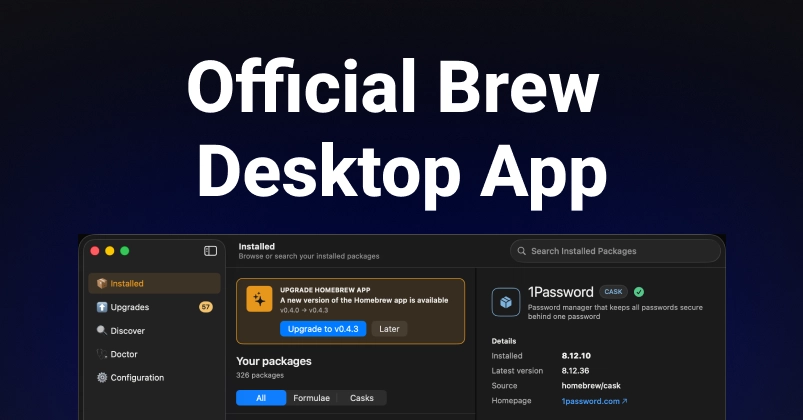
Homebrew Gets a Visual Overhaul with BrewUI
For developers and power users on macOS, Homebrew has long been the de facto standard for managing software installations. Its command-line interface is powerful and efficient, but for those less inclined to navigate the terminal, or for users managing a large number of packages, a visual interface has been a persistent request. Today, that request is answered. Homebrew has officially released BrewUI, its first-party desktop graphical user interface application, designed to bring visual management to installed formulae and casks.
This release marks a significant step for Homebrew, moving beyond its command-line roots to embrace a more accessible user experience. BrewUI aims to simplify the process of installing, updating, and removing software, making Homebrew more approachable for a broader audience without sacrificing the power and flexibility that existing users rely on.
Managing Packages Visually
BrewUI provides a clean, intuitive interface for interacting with Homebrew. Users can see all their installed formulae and casks at a glance. The application allows for easy searching and filtering of installed packages, as well as quick access to actions like updating or uninstalling them. This visual approach can significantly speed up common tasks, especially for users who may not have memorized every Homebrew command or its specific flags.
The core functionality of Homebrew remains the same under the hood. BrewUI acts as a front-end, translating user actions into the equivalent command-line operations. This means that users can trust that the underlying package management logic is handled by the robust and well-tested Homebrew core. The application displays detailed information about each package, including version numbers, dependencies, and installation paths, presenting this data in a structured and easily digestible format.
This move to a GUI is not entirely unprecedented. In the past, third-party tools like Brewlet attempted to fill this gap, offering menu-bar integration and simplified management. However, BrewUI benefits from being an official, first-party application. This ensures tighter integration with the Homebrew core, ongoing maintenance, and a commitment from the Homebrew maintainers to support this new facet of their ecosystem. The development team behind BrewUI has focused on creating a user experience that is both powerful and straightforward, catering to both novice and experienced Homebrew users.
What This Means for the Homebrew Ecosystem
The introduction of BrewUI has several implications for the Homebrew community and its users. For developers who frequently install and manage numerous development tools, libraries, and applications, BrewUI offers a welcome alternative to constant terminal interaction. It can streamline the setup process for new machines or help quickly identify and clean up outdated or unused packages.
For less technical users, or those new to macOS development workflows, BrewUI lowers the barrier to entry for using Homebrew. It demystifies the package management process, allowing users to focus on their development tasks rather than wrestling with command-line syntax. This could lead to wider adoption of Homebrew as a standard tool for software management on macOS.
The Homebrew team has historically been cautious about introducing graphical interfaces, prioritizing the stability and efficiency of its command-line tools. The decision to develop and release BrewUI suggests a strategic understanding of their user base and a commitment to evolving with user needs. It’s a move that acknowledges that while the command line is king for many, a visual alternative can coexist and even enhance the overall Homebrew experience.
The development of BrewUI was driven by a desire to make Homebrew more accessible. It’s not just about providing a graphical wrapper; it’s about enhancing the user experience and making package management a less intimidating task. This thoughtful approach, combined with the backing of the core Homebrew maintainers, positions BrewUI as a valuable addition to the macOS development toolkit.
As BrewUI matures, we can expect further enhancements and optimizations. The initial release provides a solid foundation for visual package management, and the active development by the Homebrew core team suggests a promising future for this new desktop application. It’s a testament to the project's commitment to serving its diverse user base.