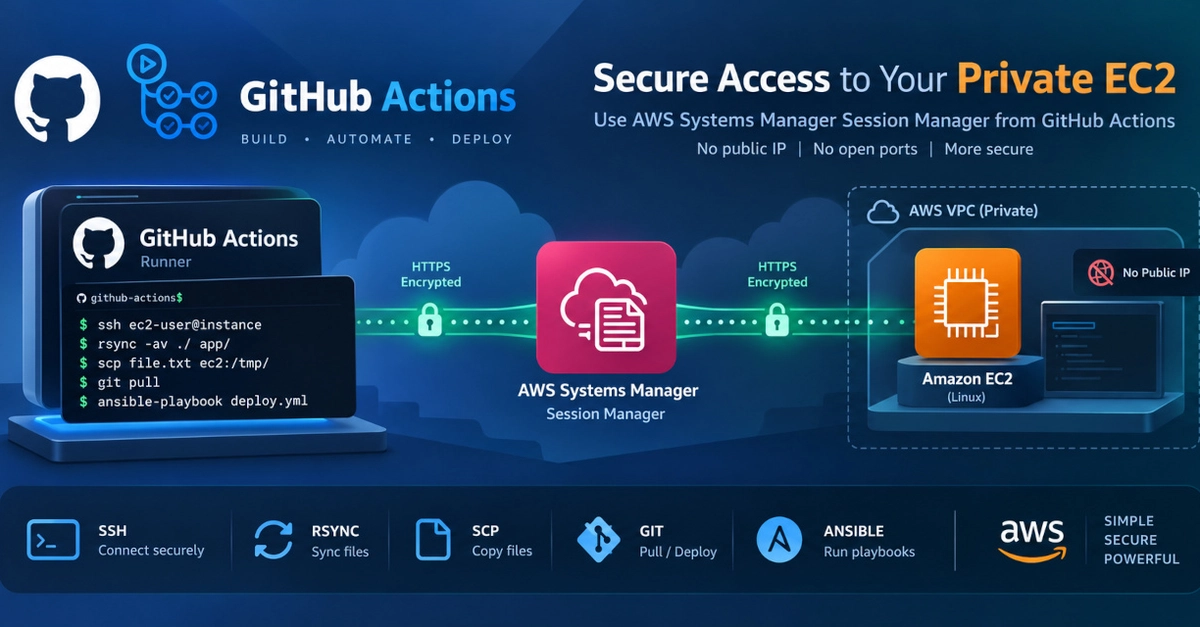
The CI/CD Bottleneck: SSH Keys and Open Ports
Deploying code to private EC2 instances from CI/CD pipelines often involves a security trade-off. The common approach uses SSH keys and opens port 22 to the world. This creates significant security risks. SSH keys, once generated, often live in CI secrets indefinitely, never rotating. This means any compromise of your repository secrets or a vulnerability in a third-party action grants unfettered shell access to your production servers. Opening port 22 to 0.0.0.0/0 exposes your instances to the entire internet. While security groups can be managed dynamically to allow GitHub's egress IPs, this is complex, error-prone, and requires constant updates as GitHub's IP ranges change.
A bastion host is another option, but it adds operational overhead and another point of failure. The core problem remains: how to securely provide CI/CD access to private EC2 instances without maintaining long-lived credentials or exposing sensitive ports?
AWS Systems Manager Session Manager: The Secure Alternative
AWS Systems Manager Session Manager offers a robust solution. It allows you to manage your EC2 instances without opening inbound ports, using SSH keys, or bastion hosts. Instead, it leverages the AWS API and an agent installed on the EC2 instance. This means you can execute commands, start shells, and transfer files securely through the AWS console, AWS CLI, or, crucially, your CI/CD pipelines.
The benefits are immediate: no open SSH ports, no long-lived SSH keys in secrets, and centralized audit logs of all session activity. Access is managed through IAM roles and policies, aligning with AWS's best practices for identity and access management.
Integrating GitHub Actions with AWS SSM
To integrate GitHub Actions with AWS SSM for private EC2 access, you need a few key components:
- An IAM Role for the GitHub Actions Runner: This role needs permissions to assume an IAM role on the EC2 instance. The most straightforward way is to use an OIDC provider for GitHub Actions and an IAM role that trusts your GitHub OIDC provider.
- An IAM Role for the EC2 Instance: This role must have the
AmazonSSMManagedInstanceCorepolicy attached. It also needs a trust relationship with the IAM role assumed by the GitHub Actions runner. - AWS CLI configured on GitHub Actions Runner: Ensure the runner has the AWS CLI installed and configured to use the credentials provided by the IAM role.
- SSM Agent installed on EC2: This is typically pre-installed on Amazon Linux 2 and other recent AMIs. If not, it needs to be installed and running.
The workflow involves the GitHub Actions runner assuming an IAM role that grants it permission to initiate an SSM session. This session is then directed towards the specific EC2 instance. The SSM agent on the instance receives the command and executes it, returning the output to the runner. This entire process is authenticated and authorized via IAM, and all actions are logged in CloudTrail.
Practical Implementation Steps
Let's outline a practical workflow for deploying code using rsync via SSM from GitHub Actions.
1. Configure IAM Roles
First, create an IAM role that your GitHub Actions runner will assume. This role needs a trust policy that allows your GitHub OIDC provider. For example:
{
  "Version": "2012-10-17",
  "Statement": [
    {
      "Effect": "Allow",
      "Principal": {
        "Federated": "arn:aws:iam::ACCOUNT_ID:oidc-provider/token.actions.githubusercontent.com"
      },
      "Action": "sts:AssumeRoleWithWebIdentity",
      "Condition": {
        "StringEquals": {
          "token.actions.githubusercontent.com:aud": "sts.amazonaws.com"
        },
        "StringLike": {
          "token.actions.githubusercontent.com:sub": "repo:YOUR_GITHUB_ORG/YOUR_REPO:ref:refs/heads/*"
        }
      }
    }
  ]
}
This role should have a policy allowing it to assume another role (the EC2 instance's role) via sts:AssumeRole. The EC2 instance's IAM role needs the AmazonSSMManagedInstanceCore policy and a trust relationship with the GitHub Actions IAM role.
2. Set up GitHub Actions Workflow
In your GitHub Actions workflow, you'll use an action like aws-actions/configure-aws-credentials to assume the IAM role. Then, you can use the AWS CLI to initiate an SSM session.
Here's a simplified example using aws ssm start-session to run a remote command:
name: Deploy to EC2 via SSM

on: [push]

jobs:
  deploy:
    runs-on: ubuntu-latest
    steps:
    - name: Checkout code
      uses: actions/checkout@v3

    - name: Configure AWS Credentials
      uses: aws-actions/configure-aws-credentials@v1
      with:
        aws-access-key-id: ${{ secrets.AWS_ACCESS_KEY_ID }}
        aws-secret-access-key: ${{ secrets.AWS_SECRET_ACCESS_KEY }}
        aws-session-token: ${{ secrets.AWS_SESSION_TOKEN }}
        aws-role-arn: arn:aws:iam::ACCOUNT_ID:role/YOUR_GITHUB_ACTIONS_ROLE
        aws-region: YOUR_AWS_REGION

    - name: Deploy with rsync via SSM
      run: |
        aws ssm start-session --target YOUR_EC2_INSTANCE_ID --document-name AWS-RunShellScript --parameters commands='rsync -avz --delete ./build/ user@your-ec2-private-ip:/path/to/deploy/'
Note: Directly using rsync with an IP address in start-session is not directly supported because start-session executes a single command and returns. For rsync, you'd typically use aws ssm start-session --target INSTANCE_ID --document-name AWS-StartSSHSession which establishes an SSH tunnel, or use a custom SSM document that orchestrates the rsync process on the remote host.
A more robust approach for file transfers involves using aws ssm start-session to execute a script on the remote EC2 instance that pulls files from a location accessible by the instance (e.g., an S3 bucket) or uses a more advanced SSM document for file transfer.
Beyond Deployment: Interactive Shells and Auditing
Session Manager isn't limited to scripted commands. You can initiate interactive shell sessions directly from the AWS console or CLI. This is invaluable for debugging or performing ad-hoc administrative tasks without needing to expose SSH. The audit trail provided by CloudTrail for all SSM session activity is a significant security and compliance benefit. You can track who accessed which instance, when, and what commands were run.
The implications for security teams are substantial. They can enforce granular access controls using IAM policies, revoke access instantly by detaching roles, and gain complete visibility into instance access. This eliminates the shadow IT risks associated with unmanaged SSH keys and perpetually open ports.
Conclusion: A Modern Approach to CI/CD Access
Moving away from whitelisting port 22 and managing SSH keys in CI/CD is not just about reducing attack surface; it's about adopting a more secure, manageable, and auditable approach to infrastructure access. AWS Systems Manager Session Manager provides a powerful, native AWS solution that aligns with modern security principles. By integrating it with GitHub Actions, organizations can achieve secure, audited deployments to private EC2 instances without compromising their security posture.