
AI-Generated UI: A Glimpse into Future Development
The artificial intelligence landscape is rapidly evolving, with new applications emerging daily. A recent demonstration has captured attention by showcasing an AI model capable of generating a complete front-end dashboard interface from a single text prompt. This development, shared on Reddit, presents a compelling, albeit artificial, example of AI's potential in user interface creation.
The core of this demonstration lies in its simplicity and impressive output. A user reportedly fed a single prompt into an open-source AI model running on a local desktop machine. The AI then generated a functional front-end, complete with elements like gauges, a temperature bar, and sparkline charts. The prompt itself was visible on screen, explicitly requesting placeholder data. This means the dashboard, while visually complete, is not connected to any real-time information; its readings are entirely fabricated. The creator clarified that it functions as a UI demonstration, not a live monitoring tool.
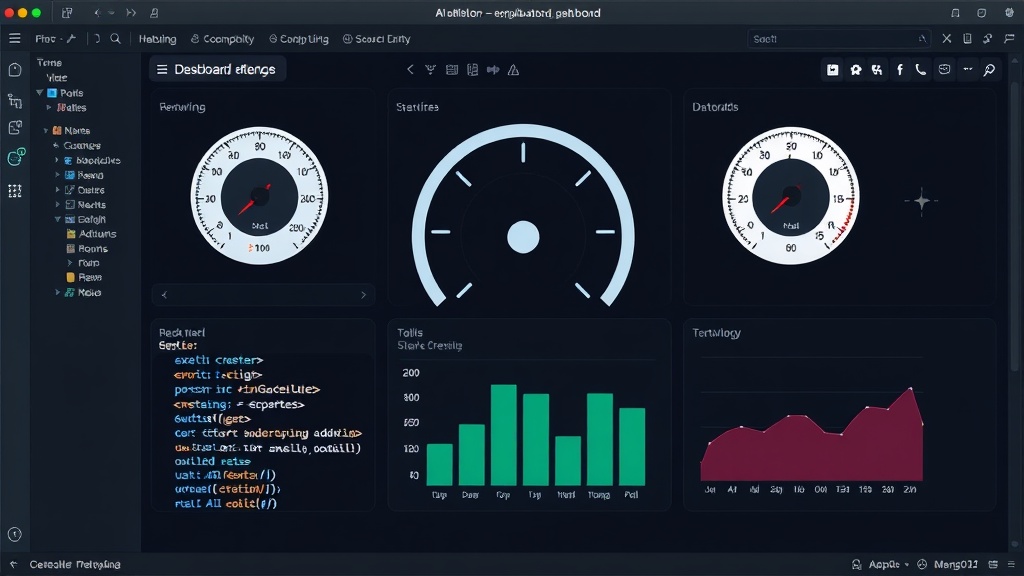
The 'Toy or Tool' Debate
This capability immediately sparks a debate: is this a sophisticated toy, a proof-of-concept demonstrating AI's creative potential, or a genuine tool that could streamline development workflows? For developers who run their tools locally, the implication of such a system is significant. Imagine being able to prototype complex UIs in minutes, rather than hours or days, simply by describing the desired components and their layout. This could dramatically accelerate the initial stages of product development, allowing for rapid iteration and visualization of ideas.
However, the caveat of fake data is crucial. A dashboard is typically built to display and interact with real information. While the front-end generation is impressive, its immediate practical application is limited without a robust backend and data pipeline. This highlights a common challenge in AI development: the ability to generate compelling outputs does not always equate to readiness for production environments. The AI can build the house, but it can't yet stock the pantry or pay the utility bills.
The prompt itself is a key element here. It was specific enough to guide the AI towards a dashboard structure, specifying visual elements like gauges and charts. This suggests that the AI models are becoming adept at understanding functional requirements for UIs. The ability to iterate on these prompts, refining the design and functionality with further text input, could unlock more sophisticated use cases. For instance, a developer could ask the AI to 'add a dropdown menu for selecting data sources' or 'rearrange the charts to prioritize real-time metrics' (even if the data remains placeholder for now).
Implications for Developers and Designers
The potential impact on front-end development is multifaceted. For junior developers, such a tool could serve as an educational aid, helping them understand UI structures and common design patterns. For experienced developers, it could offload the tedious work of boilerplate UI generation, freeing them to focus on complex logic, API integrations, and performance optimization. This doesn't necessarily replace designers or developers, but rather augments their capabilities, much like compilers and IDEs did for programming decades ago.
The question of 'running locally' is also pertinent. The fact that this demonstration was performed on a single desktop machine using an open-source model suggests a move towards decentralized AI development. This has significant implications for data privacy, cost, and accessibility. Developers can experiment and build without relying on expensive cloud services or sending sensitive data to third-party APIs. This local execution model is particularly appealing for companies with strict security and privacy requirements.
The current output, while functional as a UI, lacks the polish and customization often required for production applications. Real-world dashboards need to adhere to brand guidelines, accessibility standards, and specific user interaction patterns. AI-generated code might require significant refactoring to meet these demands. It's akin to having a skilled carpenter build you a perfectly functional chair, but you still need to sand it, paint it, and add upholstery to make it suitable for your living room.
The Future of UI Generation
While this specific demonstration uses placeholder data, it points towards a future where AI plays a more integrated role in the entire software development lifecycle. We might see AI tools that can not only generate front-ends but also suggest backend architectures, write unit tests, and even predict potential bugs based on code patterns. The ability to generate a UI from a single prompt is a significant step, but it's just one piece of a much larger puzzle.
The true value will be unlocked when these AI systems can seamlessly connect the front-end generation with realistic data simulation, backend logic, and deployment pipelines. Until then, this AI-generated dashboard serves as a powerful, albeit artificial, testament to the rapid advancements in generative AI and its growing potential to reshape how we build software. It’s a fascinating glimpse into what might become a standard development tool, moving beyond the realm of a mere toy.