Understanding Workable's Public Jobs API
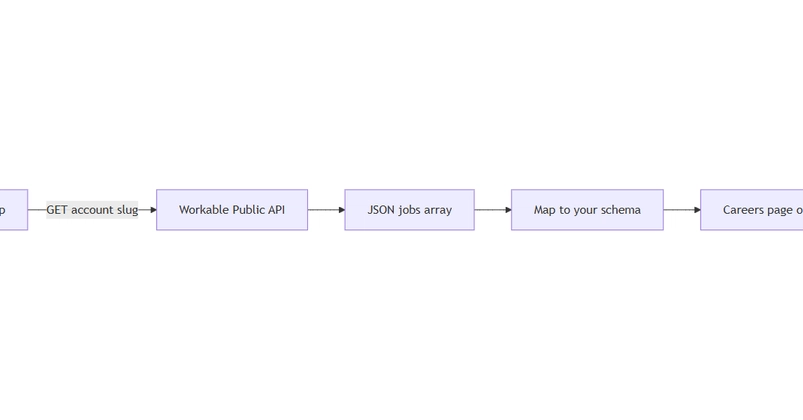
Workable, a popular Applicant Tracking System (ATS), offers a public-facing careers layer that allows for unauthenticated access to job postings. This layer is primarily used to power Workable-hosted career pages and to provide embeddable job widgets. For developers looking to integrate job listings from a specific Workable account into their own platforms, understanding this public endpoint is key. Unlike the authenticated REST API v3, which requires a bearer token and is designed for deeper HR integrations, the public jobs API provides a simpler, read-only interface for displaying available positions.
Accessing Published Jobs
The public jobs API endpoint for a Workable account is structured as a widget-style JSON feed. To retrieve a list of published jobs for a particular Workable account, you will typically query a specific URL that includes the account's subdomain. The basic structure for this query usually looks something like https://{subdomain}.workable.com/spi/v1/jobs. This endpoint returns a JSON array, where each object represents a job opening.
Each job object in the response contains essential information such as the job title, a short description, and the location. However, for a full understanding of the role, including detailed responsibilities, qualifications, and benefits, a separate request is often necessary. Workable's API design typically separates the summary list from the detailed job description to optimize initial load times.
Retrieving Full Job Descriptions
To get the complete details for a specific job posting, you need to make a secondary API call. Each job object returned from the initial list endpoint usually includes a unique identifier or a direct link to its detailed view. By using this identifier or URL, you can construct a request to a dedicated endpoint for that specific job. This often looks like https://{subdomain}.workable.com/spi/v1/jobs/{job_id}, where {job_id} is the unique identifier for the job.
The response from this detailed job endpoint provides rich content, including the full job description, requirements, and any other relevant information posted by the hiring team. This comprehensive data is crucial for applications that aim to present job opportunities to candidates with all necessary context. Developers can then parse this HTML-rich description for display or further processing.
Normalizing Location and Remote Fields
A common challenge when integrating job data from various sources is the inconsistency in how location and remote work policies are represented. Workable's public jobs API, while structured, may still present location data in a format that requires normalization for your application. The location field can sometimes be a simple string (e.g., "New York, NY", "Remote", "London, UK") or a more structured object containing city, state, country, and zip code.
Similarly, remote work status might be indicated through keywords in the location string (e.g., "Remote", "Fully Remote", "Hybrid") or potentially through a dedicated field that might not always be present or consistently populated across all listings. To create a unified experience for users, developers must implement logic to parse these fields and standardize them. For instance, you might map various "remote" strings to a single boolean flag or a standardized enum value like 'REMOTE', 'HYBRID', 'ON_SITE'. Location data could be parsed into distinct city, state, and country fields, or a standardized geographical identifier.
Consider the following normalization strategy:
- Location Parsing: If the location is a string, attempt to parse it into city, state, and country components. Libraries for address parsing can be helpful here. If parsing fails or yields ambiguous results, fall back to using the raw string.
- Remote Status Detection: Look for keywords like "Remote", "Work from Home", "WFH", "Hybrid" within the location string or a dedicated remote field. Define clear categories (e.g., Fully Remote, Hybrid, On-site) and assign jobs accordingly.
- Standardization: Store the normalized data in a consistent format within your own database or application logic. This might involve using predefined country codes, state abbreviations, and consistent terminology for remote work policies.
Comparing with Other ATS Public APIs
The Workable public jobs API shares similarities with the public APIs offered by other major ATS providers like Ashby, Greenhouse, and Lever. Each of these platforms exposes job listings through public endpoints, enabling external applications to aggregate and display job opportunities. However, the specific structure of the JSON response, the methods for retrieving full job descriptions, and the way location and remote work information is presented can vary significantly.
For example, Ashby's public API might provide a more granular breakdown of location components directly in the initial response, while Greenhouse might use a different URL structure for accessing detailed job descriptions. Lever's API might have its own nuances in how it handles remote work indicators. Developers integrating with multiple ATS platforms will find that building a robust data normalization layer is essential. This layer acts as a universal translator, converting the unique data formats of each ATS into a consistent schema that your application can understand and use effectively. The principles of parsing and standardizing location and remote fields remain consistent across these platforms, even if the implementation details differ.
Key Takeaways for Integration
Integrating with Workable's public jobs API involves understanding its two-tiered structure: a summary list endpoint and a detail endpoint for full descriptions. The primary technical hurdle lies in normalizing the location and remote work fields to ensure a consistent user experience across your platform. By implementing careful parsing and standardization logic, developers can effectively leverage Workable's public data to enhance their job boards, career pages, or internal recruitment tools. The experience gained here is transferable, as similar challenges and solutions apply when integrating with other ATS public APIs.