The Problem with Cloud Notebooks
Many users find cloud-based note-taking applications like Notion convenient for writing and organization. However, concerns arise regarding data ownership and where these notes are stored. While alternatives like Obsidian offer local file storage, seamless multi-device synchronization remains a challenge, often requiring add-on solutions. The core issue is that these platforms frequently abstract away direct file control, leading to a proprietary data store rather than a user-managed system.
Git, on the other hand, has long solved problems related to version history, private hosting, and establishing a definitive source of truth for files. The missing piece was a desktop application that could leverage a Git repository as its primary workspace, directly editing and managing files within the repo without imposing its own proprietary storage layer. This is the gap UNote aims to fill.
Introducing UNote: Git-First Desktop Notes
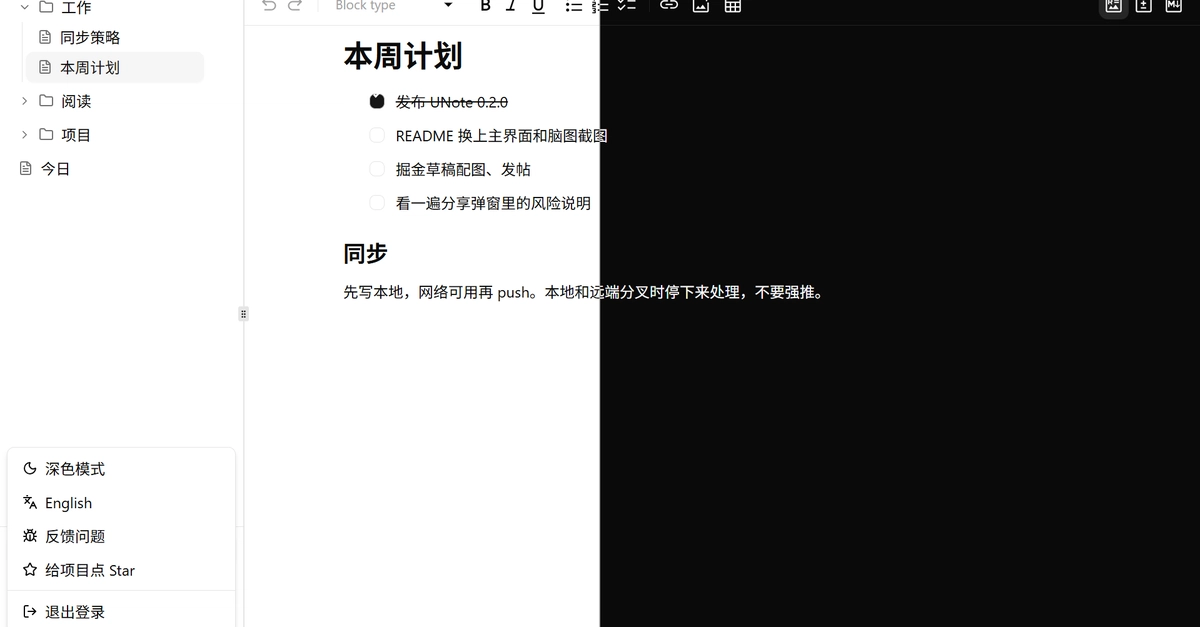
UNote is a new desktop application designed with a Git-first philosophy. Its latest release, version 0.2.0, emphasizes treating a user's private Git repository as the central hub for all notes. Unlike traditional cloud notebooks, UNote's architecture ensures that your files remain securely within your own Git repository. The application focuses on editing, navigating, and syncing these files, rather than owning or encapsulating the data.
Git-first desktop notes. Your files stay in your private Git repository. The app edits, navigates, and syncs. It does not own the data.
This approach grants users complete control over their data. By using Git as the backend, UNote inherits robust version control capabilities. Every change is tracked, allowing users to revert to previous states, branch out for different lines of thought, or merge changes seamlessly. Private Git hosting services provide secure, offsite storage, ensuring that notes are backed up and accessible from anywhere, provided the user has Git configured on their machines.
The development team behind UNote has prioritized a user experience that feels familiar to developers who are already accustomed to working with Git. The desktop shell acts as an intelligent interface to the repository, abstracting away the complexities of Git commands for common note-taking operations while preserving the underlying power and flexibility of the version control system.
Key Features and Workflow
UNote's design centers around a few core principles that distinguish it from other note-taking applications:
Direct Git Integration
The fundamental feature is the direct integration with Git repositories. When you start using UNote, you point it to a local Git repository. All your notes are stored as plain text files (or other formats you choose) within this repository. UNote then provides a dedicated interface for managing these files.
Editing and Navigation
The application offers a streamlined editing experience, likely supporting Markdown for rich text formatting. Navigation is facilitated through the repository structure, allowing users to browse folders and files as they would in a standard file explorer, but with the added context of a notes application. This means easy linking between notes, quick searching, and a clear overview of your knowledge base.
Synchronization and Version Control
Synchronization is handled via standard Git commands. When you make changes, UNote can stage, commit, and push these changes to a remote repository (like GitHub, GitLab, or a self-hosted instance). Similarly, it can pull changes from the remote to keep your local copy up-to-date across multiple devices. The inherent versioning of Git means that every commit is a snapshot of your notes at a specific point in time, providing a powerful safety net against data loss or accidental edits.
Data Ownership
Crucially, UNote does not create its own proprietary database or file format. Your notes are always accessible as plain files in your Git repository, meaning you can use other tools to read, edit, or process them independently of UNote. This commitment to data ownership is a significant draw for users wary of vendor lock-in.
Why Choose a Git Repo for Notes?
For developers and technically inclined users, adopting a Git repository for note-taking offers several compelling advantages:
- Version History: Track every modification, revert to previous versions, and understand the evolution of your ideas.
- Backup and Redundancy: Leverage the robust hosting options available for Git repositories, ensuring your notes are safe and accessible.
- Cross-Device Sync: Use Git's pull and push mechanisms to maintain consistent notes across desktops, laptops, and potentially even mobile devices (though mobile editing might require separate tools or a different Git client).
- Data Portability: Your notes are stored in standard formats, making them easily transferable to new systems or other applications.
- Automation Potential: Integrate note management into broader development workflows. For instance, trigger actions based on new notes or automatically link notes to code commits.
Think of it less like a cloud notebook and more like a personal wiki on steroids, where every edit is logged, auditable, and backed by one of the most reliable systems for managing digital assets: Git.
The UNote Development Journey
The release of UNote 0.2.0 signifies ongoing development and refinement of this Git-first approach. While the initial focus is on core functionality—editing, navigating, and syncing notes within a Git repository—future iterations will likely expand on features such as advanced search capabilities, better integration with external tools, and potentially improved support for various note formats beyond plain text or Markdown.
The team's commitment to keeping data within the user's Git repo is a strong statement against the trend of data lock-in in many productivity applications. For those who value control, version history, and a developer-centric workflow, UNote presents a compelling alternative to conventional cloud-based note-taking solutions.