The Problem: Unreadable Math in Your Terminal
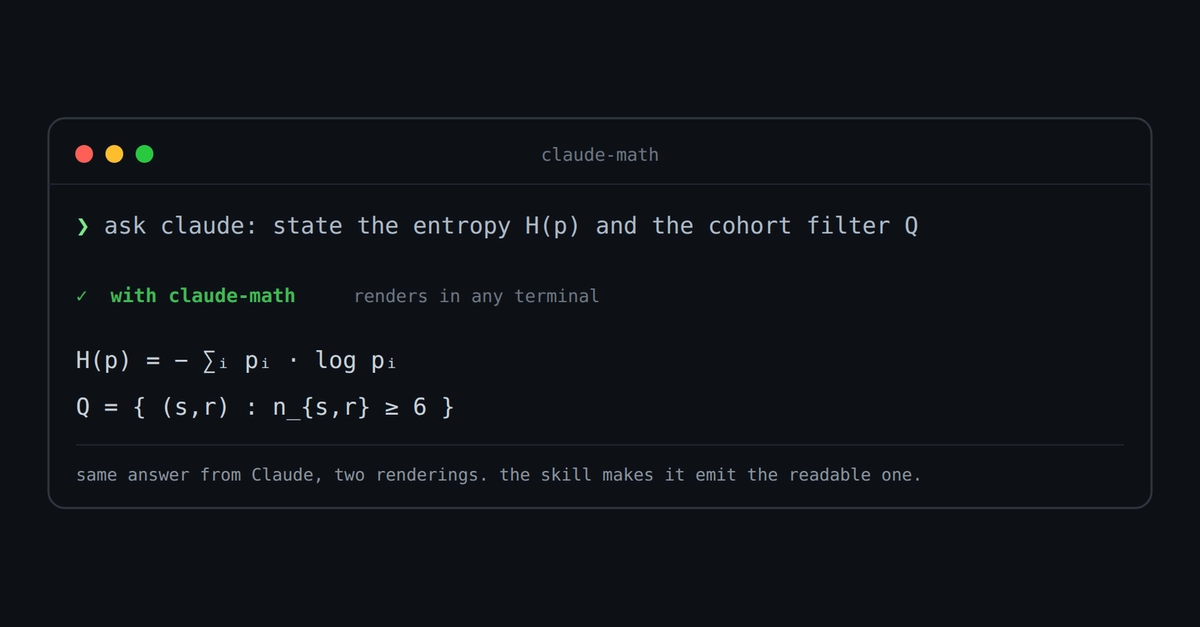
When you ask AI code assistants like Claude Code or Codex to explain mathematical concepts, they often respond with equations formatted in LaTeX. While browsers and dedicated math rendering software can display these equations beautifully, your standard terminal emulator cannot. Instead of a clean equation, you see a jumble of characters like H(p) = $-\sum_{i} p_{i} \log p_{i}$. This is a significant hurdle for developers and researchers working in fields heavily reliant on mathematics, such as machine learning, statistics, optimization, and formal proofs. The clarity needed for complex formulas is lost in translation to a plain text environment.
The core issue is that terminals are designed for text, not for rendering complex mathematical notation. They lack the built-in engines required to interpret and display LaTeX. This fundamental incompatibility means that crucial mathematical output from AI assistants is rendered as noise, precisely when clarity is most needed.
The Simple Solution: Unicode Conversion
The fix is surprisingly straightforward and takes mere seconds. Instead of accepting the raw LaTeX output, you can instruct the AI to convert the LaTeX into Unicode characters that are broadly supported by most terminals. This process bypasses the need for a full LaTeX rendering engine within the terminal itself.
Consider the entropy formula: H(p) = $-\sum_{i} p_{i} \log p_{i}$. If you ask Claude Code or Codex to output this as Unicode, it will render as:
H(p) = −∑ᵢ pᵢ log pᵢ
This transformation makes the equation immediately understandable in a terminal environment. The superscripts, Greek letters, and summation symbols are replaced with their Unicode equivalents. This is not a complex parsing or rendering task; it's a character-mapping exercise that most modern terminals can handle seamlessly.
How to Implement the Fix
The method involves a simple prompt engineering technique. When interacting with Claude Code or Codex, append a clear instruction to the end of your query. For example, instead of just asking for the explanation of a mathematical concept, you would ask:
Explain the concept of entropy in information theory, and provide the formula in Unicode characters.
Or, if you already have the LaTeX output and want to convert it:
Convert the following LaTeX to Unicode characters: H(p) = $-\sum_{i} p_{i} \log p_{i}$
This explicit instruction guides the AI to produce output that is directly consumable by your terminal. The AI models are trained on vast datasets that include both LaTeX and Unicode representations of mathematical symbols, making this conversion a well-within-their-capabilities task.
Why This Works: The Power of Unicode
Unicode is an international standard that assigns a unique number, called a code point, to every character, regardless of the platform, program, or device. This ensures that characters are displayed consistently across different systems. Many mathematical symbols, such as summation signs (∑), Greek letters (α, β, π), and superscripts (², ³), have dedicated code points within the Unicode standard.
Terminals, being text-based interfaces, are inherently capable of displaying these Unicode characters, provided the terminal emulator and the underlying operating system have a font installed that contains the necessary glyphs. Most modern operating systems and their default terminal emulators come equipped with fonts that cover a vast range of Unicode characters, including those commonly used in mathematical expressions.
This approach is akin to asking a translator to use a common alphabet instead of a specialized script. The meaning is preserved, and the output becomes accessible to a much wider audience—in this case, anyone using a standard terminal.
Limitations and Future Considerations
While this Unicode conversion is a highly effective and immediate solution for many common mathematical expressions, it is not a perfect replacement for full LaTeX rendering. Highly complex equations involving intricate layouts, matrices with specific formatting, or specialized mathematical symbols not yet widely adopted in Unicode might still present challenges. The rendering quality will also depend on the specific fonts installed on the user's system and the terminal's capabilities.
Furthermore, this fix relies on the AI model's ability to correctly interpret the request for Unicode output and accurately map the LaTeX commands to their Unicode equivalents. While current models like Claude Code and Codex are proficient, there's always a possibility of misinterpretation or errors in complex cases.
What remains unaddressed is whether AI code assistants will, in the future, offer a dedicated terminal-friendly output mode for mathematical content, perhaps leveraging terminal graphics capabilities or alternative plain-text representations beyond basic Unicode. The current solution is a practical workaround, but a more integrated approach from the AI providers themselves would be ideal.
Broader Implications
This simple prompt engineering trick highlights a broader theme in interacting with AI models: the importance of specifying output format. Developers and users are not passive recipients of AI-generated content; they can actively shape the output to better suit their needs and environments. This technique is applicable beyond mathematical notation, potentially extending to code formatting, data serialization, or even natural language summarization tailored for specific contexts.
For those working with AI assistants in technical domains, understanding these nuances of output formatting can significantly improve workflow efficiency. It means that the insights and code generated by these powerful tools can be more readily integrated into existing development processes, reducing friction and saving valuable time.