The 10GB Mystery in /var/log/sudo-io
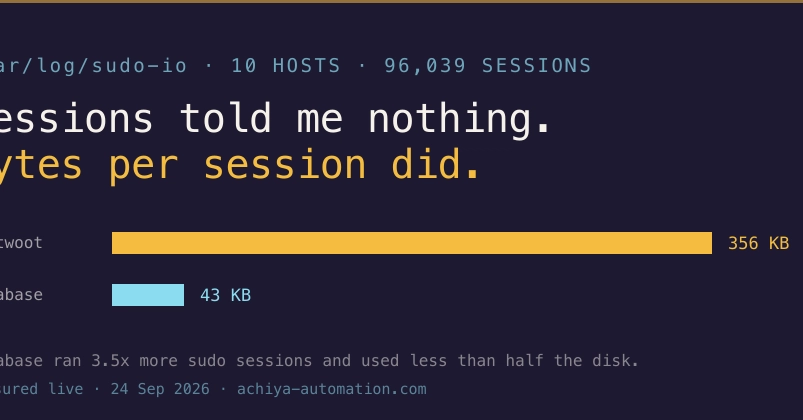
A disk space alert on a Chatwoot production server flagged /var/log/sudo-io at a staggering 5.9 GB, with an alarming growth rate of 654 MB per week. This occurred despite no apparent changes on the server: no new services, no new administrators, and no new cron jobs were introduced. The immediate assumption was increased server activity, but this proved incorrect. The affected server actually handled the fewest sudo sessions among the entire fleet that logged them.
The initial investigation focused on session counts. A common approach is to use find /var/log/sudo-io -name log -type f | wc -l to tally the number of logged sudo sessions. However, on this particular server, the session count was low, directly contradicting the massive log file size. This disconnect pointed towards a problem not with the frequency of sudo usage, but with the content and verbosity of each logged session.
Unpacking the Verbosity Problem
The core issue lay in the default logging configuration for sudo, specifically the log_output directive. When configured to log to a file, sudo can be set to log not just the command executed, but also its entire input and output. This is often controlled by the iolog_dir and iolog_file directives in /etc/sudoers or files within /etc/sudoers.d/. The default configuration, or configurations that have been inadvertently broadened, can lead to extremely verbose logging.
In this case, the server was logging not just the commands run via sudo, but also the complete standard output and standard error for each command. For commands that produce extensive output, or for interactive sessions where multiple commands are run, this can rapidly inflate log sizes. Imagine running a command like find / -print with sudo – the output alone could be gigabytes if not carefully managed. Even seemingly innocuous commands, when executed repeatedly or in specific contexts, could contribute to the bloat if their output was being captured in full.
The Real Culprit: Logging Standard Input and Output
The critical realization was that the sudo-io logs were capturing the full I/O stream of sudo commands. This means not only the command itself, but also everything that was printed to the terminal (stdout) and any error messages (stderr). For a busy server, even a moderate number of sudo commands could generate gigabytes of data if their entire output was being recorded. This is akin to recording not just the script of a play, but also every single prop movement, stage direction, and audience reaction for every performance.
The commands used to investigate were simple but effective. The first, as mentioned, counted the number of log files: sudo find /var/log/sudo-io -name log -type f | wc -l. This provides the session count. The second command, crucial for understanding the size issue, measures the disk space consumed by these logs: sudo du -sh /var/log/sudo-io. When the session count was low but the disk usage was high, the focus shifted to the content of those logs.
Mitigation and Best Practices
The solution involved reconfiguring sudo's logging behavior. The primary goal is to log only essential information, such as the command executed, the user who ran it, the timestamp, and the success or failure status, without capturing the full I/O. This is achieved by modifying the sudoers configuration.
For systems where detailed I/O logging is not strictly necessary for security auditing or debugging, the log_output directive can be set to stderr or null. Setting it to null effectively disables logging of command I/O. If session recording is required for compliance, it should be carefully managed, perhaps by logging only to a central syslog server with appropriate retention policies, rather than allowing local logs to grow unbounded.
The specific configuration change would typically involve editing /etc/sudoers or a file in /etc/sudoers.d/. For example, if the current configuration is implicitly capturing I/O due to a broad rule, one might add or modify a line to ensure only command execution is logged. A common way to disable I/O logging is to ensure no rules are explicitly or implicitly setting log_output to file or similar verbose modes without proper constraints. If iolog_dir is set, ensuring that the commands executed do not produce excessive output or that the logging is otherwise constrained is key.
For instance, a more judicious configuration might look like this (simplified):
Defaults log_input,log_output
Defaults iolog_dir="/var/log/sudo-io"

# Instead of capturing full I/O, focus on command execution logging
# This often means ensuring no broad 'log_output' rules are in place that capture everything
# If specific I/O logging is needed, it should be for specific users/commands and short-lived.
The surprising detail here is not the disk usage itself, but that the number of sudo sessions provided zero insight into the problem. This highlights a critical gap in monitoring: simply counting events is insufficient if the *data generated by each event* is disproportionately large. It underscores the need for monitoring not just the volume of operations, but also the volume of data produced by those operations.
Broader Implications
This issue is not unique to Chatwoot. Any system using sudo with verbose logging enabled is susceptible to rapid disk space exhaustion. Developers and system administrators must be aware of the potential for sudo's I/O logging to become a significant storage burden. Regular audits of log file sizes and configurations are essential. Furthermore, monitoring solutions should ideally track not just the number of sudo commands, but also the total size of the sudo-io directory to catch such issues before they impact system stability.
The lesson learned is that default configurations, while convenient, can have unforeseen consequences. When dealing with log files, especially those capturing command input and output, understanding the exact verbosity of the logging is paramount. Relying solely on session counts is a flawed strategy when log data size per session can vary so wildly.