The Irreversible Steps of Solana Mainnet Deployment
Launching a Solana program to mainnet-beta is not a trivial task. It involves a series of irreversible steps that, if mishandled, can lead to significant complications, including stranded SOL or broken program verification. This detailed checklist, compiled immediately after a successful devnet-to-mainnet transition, aims to capture the critical sequence of actions and considerations that are easy to forget under pressure.
The wallet that signs the initial deployment transaction quietly becomes the program's upgrade authority. This is a permanent association unless explicitly transferred. A single mistake in handling a buffer account during the deployment process can lead to real SOL being stranded, inaccessible and lost. Furthermore, performing a standard anchor build after a verifiable build has been established can result in a different program binary hash, breaking the crucial verification step later on. This checklist is designed to be run top-to-bottom before every mainnet launch to prevent such costly errors.
Pre-Deployment Preparations
Before initiating any deployment to mainnet, rigorous preparation is key. This phase focuses on ensuring all necessary components are ready and validated.
1. Code Freeze and Verification
The first critical step is to freeze the code that will be deployed. This means no further changes should be made to the program's source code. Once frozen, generate a verifiable build. This involves using specific build flags to ensure the resulting binary can be cryptographically verified against its source. Store this verifiable build artifact securely. It is essential for future audits and for proving the integrity of the deployed program. A common mistake is to assume that a standard build is sufficient; however, for mainnet, a verifiable build is paramount.
2. Environment Setup and Configuration
Ensure your development environment is correctly configured for mainnet. This includes having the appropriate RPC endpoint set up, typically a reliable mainnet-beta cluster endpoint. Verify that your wallet has sufficient SOL for transaction fees, as mainnet transactions are not free. It is also wise to have a secondary wallet ready for potential authority transfers or emergency actions, though the primary deployment wallet should be the one intended to hold upgrade authority initially.
3. Account and Program ID Generation
Generate the Program ID for your program. This ID is a public key that uniquely identifies your program on the Solana network. It's often generated deterministically from a keypair, and this keypair should be securely stored. Crucially, this Program ID will be used to create associated accounts, such as a buffer account for the program data. Ensure these accounts are created with sufficient rent exemption and that you understand their purpose and lifecycle. The order of operations here is vital: create necessary accounts before deploying the program itself.
The Deployment Sequence
This sequence outlines the precise order of operations for deploying the program to the Solana mainnet.
1. Deploy the Program Binary
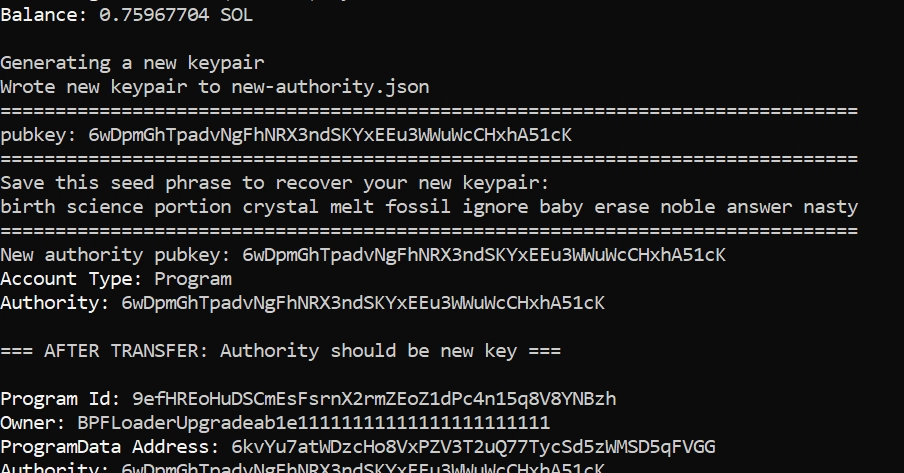
Using the `solana program deploy` command with your verified build artifact, deploy the program binary to the mainnet-beta cluster. This command requires the path to your compiled program binary and the keypair file for the wallet that will sign the transaction. This wallet implicitly becomes the program's upgrade authority. Double-check that you are using the correct keypair – this is the wallet that will hold the upgrade authority. Ensure the transaction is confirmed on the network.
2. Verify Program on Solana Explorer
Immediately after deployment, navigate to a Solana block explorer (e.g., Solana Explorer, Solscan) and verify that your program has been deployed correctly. Check its Program ID, transaction signature, and the deployed program data. Crucially, use the verified build artifact to upload the program's source code or binary hash to the explorer for verification. This step is non-negotiable for transparency and trust. If verification fails, investigate immediately – it often points to an issue with the build process or the deployed binary itself.
3. Transfer Upgrade Authority (If Necessary)
If your deployment strategy requires transferring the upgrade authority away from the initial deployment wallet (e.g., to a multisig or a dedicated governance contract), this must be done after the program has been successfully deployed and verified. Use the `solana program set-upgrade-authority` command, signed by the current upgrade authority (your deployment wallet). Specify the new authority's public key. This is a critical step that should be performed with extreme caution, as losing the upgrade authority irreversibly prevents future upgrades. If you intend to keep the authority on the deployment wallet, skip this step.
4. Update Interface Definition (IDL)
The Interface Definition Language (IDL) file describes your program's accounts, instructions, and types. This file is crucial for frontend applications and SDKs to interact with your program. Ensure the IDL file accurately reflects the deployed program. If your program uses versioning or has undergone significant changes, ensure the IDL is updated accordingly. The IDL should be published to a reliable location, such as an IPFS gateway or a dedicated service, and its hash or URL should be made accessible to frontend applications.
5. Frontend Integration and Testing
With the program deployed and verified, and the IDL updated, proceed with integrating your frontend applications. This involves updating SDKs or client libraries to point to the correct mainnet program ID and IDL. Thoroughly test all program interactions from the frontend. This includes creating accounts, executing instructions, and handling potential errors. Test edge cases and failure scenarios to ensure robustness. Any bugs found here must be addressed by redeploying a new program version (if upgrade authority is retained) or by fixing the frontend if the program is immutable.
Post-Deployment Considerations
Once the program is live and integrated, ongoing maintenance and monitoring are essential.
1. Error Handling and Monitoring
Implement robust error handling in both the program and the frontend. Monitor program logs and network activity for any unusual behavior or failures. Set up alerts for critical errors. Understanding common Solana error codes and their implications is vital for quick debugging.
2. Audits and Security Best Practices
For any production program, especially those handling significant value, a professional security audit is highly recommended. Ensure your deployment process adheres to security best practices, such as using hardware security modules (HSMs) for critical key management and employing multi-signature wallets for sensitive operations like authority transfers.
3. Documentation and Community Support
Maintain clear and up-to-date documentation for your program, including the IDL, API endpoints, and usage examples. Engage with your community to provide support and gather feedback. A well-documented program fosters wider adoption and trust.
This checklist serves as a critical safeguard against the irreversible nature of Solana mainnet deployments. By meticulously following these steps, developers can significantly reduce the risk of costly errors and ensure a smooth, successful launch.