Diagrams Living with Code
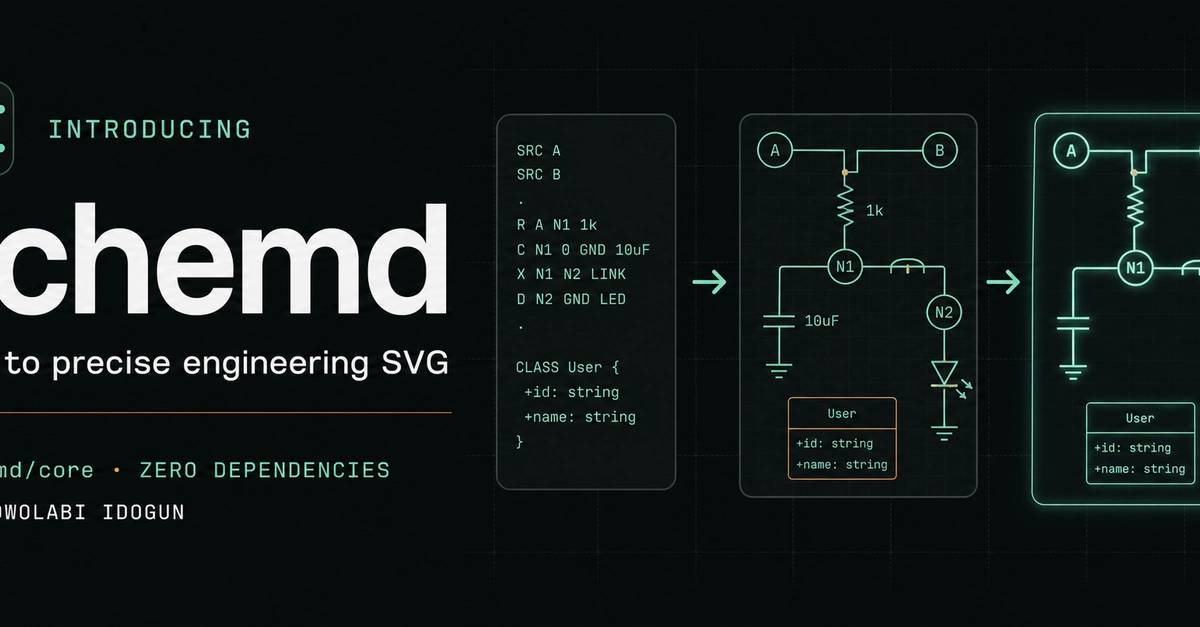
Developers often struggle with diagrams that become stale representations of their code. Exported images are difficult to review and quickly fall out of sync with the codebase. To address this, an open-source project called Schemd has introduced @schemd/core, a zero-dependency compiler designed to generate accessible SVG diagrams directly from a simple text format.
The core philosophy behind Schemd is to keep diagrams close to the code they illustrate. This proximity ensures that diagrams remain up-to-date and relevant, facilitating easier review and maintenance. The compiler runs server-side or during a build process, meaning the end-user's browser doesn't require the compiler or any additional Markdown packages to render the diagrams.
Schemd currently supports a range of diagram types crucial for technical documentation. This includes common electronic circuit components, both classical and quantum gates, configurable integrated circuits (ICs), and several frequently used UML diagram types: class diagrams, sequence diagrams, state diagrams, and use-case diagrams. This breadth of support aims to cover many common diagramming needs within software development and hardware design.
Getting Started with Schemd
To begin using Schemd, developers can install the core package via npm:
npm install @schemd/core
Once installed, compiling a diagram is straightforward. The compiler accepts a string containing the diagram definition in Schemd's text format. For instance, a simple circuit diagram can be defined as follows:
const schemd = require('@schemd/core');

const circuitDiagram = `
  R1 1k;
  C1 10uF;
  V1 5V;
  V1 -- R1 -- C1;
`;

schemd.render(circuitDiagram).then(svg => {
  console.log(svg);
});
This code snippet defines a simple circuit with a resistor (R1), a capacitor (C1), and a voltage source (V1), and then uses Schemd to render it as an SVG string. The output can be directly embedded into HTML or saved as an SVG file.
UML Diagram Capabilities
Beyond electronic circuits, Schemd's capabilities extend to several essential UML diagram types, streamlining the process for software architects and designers. Developers can define class diagrams, which are fundamental for illustrating the static structure of a system, including classes, interfaces, attributes, and operations.
Sequence diagrams, crucial for visualizing interactions between objects over time, are also supported. Users can define the lifelines, messages, and activations that represent the flow of control in a system. Similarly, state diagrams, used to model the behavior of an object through its different states and transitions, can be generated.
Finally, use-case diagrams, which depict the functionality of a system from an end-user's perspective, are included in Schemd's repertoire. The ability to generate these varied UML diagrams from a text-based format means that documentation can be version-controlled alongside the code, updated automatically, and integrated seamlessly into build pipelines.
Technical Design and Advantages
A key design principle of Schemd is its lack of external dependencies. This makes the compiler lightweight and easy to integrate into various build systems without introducing complex dependency trees. The output format, SVG, is a vector-based image format that scales without loss of quality and is well-supported across web browsers and documentation tools. Furthermore, SVG is an accessible format, allowing for text alternatives and better integration with assistive technologies compared to raster images.
The compiler runs in a Node.js environment, making it suitable for server-side rendering or build-time generation. This approach ensures that the diagram generation logic is separated from the client-side application, reducing the load on the user's browser. For developers, this means that diagrams can be generated as static assets during the build process of a website or application, or dynamically on the server before being sent to the client.
The text-based input format is designed for simplicity and readability. It aims to be intuitive for developers familiar with basic scripting or configuration syntax. This contrasts with graphical tools that require manual manipulation and can be cumbersome to integrate into automated workflows. By using a declarative text format, Schemd enables a more robust and repeatable way to create and manage technical diagrams.
What remains to be seen is how Schemd will evolve to support more complex circuit topologies or advanced UML features. While the current set covers common use cases, the long-term extensibility for highly specialized diagrams will be a critical factor in its adoption by larger teams and complex projects.