Beyond the Cryptography: Building a Usable Steganography Tool
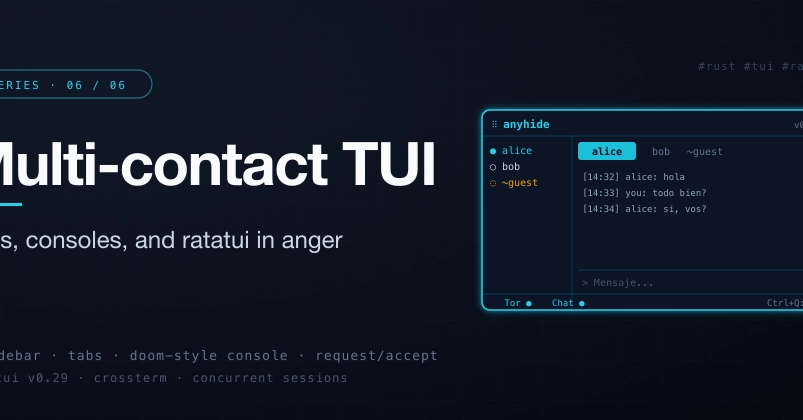
The most sophisticated cryptographic tool is useless if its interface alienates users. For Anyhide, a Rust-based steganography utility, this reality meant prioritizing user experience. While the underlying encryption and steganography logic might be complex, the final hurdle for adoption is often the interface. The development team opted for a Terminal User Interface (TUI) to ensure speed, SSH compatibility, and a consistent aesthetic with the command-line-centric nature of privacy tools.
This decision led them to Ratatui, a robust fork of the established tui-rs crate. Ratatui provides the building blocks for creating interactive and visually rich terminal applications. This post details the implementation of Anyhide's TUI, exploring the design choices, the development process, and lessons learned.
Designing for Interaction: Tabs, Consoles, and Workflow
The core of the Anyhide TUI revolves around a tabbed interface, allowing users to switch between different functional areas without losing context. This approach is familiar to users of graphical applications and translates effectively to the terminal environment. Each tab serves a distinct purpose, streamlining the workflow for common operations.
One of the primary functional areas is the console, which acts as the central hub for interacting with Anyhide's steganography features. Here, users can input commands, view output, and manage the embedding and extraction processes. The console needs to be responsive and provide clear feedback, whether it's confirming successful operations or reporting errors.
Beyond the main console, the TUI incorporates dedicated sections for managing tasks, viewing logs, and potentially configuring settings. This modular design ensures that users can access specific functionalities without being overwhelmed by the tool's full capabilities at once. For a steganography tool, this means separating the process of hiding data from the process of revealing it, and providing clear visual indicators for the status of each operation.
The choice of Ratatui facilitated the creation of these distinct UI components. The library's widget system allows for the composition of complex layouts from simpler elements. This includes creating scrollable lists for file selection, input fields for text, and status bars for progress updates. The development team focused on making these interactions intuitive, ensuring that common actions require minimal keystrokes and that the UI provides immediate visual confirmation.
Technical Implementation with Ratatui
Building a TUI with Ratatui involves several key concepts. At its heart, Ratatui operates on a render loop. The application maintains a state, which is then used to draw the UI onto the terminal buffer. This state is updated based on user input and internal logic.
For Anyhide, the state management likely includes tracking the active tab, the current input in the console, the list of files being processed, and the status of ongoing steganography operations. Ratatui's event handling mechanism captures user input—keyboard presses, mouse events (if supported and enabled)—and dispatches them to the application logic for processing.
The tabbed interface, for instance, would be implemented by having a state variable that indicates the currently selected tab. Based on this variable, different sets of widgets are rendered. When a user presses a key to switch tabs, this state variable is updated, and the UI is redrawn to reflect the new active tab.
Similarly, the console component would involve a widget capable of displaying multi-line text and accepting user input. This might be a custom widget or a combination of Ratatui's built-in components. Handling commands typed into the console would involve parsing the input string, executing the corresponding steganography function (e.g., embedding data into an image), and then displaying the results or error messages back in the console output area.
The surprising detail here is not the complexity of Ratatui itself, but the effort required to make a TUI feel as fluid and responsive as a well-designed graphical application. Achieving smooth scrolling, clear visual feedback for interactive elements, and efficient redrawing across different terminal emulators demanded careful attention to performance and state management.
Iterative Development and Future Considerations
The development of Anyhide's TUI was an iterative process. The team likely started with a basic layout and core functionality, then gradually added features and refined the user experience. This approach is well-suited for TUI development, where rapid feedback loops allow for quick adjustments.
One area for potential improvement lies in enhancing the visual feedback for complex operations. For instance, when embedding large amounts of data, providing a more detailed progress indicator or estimated time of completion could significantly improve the user's perception of the tool's performance.
Another consideration is the extensibility of the TUI. As Anyhide evolves, the UI needs to accommodate new features without becoming cluttered. This might involve implementing more sophisticated navigation patterns or a plugin system for custom commands.
The team also highlighted the importance of user testing. Even with careful design, real-world usage can reveal unexpected usability issues. Gathering feedback from users, especially those new to steganography or TUIs, is crucial for identifying areas that need refinement.
What nobody has addressed yet is how such TUI designs scale to even more complex operations, such as batch processing or managing multiple concurrent steganography tasks. Designing an interface that remains clear and manageable under such conditions presents a significant UX challenge.
Conclusion: Usability is Key
The journey of building the Anyhide TUI with Ratatui underscores a critical point: a powerful backend is only half the battle. For tools intended for practical use, especially in sensitive areas like privacy and security, the user interface is paramount. By leveraging Ratatui, the Anyhide team successfully created a terminal-based experience that is both functional and user-friendly, demonstrating that powerful tools do not need to be inaccessible.