The Silent Threat of Misconfigured RLS
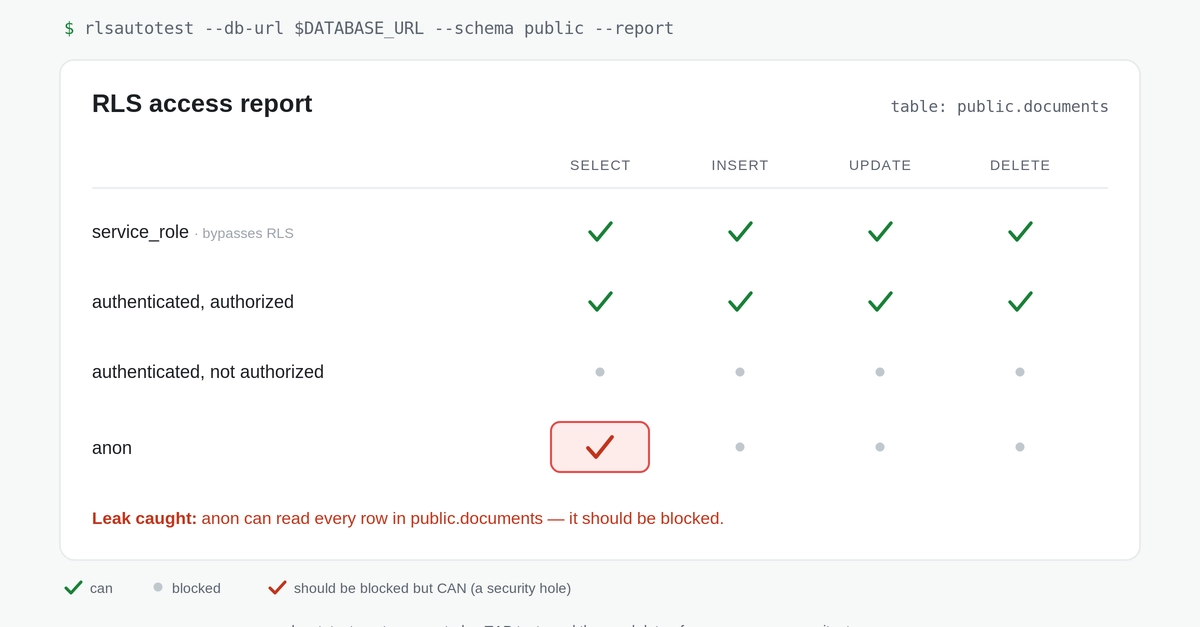
Row-Level Security (RLS) in databases like Supabase is a critical safeguard. It ensures that users can only access the data they are authorized to see, preventing cross-tenant data leaks or unauthorized access. However, RLS has a dangerous characteristic: when a policy is misconfigured, it doesn't throw an error. Instead, it fails silently. This means a policy that is too restrictive might return empty result sets, making an application appear broken, while a policy that is too permissive will quietly leak sensitive data. The true failure mode only surfaces when a user reports seeing incorrect data, or worse, when a security incident is reported. Relying on manual checks or testing within a SQL editor is insufficient because these environments often bypass RLS, meaning your policies are never truly exercised under real-world conditions.
The complexity of writing comprehensive tests for RLS policies is a significant barrier. Supabase's own documentation acknowledges that creating pgTAP tests for RLS is “inaccessible to most web developers.” Manually crafting these tests for each policy, especially in large or complex applications, is time-consuming and requires specialized knowledge of PostgreSQL testing frameworks. This difficulty leads to RLS policies often being deployed with untested assumptions, creating a ticking time bomb for data security and integrity.
Introducing RLS AutoTest: Automating Policy Verification
To address this critical gap, the open-source tool rlsautotest has emerged. This utility automates the process of generating and running tests for Supabase Row-Level Security policies. Its core functionality lies in its ability to derive test cases directly from your existing RLS policies. It analyzes your policies and automatically generates both the necessary pgTAP tests and the corresponding seed data required to execute those tests effectively. This approach ensures that your RLS configurations are rigorously validated against a comprehensive set of scenarios, catching potential issues before they reach production.
The tool's workflow is designed to be straightforward for developers. You point rlsautotest at your Supabase project, and it inspects your database's security policies. From these policies, it constructs a suite of pgTAP tests that cover various access scenarios – including both authorized and unauthorized attempts to access data. Crucially, it also generates the specific data needed to populate your tables for these tests. This means you don't need to manually create complex test datasets; rlsautotest handles that complexity for you. The generated tests then run against your database, simulating how real users would interact with the data under the defined RLS rules. Any deviation from the expected outcome – such as unauthorized data being returned or legitimate data being blocked – is flagged as a test failure.
How RLS AutoTest Works Under the Hood
At its heart, rlsautotest leverages the power of PostgreSQL's built-in testing framework, pgTAP. pgTAP provides a robust set of functions and assertions for writing unit and integration tests directly within the database. The challenge has always been translating RLS logic into these testable formats. rlsautotest bridges this gap by parsing the SQL definitions of your RLS policies. For each policy, it identifies the conditions under which rows should be visible or hidden.
Consider a simple policy like:
-- Policy for accessing user-specific data
CREATE POLICY "Users can view their own data" ON "users"
  FOR SELECT
  USING (auth.uid() = id);
rlsautotest would interpret this policy and generate a pgTAP test that:
- Inserts a user record with a specific ID.
- Attempts to select data for that user using
auth.uid()matching the inserted user's ID. This should succeed. - Attempts to select data for a *different* user (simulating another authenticated user). This should fail, returning no rows.
The tool automates the creation of these assertions and the necessary setup/teardown for the test data. This meticulous generation process ensures that edge cases and common misconfigurations are systematically uncovered. It transforms the daunting task of RLS testing into a manageable, automated workflow, akin to how developers routinely test their application logic.
Benefits and Implementation for Developers
The primary benefit of rlsautotest is its ability to transform a high-risk, low-visibility problem (silent RLS failures) into a manageable, automated testing process. By catching policy errors early in the development cycle, developers can prevent data leaks, maintain data integrity, and avoid costly post-deployment fixes or security breaches. The tool's open-source nature means it's freely available and can be integrated into CI/CD pipelines, ensuring that RLS policies are continuously validated with every code change.
Implementing rlsautotest typically involves installing the tool and configuring it to connect to your Supabase project. You then run the tool, which will generate a set of `.sql` files containing the pgTAP tests and seed data. These files can be executed against your database, either manually or as part of your automated build or deployment process. The output clearly indicates which tests pass and which fail, providing specific feedback on policy violations. This allows developers to quickly identify and rectify issues, significantly improving the security posture of their Supabase applications.
The fact that this tool is free and open-source is a significant advantage. It lowers the barrier to entry for implementing robust RLS testing, making advanced security practices accessible to projects of all sizes. This initiative directly addresses the long-standing challenge of making RLS policy validation practical for the everyday web developer, moving beyond the