The Problem: Raw Data vs. Room Heat
For gamers and power users, the heat generated by a high-performance PC is a tangible, often uncomfortable, reality. While tools like Task Manager and HWiNFO provide detailed sensor readouts—CPU usage, component temperatures, and power draw in watts—they rarely answer the fundamental question: How much heat is this machine actually putting into my room right now? The desire is for plain language context, not a spreadsheet of raw numbers that requires mental conversion.
The gap lies in translating technical metrics like watts into a user-friendly understanding of ambient heat. While the conversion from watts to British Thermal Units per hour (BTU/hr ≈ watts × 3.412) is mathematically straightforward, performing this calculation mentally, especially during an active gaming session or intensive task, is inconvenient. Users want to know if their PC is contributing the equivalent of a quarter of a space heater's output, or how much heat has accumulated over a specific period, ideally correlated with the ambient room temperature.
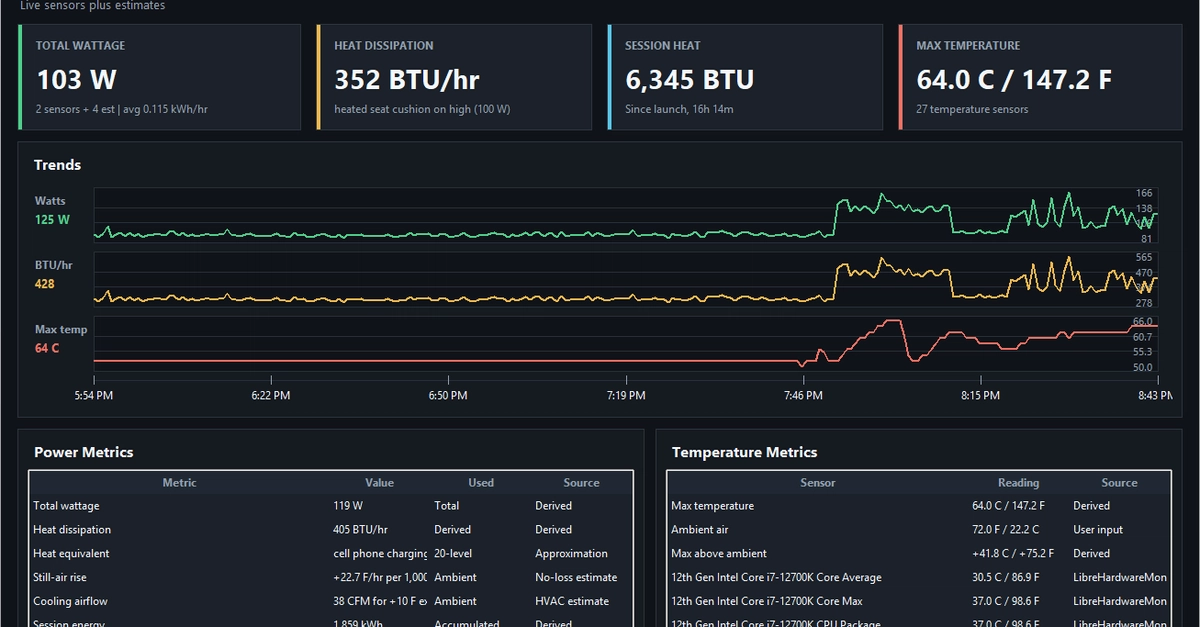
This is precisely the problem developer aragorn993hue set out to solve, leading to the creation of HeatLens. This desktop widget is designed not to replace existing hardware monitoring tools, but to augment them by providing a clear, immediate interpretation of a PC's thermal output in terms of its impact on the room's environment.
Introducing HeatLens: Contextualizing PC Thermal Output
HeatLens aims to bridge the information deficit by offering a simplified, contextualized view of a PC's heat generation. Instead of just displaying raw wattage, the widget interprets this data and presents it in a way that directly relates to the user's immediate environment. This includes metrics such as:
- BTU per hour: A standard measure of heat energy transfer, making it easier to compare PC heat output to common appliances like space heaters or air conditioners.
- Accumulated heat: Tracking the total heat added to the room over a gaming session or a defined period, giving users a sense of the cumulative thermal load.
- Comparative context: Providing relatable analogies, such as comparing the PC's heat output to a fraction of a space heater's capacity.
- Ambient temperature correlation: When combined with ambient room temperature readings, HeatLens can offer insights into the potential temperature rise or even estimate exhaust airflow (CFM) needed to dissipate that heat.
The core innovation of HeatLens is its focus on user-centric interpretation. It acknowledges that while technical users might understand watts and Celsius, the average user, particularly gamers sensitive to room temperature, benefits more from information framed as 'how warm is my room getting because of this PC?'
The Technical Underpinnings and Potential
Building such a widget involves interfacing with existing system monitoring software or directly accessing hardware sensors. Tools like HWiNFO are invaluable for their ability to expose detailed hardware telemetry, including power consumption figures from various components like the CPU and GPU. The challenge, then, is to reliably extract this data and perform the necessary conversions and contextualization in real-time.
The calculation itself is a fundamental physics principle: power (in watts) directly correlates to energy transfer. A PC drawing 300 watts continuously is dissipating 300 joules of energy per second into its surroundings as heat. Converting this to BTU/hr, a more common unit for HVAC and heating discussions, involves a simple multiplier. However, the true value of HeatLens lies in its software layer, which takes these raw numbers and adds the crucial layer of interpretation.
Consider the common scenario of a gaming PC under load. A high-end system might draw 500-700 watts or more. At 500 watts, this translates to approximately 1700 BTU/hr. For context, a small portable electric heater might be rated at 1500 watts, or about 5100 BTU/hr. Thus, a 500W PC is contributing roughly one-third the heat of a small space heater. HeatLens presents this information directly, eliminating the need for the user to perform these calculations or comparisons manually. This context is invaluable for users trying to manage their room's thermal environment, whether for comfort during gaming or to optimize cooling solutions.
What remains to be seen is how HeatLens will handle variations in component efficiency and the nuances of different hardware. For instance, power draw reported by software might not perfectly reflect the actual heat dissipated, especially concerning power supply inefficiencies, which also generate heat. Furthermore, the effectiveness of heat dissipation also depends heavily on the PC's case design, fan configuration, and the ambient room conditions. Future iterations could potentially incorporate more sophisticated models to account for these variables, offering even more precise insights into the PC's thermal impact.
Implications for PC Users and Enthusiasts
The advent of tools like HeatLens signifies a growing trend towards more user-friendly and context-aware system monitoring. As hardware becomes more powerful and power-hungry, managing the resulting heat output becomes a critical consideration for many users, not just for comfort but also for component longevity and performance throttling.
For developers and tinkerers, HeatLens serves as an example of how existing data can be repurposed to solve practical, everyday problems. It highlights an unmet need in the PC enthusiast market for information that is immediately actionable and understandable. This could inspire similar projects focused on translating complex system metrics into relatable insights.
For the average user, HeatLens offers a simple solution to a common annoyance. Instead of just knowing their PC is using a lot of power, they can understand the direct consequence: a quantifiable contribution to their room's temperature. This awareness can inform decisions about PC placement, room ventilation, or even hardware choices for future builds, prioritizing thermal efficiency alongside raw performance.