Opera's New Defense Against Clipboard Hijacking
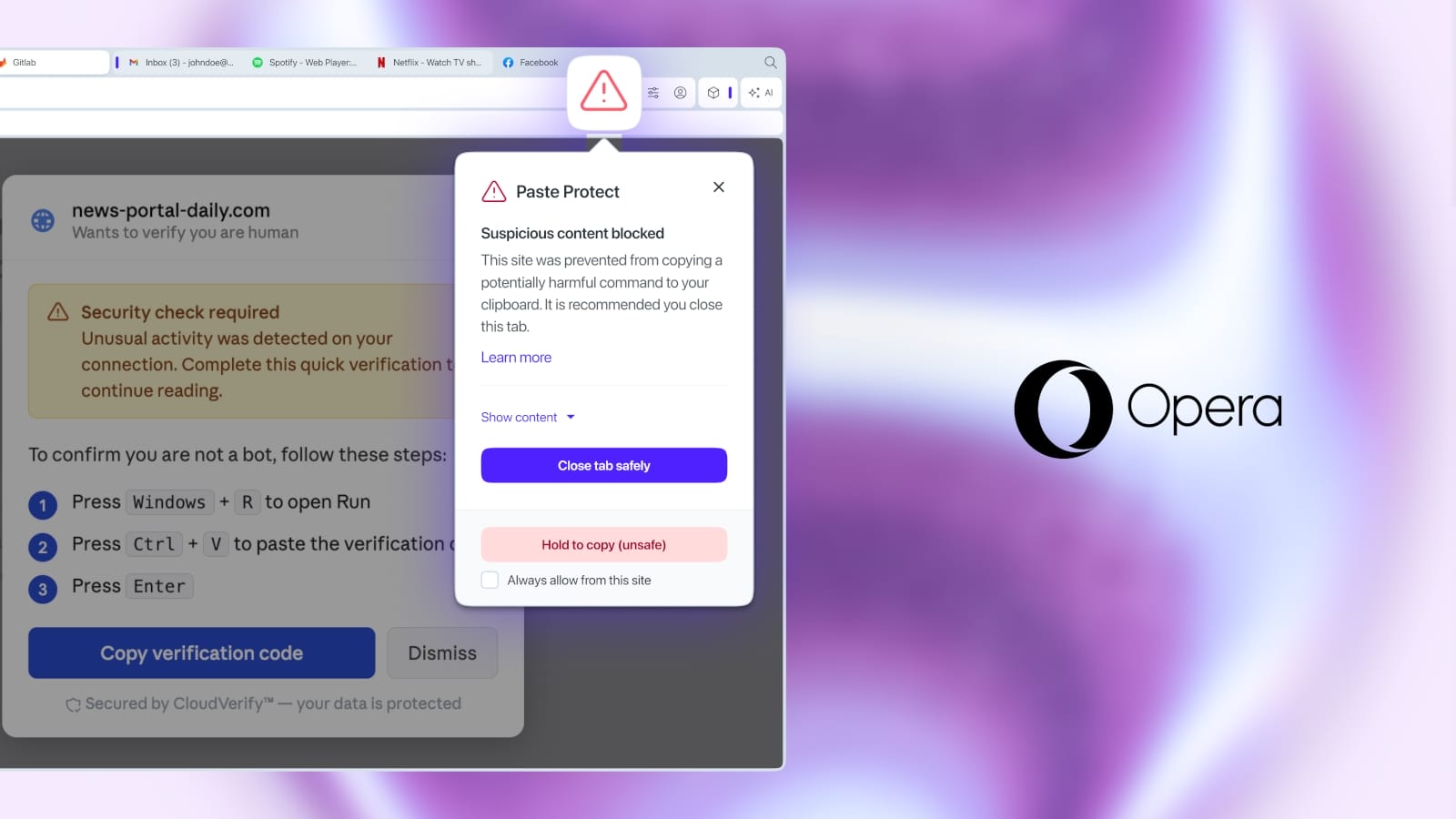
Opera has rolled out a new security feature called Paste Protect, designed to combat a specific type of social engineering attack known as ClickFix. This feature aims to prevent malicious commands from being surreptitiously executed when a user pastes content into their browser. The move addresses a growing concern about how attackers leverage seemingly innocuous actions, like pasting text, to compromise user systems.
Understanding ClickFix Attacks
ClickFix attacks, while not a new concept, have seen a resurgence as attackers become more sophisticated. The core mechanism involves tricking a user into pasting a specially crafted string into a command-line interface or a similar input field within a web application. This string, when executed, can trigger a range of malicious actions, from downloading and running malware to gaining unauthorized access to sensitive data. The effectiveness of these attacks often hinges on the user's trust in the source of the information and their lack of awareness regarding the potential dangers hidden within seemingly normal text.
For instance, an attacker might present a user with a seemingly helpful code snippet or command-line instruction, disguised as a solution to a common problem. The user, believing they are applying a fix, copies the entire block of text, which includes hidden malicious commands. When pasted into a vulnerable application or operating system interface, these hidden commands execute without explicit user confirmation beyond the initial paste action. The attack vector often exploits the expectation that pasting text is a benign operation.
How Paste Protect Works
Opera's Paste Protect addresses this vulnerability by actively scanning clipboard content for patterns indicative of malicious commands before a user can paste them into input fields. When the browser detects potentially harmful code—such as shell commands or executable script snippets—it intercepts the paste action. Instead of allowing the content to be pasted directly, Opera displays a warning to the user, informing them that the clipboard contains suspicious code. The user is then given the choice to proceed with the paste or to cancel the operation, thereby preventing accidental execution of malicious instructions.
This proactive approach acts as a crucial safety net. It doesn't rely on users meticulously scrutinizing every piece of text they copy. Instead, it leverages pattern recognition to identify common attack signatures. This is particularly important in development environments or technical support scenarios where users frequently copy and paste commands. Without Paste Protect, these legitimate actions could inadvertently become vectors for compromise.
Broader Implications for Browser Security
The introduction of Paste Protect by Opera signifies a continued evolution in browser security, moving beyond traditional defenses like sandboxing and malware blocking. It highlights a focus on user behavior and the subtle ways malicious actors attempt to exploit human trust. By integrating this feature directly into the browser, Opera provides a layer of protection that is accessible to all its users, regardless of their technical expertise. This is akin to a bouncer at a club checking IDs not just at the door, but also before someone can enter a restricted VIP area – it adds an extra checkpoint for potentially risky actions.
This move also puts pressure on other browser vendors to consider similar user-centric security measures. As web applications become more interactive and rely heavily on user input, the attack surface for clipboard-based exploits will only grow. Features like Paste Protect are essential for maintaining a secure online environment. The challenge for other browsers will be to implement similar safeguards without introducing significant performance overhead or disrupting legitimate user workflows.
What This Means for Users and Developers
For everyday users, Paste Protect offers peace of mind. They can be more confident when copying and pasting information from various sources, knowing that their browser is actively looking out for potential threats. This is especially valuable for users who may not be fully aware of the risks associated with command-line interfaces or script execution.
For developers and security professionals, this feature underscores the importance of sanitizing user input and being mindful of how command execution can be triggered through seemingly simple paste operations. While Paste Protect is a valuable tool for end-users, it does not eliminate the need for robust server-side validation and secure coding practices. Developers should continue to ensure that their applications do not blindly execute pasted commands without proper validation and escaping. The feature serves as a last line of defense, not a replacement for secure development.
The success of Opera's Paste Protect could inspire similar features in other browsers and applications, potentially shifting the landscape of how clipboard security is addressed. It represents a proactive stance against a specific, yet potent, category of cyber threats, demonstrating that even seemingly minor user interactions can be critical security touchpoints.