Opera's New Defense Against Clipboard Exploits
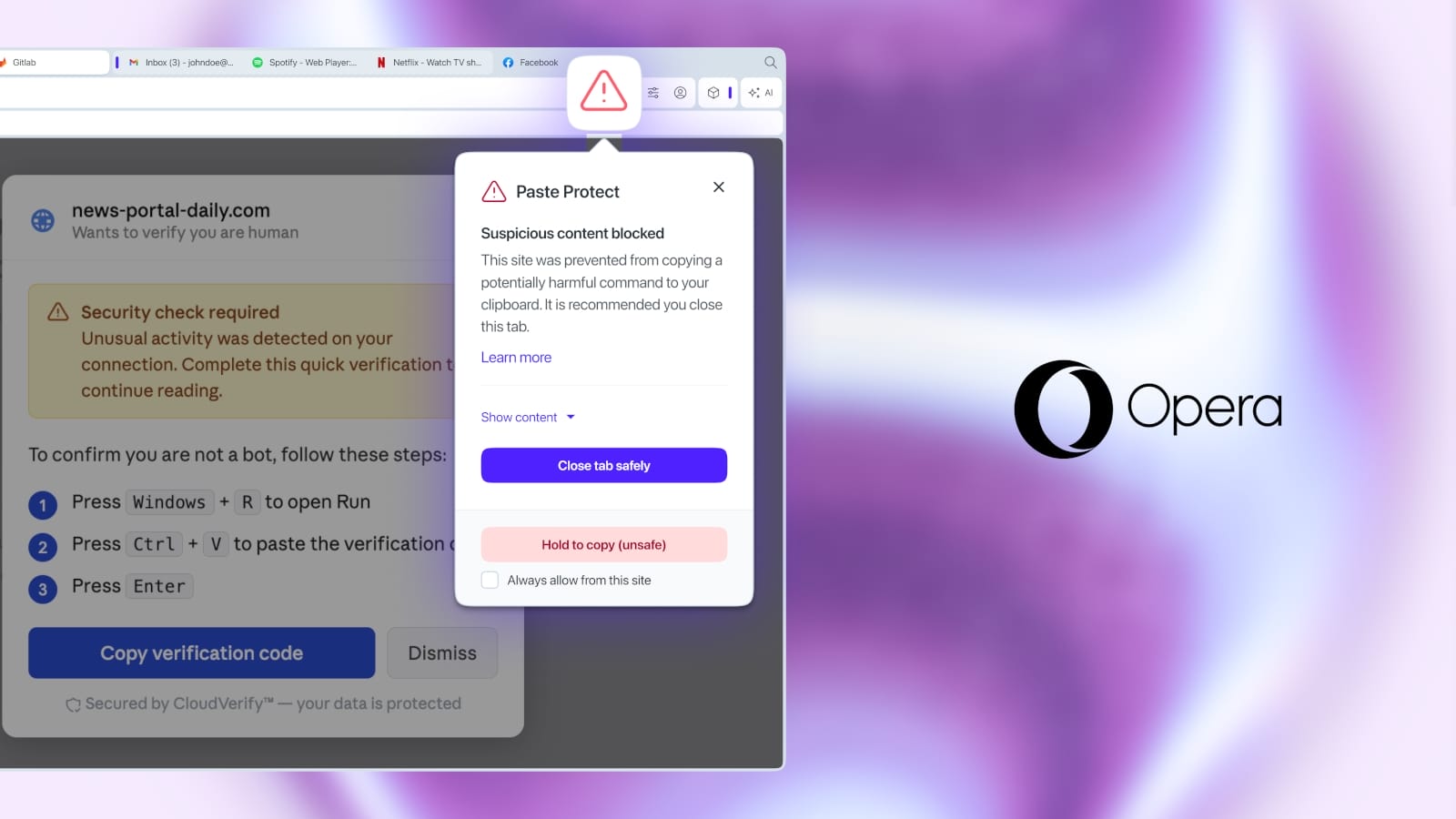
Opera has introduced a proactive security measure called Paste Protect, designed to thwart a specific type of social engineering attack known as ClickFix. These attacks leverage the user's clipboard to trick them into inadvertently executing malicious commands on their system. The browser’s new feature aims to add a crucial layer of defense by scrutinizing clipboard content before it can be pasted into potentially harmful contexts.
Understanding ClickFix Attacks
ClickFix attacks, while not a new category, have seen a resurgence in sophistication. The core mechanism involves manipulating users into copying seemingly innocuous text, which, when pasted into a command-line interface or a similar input field, triggers a malicious script or command. Attackers often use social engineering tactics, such as phishing emails or malicious websites, to prompt users to copy specific strings. These strings are crafted to exploit how terminals or other applications interpret pasted data, often by including special characters or commands that are executed by the operating system.
For instance, a user might be told to copy a command to 'fix' a common issue or to access a 'hidden' feature. Unbeknownst to them, the copied text contains commands like `echo 'malicious_command' | bash` or similar constructs that, upon pasting and pressing Enter, execute arbitrary code. The danger lies in the user's trust in the prompt and the seemingly harmless act of copying and pasting.
How Paste Protect Works
Paste Protect operates by intercepting data copied to the clipboard. When a user attempts to paste content into a text field within the Opera browser, the feature analyzes the pasted string. It looks for patterns indicative of malicious commands, such as shell metacharacters (like `|`, `;`, `&`, `>`, `<`), escape sequences, or commands commonly used in scripting languages like Bash or PowerShell. If suspicious patterns are detected, Paste Protect will block the paste operation and alert the user to the potential threat.
This is not about preventing users from pasting legitimate text; it's about adding a gatekeeper for potentially executable content. The feature is designed to be intelligent enough to differentiate between normal text, code snippets intended for development, and strings that are clearly malicious. Opera has not detailed the exact algorithms or signature databases used, but the focus is on identifying command injection vectors.
User Control and Awareness
Opera emphasizes that Paste Protect is an opt-in feature, giving users control over its activation. This approach acknowledges that some power users or developers might need to paste complex commands or scripts regularly and may wish to bypass the protection for specific use cases. When the feature is enabled, and a paste operation is blocked, users are presented with a notification. This notification serves a dual purpose: it prevents the immediate execution of a potentially harmful command and educates the user about the nature of the threat they narrowly avoided.
The browser might display a message like, “Pasting this content could be risky. It might contain commands that could harm your computer. Do you still want to paste?” Users can then choose to proceed with caution, cancel the paste, or, importantly, learn more about the detected threat. This educational component is vital for long-term user security awareness.
Broader Implications for Browser Security
The introduction of Paste Protect by Opera signifies a growing trend in browser security: moving beyond traditional defenses like malware scanning and phishing protection to address more nuanced attack vectors that exploit user behavior and system functionalities. Clipboard data, often overlooked, is a prime target for social engineering because it's a temporary holding space for information that users are actively moving between applications.
Other browsers have implemented similar, albeit distinct, security measures. For example, some browsers warn users when pasting content from a different origin than the current page, or when pasting into password fields. However, a feature specifically targeting the command-injection aspect of clipboard manipulation is a more specialized defense. This move by Opera could set a precedent, prompting other browser vendors to consider similar protections.
The challenge for browser developers is to balance robust security with user convenience. Overly aggressive blocking could frustrate users and hinder legitimate workflows. Conversely, insufficient protection leaves users vulnerable. Opera’s opt-in strategy with clear user alerts appears to be their chosen path to navigate this trade-off. The effectiveness of Paste Protect will ultimately depend on the sophistication of its detection mechanisms and the diligence of users in heeding its warnings.
What This Means for Users
For the average Opera user, Paste Protect offers an invisible shield against a class of attacks that are difficult to detect without specific technical knowledge. By default, it adds a layer of safety, particularly for users who might be less experienced with cybersecurity threats. For developers and power users, the ability to selectively disable or manage the feature provides the flexibility needed for their work. The key takeaway is that browsers are evolving to protect users from increasingly clever social engineering tactics that target everyday computer interactions.