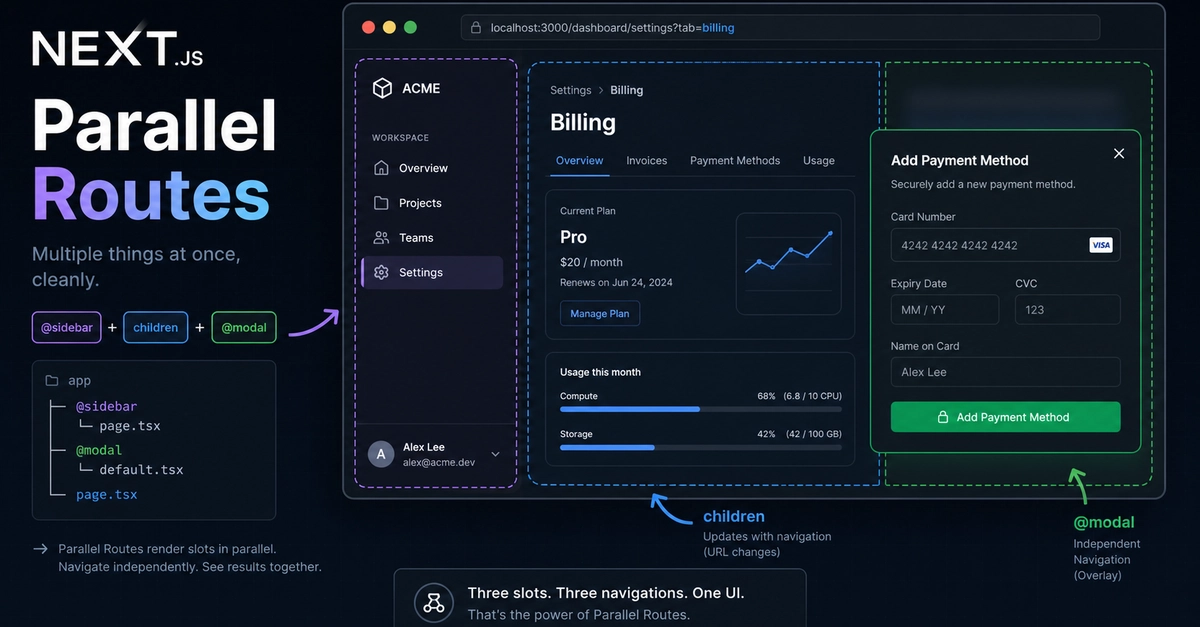
The Core Concept: Named Slots
Next.js Parallel Routes, a powerful feature within the App Router, allow developers to render multiple distinct pages simultaneously within the same layout. This fundamentally changes navigation paradigms by enabling side-by-side content display, rather than requiring users to navigate away from a page to view new information. Imagine a dashboard where different sections update independently, or a detailed view panel that slides open without disturbing the main content feed. This capability is crucial for building complex, multi-panel interfaces.
The mechanism behind parallel routes is the use of named slots. These are special folders within the Next.js App Router structure, distinguished by a prefix of @ followed by a name. Each named slot acts as an independent rendering area. When you define a route like app/@analytics/page.js, it signifies that this page is intended to be rendered into a specific named slot within the parent layout. This is distinct from the default page.js, which occupies the primary slot.
Consider a common dashboard scenario. You might have a main content area displaying user data, a sidebar with navigation controls, and a separate analytics panel. Traditionally, navigating to a new section might replace the entire view or require complex state management. With parallel routes, you can define @sidebar, @analytics, and the default page.js. Each can be navigated independently. Clicking a link in the @sidebar might only update the content in the default page.js slot, while the @analytics panel remains static or updates based on its own internal logic. This offers a more fluid and responsive user experience, keeping users oriented within a single view.
The setup involves creating these specialized folders. For instance, if you have a route like app/dashboard/@users/page.js and app/dashboard/@settings/page.js, these pages will render into slots named @users and @settings respectively. The parent layout, typically app/dashboard/layout.js, is responsible for defining how these slots are displayed. It can arrange them using CSS Grid, Flexbox, or other layout techniques.
Implementing Parallel Routes
To implement parallel routes, you create special folders prefixed with @ alongside the standard page.js file within a route segment. For example, in the app/dashboard directory, you might have:
app/dashboard/page.js: This renders the default page for the dashboard.app/dashboard/@users/page.js: This renders into a named slot called@users.app/dashboard/@settings/page.js: This renders into a named slot called@settings.
The corresponding layout file, app/dashboard/layout.js, receives these parallel routes as props. The layout component can then destructure these props to render each route into its designated area. The layout acts as the container, orchestrating the display of these independent content panes.
The layout file would look something like this:
export default function DashboardLayout({ users, settings }) {
  return (
    div>
      nav>{users}/nav
      main>{settings}/main
    /div
  );
}
Here, users and settings are the React components rendered from @users/page.js and @settings/page.js respectively. The layout file is responsible for the overall structure, placing these components where they belong. This separation of concerns makes complex UIs more manageable.
Handling Navigation and State
A key advantage of parallel routes is their ability to manage state and navigation independently. Each parallel route can have its own links and routing logic without interfering with other parallel routes or the default page. This is achieved through Next.js's routing capabilities, where links within a parallel route segment are scoped to that segment.
For instance, if you have a @feed slot displaying a list of articles and a @detail slot meant to show the content of a selected article, clicking an article in the feed can update the @detail slot without causing the feed itself to reload or disappear. The @detail slot would contain its own page.js that accepts dynamic parameters for the article ID, and navigation links within the feed would point to this specific parallel route.
The setup for this might involve a link like:
import Link from 'next/link'

function ArticleListItem({ article }) {
  return (
    li>
      Link href={`/articles/${article.id}`} prefetch={false}>
        {article.title}/Link
      /Link
    /li
  );
}
This link would navigate to /articles/:id, and the app/@detail/page.js would be responsible for rendering the content for that specific article ID. Crucially, this navigation would update only the @detail slot, while the @feed slot remains untouched. This is a significant departure from traditional page-based navigation.
Advanced Use Cases and Considerations
Parallel routes are not limited to simple side-by-side content. They enable sophisticated UI patterns such as modals, drawers, and complex dashboard layouts that were previously difficult to implement efficiently. For instance, a modal can be rendered as a parallel route, appearing overlayed on the current page without disrupting the underlying content or navigation state.
To achieve this, a modal route might be defined at app/@modal/page.js, and the parent layout would conditionally render this modal based on the URL. Navigation to the modal route would typically be done programmatically or via a specific link that opens the modal slot. Closing the modal would involve navigating back or to a different route that doesn't include the modal slot.
A genuine surprise here is how seamlessly Next.js handles the composition of these independent routes. Unlike iframes or complex JavaScript state management, parallel routes feel like native routing. The framework manages the rendering and lifecycle of each slot, allowing developers to focus on the UI and functionality within each pane. This abstraction simplifies what could otherwise be an intricate system.
When considering the setup, remember that each parallel route is a distinct route segment. This means they can have their own loading states, error boundaries, and even nested layouts if needed. The default page.js in a segment defines the primary content, while the @named folders define supplementary content areas that can be activated or deactivated independently.
The initial setup might seem daunting, especially for developers accustomed to simpler routing models. However, the flexibility offered by named slots and independent rendering areas unlocks new possibilities for building dynamic and interactive web applications. It's essential to plan your UI architecture carefully, mapping out which content components will reside in which parallel slots to maximize the benefits.
If you are building a complex dashboard, an application with multiple independent content panels, or a site that requires modals or side drawers that don't break the current view, parallel routes in Next.js App Router offer a robust and elegant solution. They provide a powerful way to render multiple pages simultaneously, enhancing user experience and simplifying the development of sophisticated interfaces.