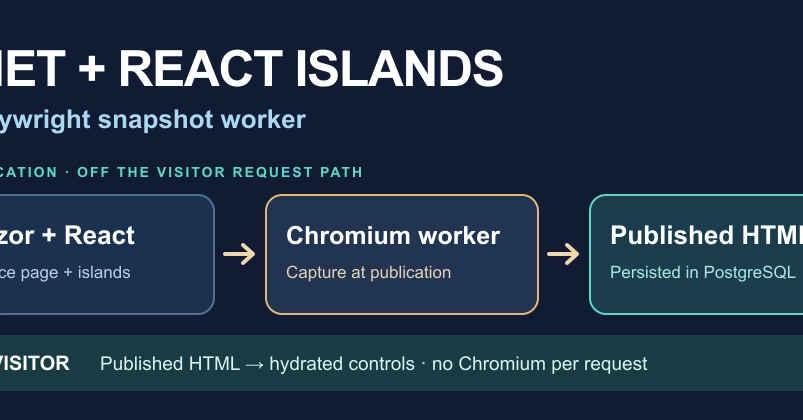
The Challenge: Crawlable HTML with Interactive Components
Building modern web applications often involves a trade-off: deliver fully rendered HTML for SEO and initial load performance, or leverage client-side JavaScript for rich interactivity. The author of this project faced a specific dilemma for a hotel and editorial site. They needed pages like /hotels/casa-aurelia to serve complete hotel descriptions, prices, photos, and metadata directly in the initial HTML response for search engine crawlers and fast user perception. Simultaneously, they wanted interactive elements, such as a photo gallery dialog, to function seamlessly after the initial load, a pattern often handled by client-side Single Page Applications (SPAs).
The core problem was achieving both objectives without compromise. A traditional SPA would send a minimal HTML shell, relying entirely on JavaScript execution to render content, which hurts discoverability for search engines. Conversely, rendering a full browser instance (like Chromium) on every visitor request to generate the HTML on the fly introduces significant operational overhead and latency. The goal was to have a crawlable, first-response HTML payload and client-side hydration for interactivity, a seemingly conflicting requirement.
This project, built using ASP.NET Core 10 Razor Pages, React islands, PostgreSQL, and a Node.js/Playwright worker, offers a solution. The site features catalog pages, a journal, search functionality, and an inquiry flow. The key innovation lies in how it handles the rendering and interactivity, effectively separating concerns between the server-side page generation and client-side component behavior.
Architectural Approach: Razor Pages, React Islands, and a Snapshot Worker
The architecture decouples page ownership: Razor Pages manage the core page structure and content, providing the server-rendered HTML. React islands are then used for specific, isolated interactive components within these pages. This means that for a page like a hotel listing, the main content, pricing, and metadata are handled by Razor Pages. However, a complex component, such as an image carousel or a booking widget, might be a React island. This approach ensures that the bulk of the content is immediately available and indexable.
The critical piece of this architecture is the Node.js worker that leverages Playwright. Instead of rendering the React islands on the client *after* the page loads, or rendering the entire page in a browser on the server for every request, this worker pre-renders the HTML for these React islands. Think of it less like a server that spins up a browser for each visitor, and more like a highly efficient factory that meticulously crafts and packages interactive components (the React islands) into static HTML pieces *before* they are even requested by a user.
The workflow involves the Playwright worker visiting the site's pages. It then captures the fully rendered HTML, including the output of the React islands, as if a real user had visited and interacted with them. This pre-generated HTML is then served to the end-user. This strategy effectively delivers static, crawlable HTML that already contains the rendered output of the interactive components, eliminating the need for client-side JavaScript to perform this initial rendering. Subsequent client-side JavaScript can then hydrate these pre-rendered islands, enabling further interactivity without a significant performance penalty or SEO drawback.
Implementing the Playwright Snapshot Worker
The implementation details reveal a practical approach to solving this complex rendering problem. The Node.js worker uses Playwright to automate a browser instance. This browser navigates to the site's URLs, allowing all client-side JavaScript, including the React islands, to execute and render their content. Once the page is fully loaded and the React islands have rendered their HTML, Playwright captures the resulting DOM. This captured HTML is then saved, effectively creating static snapshots of the interactive parts of the site.
This snapshotting process can be integrated into a build pipeline or run as a separate service. For instance, when content is updated or a new page is created, the worker can be triggered to re-render and capture the latest HTML. This pre-rendered HTML is then deployed alongside the application, ensuring that when a user or crawler requests the page, the server serves the complete, ready-to-display HTML without waiting for client-side rendering.
Referenced Sources
- verified