Unifying Image Generation and Editing
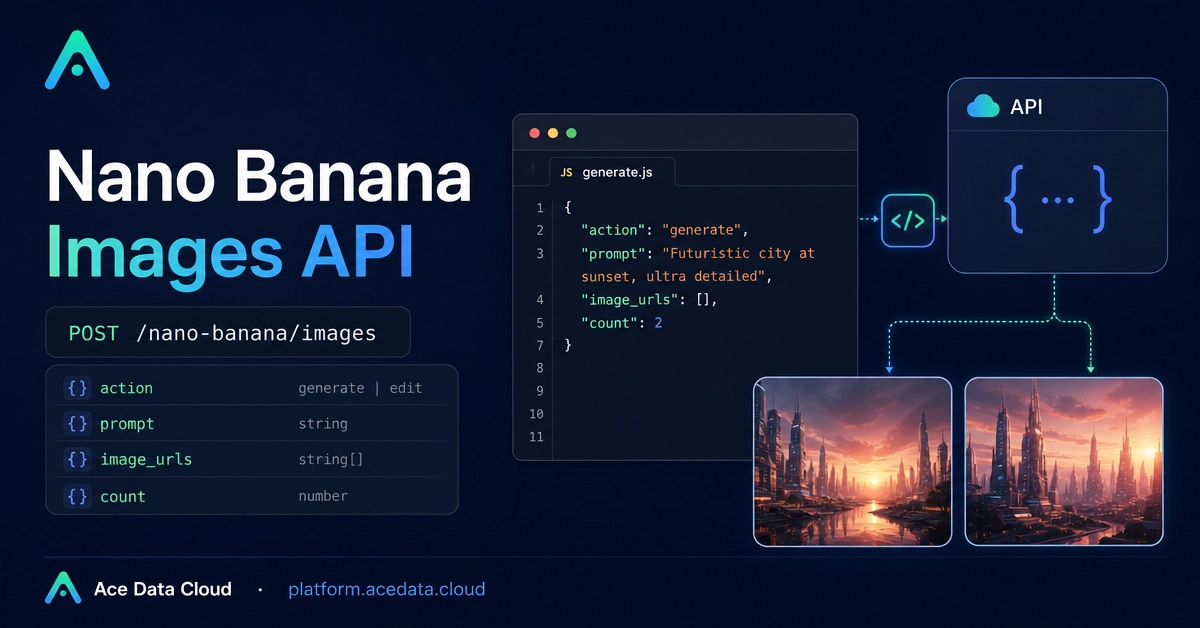
Building robust image generation and editing capabilities into applications often starts with simple experiments. Developers might begin by generating a single image from a text prompt or applying a basic edit to an existing product photo. The true challenge emerges when translating these isolated actions into a predictable, scalable backend workflow. Ace Data Cloud's Nano Banana Images API aims to solve this by providing a single, unified interface for both generation and editing tasks.
The API operates through a single endpoint: POST /nano-banana/images, accessible via the base URL https://api.acedata.cloud. Authentication is handled via an authorization header. This consolidation simplifies integration, allowing developers to manage different visual AI operations without needing to interact with multiple distinct endpoints or services.
Core Functionality: Generate and Edit
The Nano Banana Images API supports two primary actions, both routed through the same POST endpoint:
- Generate: This function allows users to create new images based on descriptive text prompts. Similar to other generative AI models, users provide a textual description of the desired image, and the API returns a generated visual output. This is ideal for creating unique assets, illustrations, or concept art on demand.
- Edit: The edit function enables modification of one or more existing input images. This capability is more nuanced than simple filters. It allows for prompt-driven alterations, such as changing elements within an image, applying stylistic modifications, or even inpainting/outpainting based on textual guidance. This is particularly useful for e-commerce, where product images might need variations, background changes, or feature highlighting.
Practical Integration: Request Fields and Examples
The API's interface is designed for practical application development. Key request fields include:
action: Specifies whether togenerateoredit.prompt: The text description for generation or the modification instruction for editing.images: For theeditaction, this field accepts a list of base64 encoded image strings or URLs of the images to be modified.negative_prompt: (Optional) Text describing elements to avoid in the generated or edited image.seed: (Optional) An integer to control the randomness of the generation, allowing for reproducible results.steps: (Optional) The number of diffusion steps to run for image generation/editing. More steps generally lead to higher quality but increased processing time.cfg_scale: (Optional) Controls how strongly the generation adheres to the prompt. Higher values mean stronger adherence.output_format: Specifies the desired output format, e.g.,pngorjpeg.
A typical curl example for generating an image might look like this:
curl -X POST https://api.acedata.cloud/nano-banana/images \
-H "authorization: YOUR_API_KEY" \
-d '{
  "action": "generate",
  "prompt": "A futuristic cityscape at sunset, digital art",
  "steps": 50,
  "output_format": "png"
}'
For editing an image, the request would include the images field with the base64 encoded image data:
curl -X POST https://api.acedata.cloud/nano-banana/images \
-H "authorization: YOUR_API_KEY" \
-d '{
  "action": "edit",
  "prompt": "Add a red sports car in the foreground",
  "images": ["base64_encoded_image_string_here"],
  "output_format": "png"
}'
Python Wrapper for Simplified Integration
To further simplify integration, a Python wrapper can abstract away the direct HTTP requests and JSON handling. Such a wrapper would typically include methods like generate_image(prompt, **kwargs) and edit_image(image_data, prompt, **kwargs). These methods would construct the API payload, handle authentication, send the request, and parse the response, returning either the image data or an error message.
Consider a basic Python wrapper structure:
import requests

class NanoBananaClient:
    def __init__(self, api_key, base_url="https://api.acedata.cloud"):
        self.api_key = api_key
        self.base_url = base_url
        self.headers = {
            "authorization": self.api_key
        }

    def _post(self, data):
        response = requests.post(f"{self.base_url}/nano-banana/images", json=data, headers=self.headers)
        response.raise_for_status() # Raise HTTPError for bad responses (4xx or 5xx)
        return response.json() # Or handle binary image data directly

    def generate_image(self, prompt, **kwargs):
        payload = {"action": "generate", "prompt": prompt, **kwargs}
        return self._post(payload)

    def edit_image(self, image_data, prompt, **kwargs):
        # image_data should be a list of base64 strings or URLs
        payload = {"action": "edit", "prompt": prompt, "images": image_data, **kwargs}
        return self._post(payload)

# Example Usage:
# client = NanoBananaClient("YOUR_API_KEY")
# generated_image_info = client.generate_image("A serene landscape", steps=30, output_format="jpeg")
# edited_image_info = client.edit_image(["base64_image_string"], "Make the sky bluer")
From Playground to Production
Moving from initial API experiments to production applications requires attention to several practical details. The first is error handling. Network issues, invalid prompts, or API rate limits can all cause requests to fail. A robust application needs to gracefully handle these errors, potentially with retry mechanisms for transient failures.
Secondly, performance is critical. The time taken to generate or edit an image can directly impact user experience. Understanding the trade-offs between parameters like steps and cfg_scale versus processing time is crucial. For applications requiring near real-time results, consider asynchronous processing or optimizing prompt engineering to reduce generation duration.
Finally, cost management is essential. API calls, especially for complex image tasks, can incur costs. Developers must monitor their usage and implement strategies to control expenses, such as caching results where appropriate or setting usage limits per user or per feature. The choice of output format (e.g., JPEG vs. PNG) can also affect data transfer costs and storage requirements.
The Nano Banana Images API's unified approach simplifies the technical overhead of integrating AI-powered image manipulation. By offering generation and editing through a single, well-defined interface, it lowers the barrier to entry for developers looking to incorporate advanced visual features into their products.