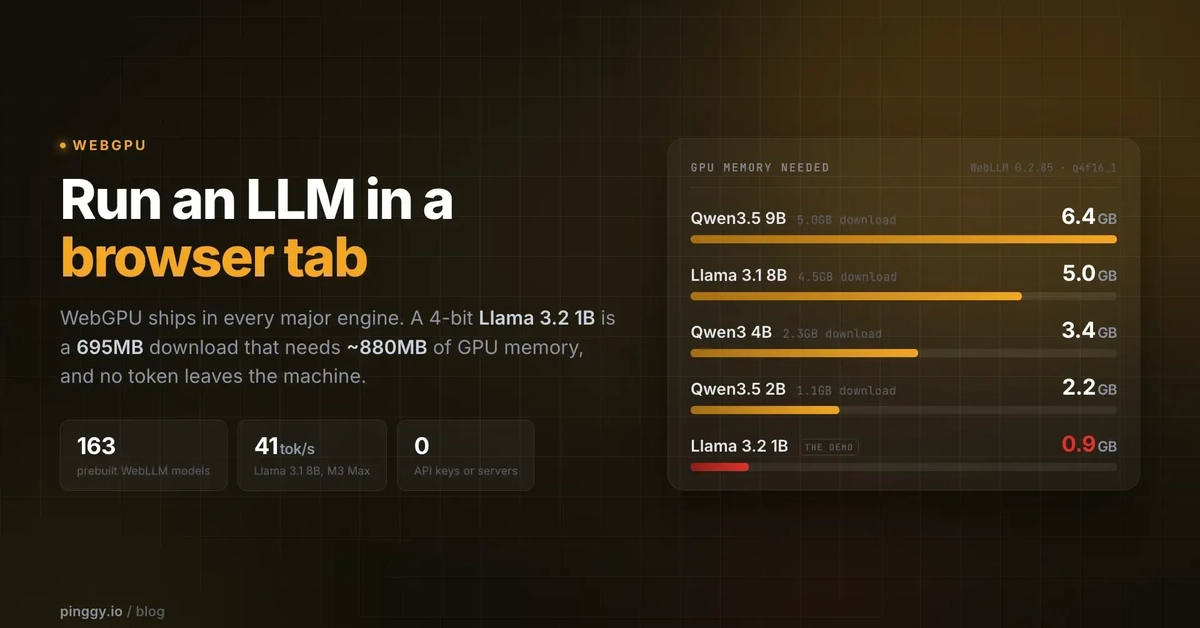
The Era of Client-Side AI is Here
For years, integrating AI into web applications meant a round trip to a server. User data traveled to a remote API, waited for processing, and returned as a response. This architecture introduced latency, privacy concerns, and per-token costs. The landscape is shifting. Thanks to the maturity of WebGPU, the browser is evolving into a powerful inference runtime, capable of executing complex AI models locally.
Why Client-Side AI?
Running Large Language Models (LLMs) directly in the browser, a concept known as client-side AI, offers several compelling advantages over traditional server-side inference. The most immediate benefit is cost reduction. Cloud-based AI services charge per token processed, which can become prohibitively expensive for applications with high usage or large data inputs. By moving inference to the client, these per-token costs are eliminated. Furthermore, user data remains on the device, significantly enhancing privacy and security. This local processing also enables offline capabilities, allowing AI features to function even without an active internet connection. The reduction in network latency is another critical factor; responses are near-instantaneous when the computation happens on the user's machine.
WebGPU: The Engine for In-Browser AI
WebGPU is the key technology enabling this paradigm shift. It's a modern web API that provides access to the GPU (Graphics Processing Unit) for general-purpose computation, not just graphics rendering. Unlike its predecessor, WebGL, WebGPU is designed with compute shaders in mind, making it ideal for the parallel processing demands of neural networks. It offers a more direct and efficient way to harness the power of the user's hardware. This allows developers to run sophisticated models that were previously confined to powerful servers, directly within the browser environment.
Think of WebGPU less like a simple graphics library and more like a high-speed internal highway for data processing. It allows the browser to leverage the parallel processing capabilities of the GPU, which is exceptionally good at handling the matrix multiplications and tensor operations that form the backbone of LLMs. This is a significant leap from JavaScript's traditional single-threaded execution model, which would choke on such computationally intensive tasks.
Challenges and Considerations
Despite the immense potential, running LLMs in the browser is not without its challenges. Model size is a primary concern. LLMs are notoriously large, often measured in gigabytes. Downloading these models to a user's browser can be time-consuming and consume significant bandwidth. Developers need strategies to manage model loading, perhaps through progressive downloading or by offering smaller, optimized models for client-side use. The computational power of the user's device also becomes a limiting factor. While GPUs are powerful, older or lower-end hardware might struggle to run complex models at acceptable speeds, leading to a subpar user experience. This necessitates careful consideration of model quantization and optimization techniques to balance performance and accuracy.
Memory management is another crucial aspect. Browsers have memory limitations, and loading large models can quickly exhaust available resources, leading to crashes or performance degradation. Developers must be mindful of how models are loaded, unloaded, and managed within the browser's memory footprint. Furthermore, the diversity of hardware and browser implementations means that performance can vary significantly across different user devices. Thorough testing and optimization across a range of target platforms are essential.
The Developer Experience
Tools and libraries are emerging to simplify the integration of client-side AI. Frameworks like ONNX Runtime Web and TensorFlow.js are being updated to leverage WebGPU, providing developers with familiar interfaces to load and run models. These libraries abstract away much of the low-level WebGPU API complexity, allowing developers to focus on the AI application logic. The ability to use JavaScript or WebAssembly to interact with these models opens up new possibilities for interactive and dynamic web experiences. Developers can now build applications that offer real-time AI assistance, personalized content generation, and sophisticated data analysis directly within the user's browser, all while respecting user privacy and reducing operational costs.
The Future of Web AI
The move towards client-side AI, powered by WebGPU, signals a fundamental shift in how AI will be deployed on the web. It democratizes access to powerful AI capabilities, making them available to a broader audience without the need for specialized hardware or complex server infrastructure. This opens doors for innovative applications in areas like education, accessibility, content creation, and personalized user experiences. As WebGPU continues to mature and browser vendors optimize its performance, we can expect to see increasingly sophisticated AI models running seamlessly in the browser, blurring the lines between local applications and web experiences.
What nobody has addressed yet is what happens to the thousands of developers who built their entire business models around server-side API inference, now facing a future where their core service could be commoditized and run locally by their users. This transition will undoubtedly reshape the AI-as-a-service market.