No Account, No Upload: The Lens Extension
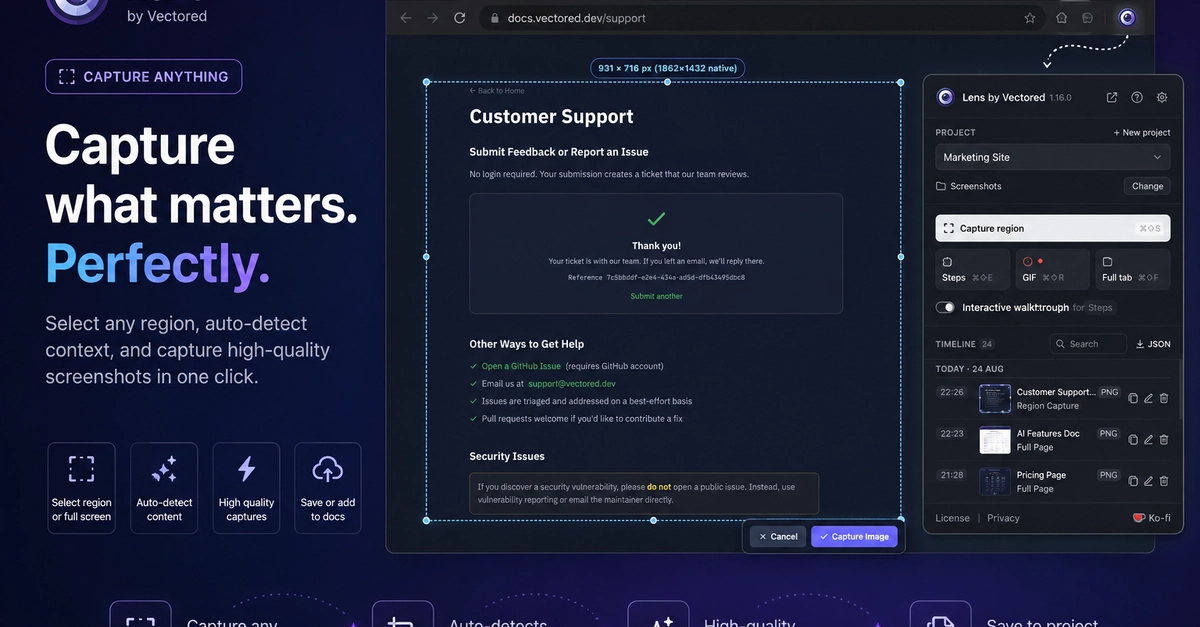
Documentation often lives and dies by its screenshots. For anyone creating tutorials, guides, or even internal process documents, the process of capturing, annotating, and exporting these visuals can be a significant bottleneck. Existing tools frequently demand account creation, upload user data to third-party servers, and then charge for basic export functionality. This is precisely the problem developer and creator Open Post aimed to solve with Lens, a new Chrome and Edge browser extension.
Lens operates entirely within the browser, leveraging Manifest V3 to ensure compatibility with modern versions of Chrome (137+) and Edge. The core promise is simple: no account required, no data uploaded to external servers, and all features accessible for free. This approach sidesteps common frustrations associated with documentation tools, positioning Lens as a privacy-focused, user-empowering solution.
The extension's licensing model is equally straightforward. A paid license removes an occasional reminder prompt, a Ko-fi link for support, and a watermark on exported images. Crucially, it does not unlock core functionality; the capture, editing, and export features remain free for all users.
Capture and Annotation Features
Lens provides three primary hotkeys, which users can rebind within Chrome's extension shortcuts (`chrome://extensions/shortcuts`). These hotkeys control the fundamental capture actions:
- Capture Region: Allows users to select a specific area of the screen to capture. The default shortcuts are
⌘⇧Son macOS andAlt+Shift+Son Windows/Linux. - Smart Capture (Step Guide): This feature is designed for creating step-by-step guides. It captures a sequence of actions, automatically numbering each step. The default shortcuts are
⌘⇧Eon macOS andAlt+Shift+Eon Windows/Linux. - Capture Full Page: Captures the entire visible webpage, including content that is currently scrolled out of view. The default shortcuts are
⌘⇧Pon macOS andAlt+Shift+Pon Windows/Linux.
Beyond capture, Lens offers a robust set of annotation tools, all accessible directly within the browser environment. These include:
- Borders: Users can add borders to their captured images, with customizable thickness and color.
- Highlighting: Essential for drawing attention to specific elements, the highlighting tool supports various colors.
- Arrows: For indicating flow or relationships between elements, arrows can be added and customized.
- Text Annotation: Users can overlay text directly onto their screenshots, with options for font, size, and color.
- Cropping: After capture, images can be cropped to refine the focus.
- Blurring: Sensitive information can be obscured using the blur tool.
The 'Smart Capture' feature is particularly noteworthy for its ability to automate the creation of sequential guides. When activated, Lens prompts the user to click through a process. Each click triggers a new capture, and the extension automatically numbers these captures sequentially, effectively building a step-by-step visual tutorial with minimal manual effort. This significantly speeds up the documentation process for software features or workflows.
No Server, No Upload: The Technical Approach
The defining characteristic of Lens is its complete absence of server-side processing or cloud storage. All operations—capture, annotation, and export—occur locally within the user's browser. This architectural choice has several significant implications:
- Privacy: User data, including screenshots and annotations, never leaves the user's machine. This eliminates concerns about data breaches, unauthorized access, or the platform using user data for other purposes.
- Cost: By avoiding server infrastructure and cloud storage, Lens can offer its core functionality for free. This dramatically lowers the barrier to entry for individuals and small teams who might find subscription fees for similar tools prohibitive.
- Speed and Reliability: Local processing means faster operations, as there is no network latency involved in uploading or downloading data. The tool's functionality is also independent of external server availability.
- Offline Use: The extension can function fully without an internet connection, provided the browser is installed and the extension is active.
This approach is enabled by modern browser capabilities, particularly within the framework of Manifest V3 extensions. These extensions can leverage local storage and perform complex operations directly within the browser's sandbox environment. The developer's commitment to this serverless model is a direct response to the perceived over-commercialization and data-handling practices of many existing screenshot and documentation tools.
Who Benefits from Lens?
Lens targets a broad audience of users who regularly create visual documentation:
- Developers: For writing README files, API documentation, or bug reports.
- Technical Writers: To create user manuals and help guides.
- Support Teams: For generating troubleshooting steps and FAQs.
- Educators and Students: For creating tutorials and study guides.
- Anyone needing to explain a process visually: From marketing teams creating product walkthroughs to individuals sharing how-to guides on social media.
The extension's ease of use, combined with its free, serverless model, makes it an attractive alternative to more complex or costly solutions. The ability to quickly generate annotated screenshots and step-by-step guides without leaving the browser streamlines workflows and encourages more frequent and detailed visual communication.
The Future of Documentation Tools
Lens represents a significant shift in how users can approach visual documentation. By prioritizing local processing and user privacy, it challenges the prevailing model of cloud-based, subscription-dependent SaaS tools. The success of Lens could signal a growing demand for developer-centric, privacy-first utilities that offer robust functionality without the typical commercial overhead. For users tired of creating accounts and uploading sensitive screenshots, Lens offers a refreshing, no-strings-attached alternative.