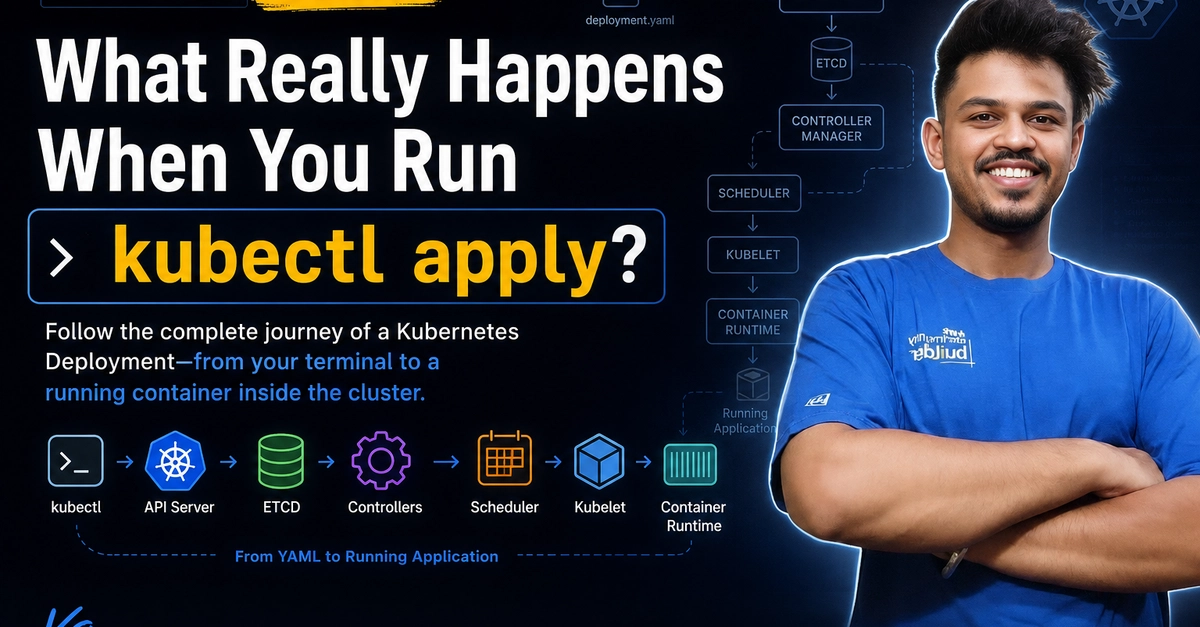
The Illusion of Simplicity: `kubectl apply`
When you run kubectl apply -f deployment.yaml, the Kubernetes cluster responds by creating or updating resources, eventually leading to running Pods. This seemingly straightforward action masks a complex choreography involving multiple core Kubernetes components. Most tutorials stop at the command, leaving a significant gap in understanding the underlying machinery. This article traces the complete lifecycle of a Kubernetes Deployment, from the initial command in your terminal to a functioning container within the cluster, detailing the roles of the API Server, ETCD, Controller Manager, Scheduler, Kubelet, and Container Runtime.
Initiating the Request: The API Server and ETCD
The journey begins when your local kubectl client sends a request to the Kubernetes API Server. This isn't a direct manipulation of cluster state; rather, it's a structured request, typically in YAML or JSON format, describing the desired state of your Deployment. The API Server acts as the central nervous system of Kubernetes. It validates the request, authenticates the user or service account, and authorizes the action based on RBAC policies. If the request is valid and authorized, the API Server persists the object's specification into ETCD, the cluster's distributed key-value store. ETCD is the single source of truth for the cluster's state. It stores all Kubernetes objects—Nodes, Pods, Deployments, Services, etc.—and their configurations. The API Server writes the new or updated Deployment object here.
The Controller Manager: Reconciliation Loop in Action
Once the Deployment object is stored in ETCD, the Kubernetes Controller Manager takes over. The Controller Manager runs various controllers, each responsible for a specific resource type. For Deployments, the Deployment Controller continuously watches the API Server for changes to Deployment objects. It operates on a reconciliation loop: it compares the cluster's current state with the desired state defined in the Deployment object. If there's a discrepancy, the controller takes action to bring the current state in line with the desired state. For a new Deployment, this means creating ReplicaSets. For an existing Deployment, it might involve updating a ReplicaSet or creating a new one as part of a rollout strategy (e.g., rolling update, blue/green). The Deployment Controller doesn't create Pods directly; it manages ReplicaSets, which in turn manage Pods.
The Scheduler: Assigning Pods to Nodes
When the Deployment Controller creates or updates a ReplicaSet, and that ReplicaSet needs new Pods, the ReplicaSet Controller creates Pod specifications. These Pod specifications are sent back to the API Server. At this point, the Pod is not yet running; it's in a pending state. This is where the Kubernetes Scheduler comes into play. The Scheduler watches the API Server for newly created Pods that have no node assigned. It then selects the best Node for each Pod to run on, based on various factors such as resource requests (CPU, memory), node taints and tolerations, node affinities, and anti-affinities. Once a suitable Node is found, the Scheduler updates the Pod object in ETCD via the API Server, assigning the Pod to that specific Node. This assignment is crucial; it signals to the chosen Node that it is responsible for running this Pod.
Kubelet and Container Runtime: The Final Execution
On the Node that the Scheduler assigned the Pod to, the Kubelet is constantly watching the API Server for Pods that have been scheduled to its Node. When the Kubelet detects a new Pod assigned to its Node, it consults the Pod's specification. This specification includes the container image(s) to be run, ports to be exposed, volumes to be mounted, and other configurations. The Kubelet then interacts with the Container Runtime Interface (CRI) on the Node to pull the specified container image(s) from a registry (like Docker Hub or a private registry). Once the image is downloaded, the Kubelet instructs the Container Runtime (e.g., containerd, CRI-O, or Docker via dockershim, though dockershim is deprecated) to create and start the container(s) based on the Pod's configuration. The Container Runtime is responsible for the actual execution of containers. It sets up the container's filesystem, network namespace, and process execution environment. As the container starts and the Pod becomes ready, the Kubelet reports the Pod's status back to the API Server, which updates ETCD. This cycle ensures that the cluster's actual state reflects the desired state defined in your YAML files.
The Continuous Reconciliation
This entire process isn't a one-off event. Kubernetes operates on a control loop principle. Controllers, like the Deployment Controller and ReplicaSet Controller, continuously monitor the state of resources. If a Pod fails, a Node goes offline, or a resource limit is breached, the relevant controllers detect these changes and initiate corrective actions to maintain the desired state. For example, if a Pod crashes, the ReplicaSet Controller will notice that the number of running Pods is less than desired and will instruct the API Server to create a new Pod, which then goes through the scheduling and execution process again. This constant watchfulness and adjustment are what make Kubernetes resilient and self-healing.