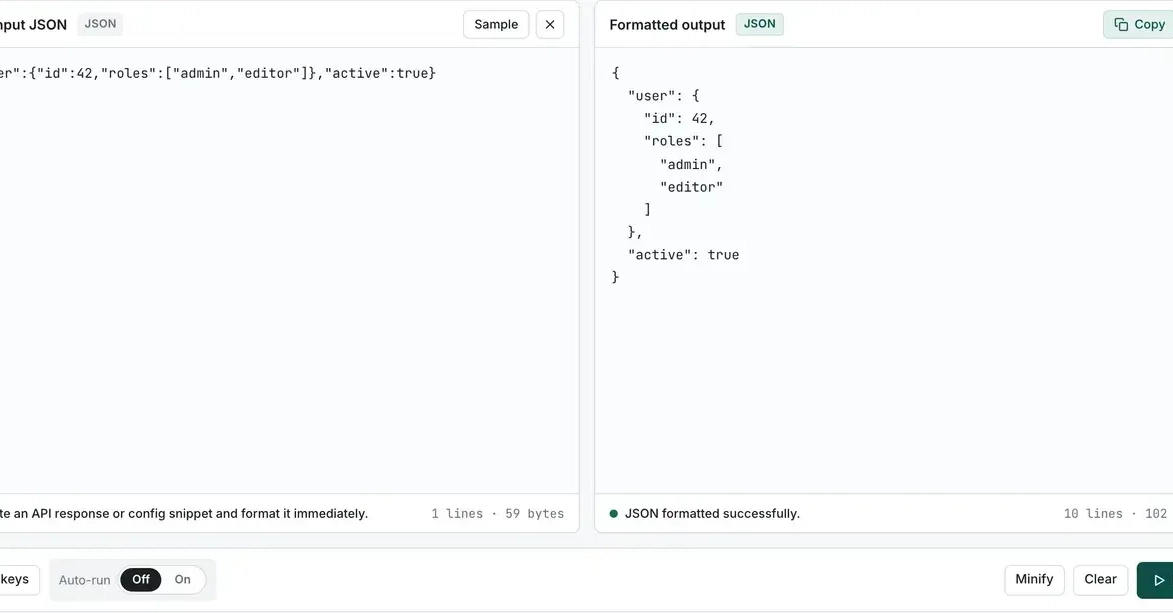
The Ubiquitous JSON Formatting Problem
Every developer has experienced it. You run a curl command to an API endpoint, and the response slams back onto your terminal as a single, unbroken line of minified JSON. Your eyes strain, your scroll wheel spins uselessly, and you inevitably give up. The next step is always the same: reach for a formatter.
curl https://api.example.com/some-endpoint
This common scenario leads to a frequent debate: which tool is best for pretty-printing JSON? While many tools exist, the real challenge lies in selecting the right one for the specific context. This isn't about discovering new tools, but rather understanding the practical application and decision-making process behind choosing one. We'll explore three primary approaches: piping through jq, using Python's built-in json.tool, and leveraging browser-based formatters.
Approach 1: Piping Through jq
For command-line users, jq is often the default and most powerful choice. Its syntax is concise, and its capabilities extend far beyond simple pretty-printing, allowing for filtering, transformation, and data extraction. The basic command to pretty-print JSON is straightforward:
curl -s https://api.example.com/users | jq .
The -s flag for curl suppresses the progress meter, ensuring only the JSON output is piped. The jq . command simply tells jq to output the entire input JSON structure, but formatted with indentation and line breaks. This is highly effective for immediate inspection directly in the terminal.
Pros:
- Extremely powerful for complex queries and transformations.
- Fast and efficient for streaming data.
- Available on most Unix-like systems or easily installable.
- Excellent for scripting and automation.
Cons:
- Requires installation if not already present.
- Learning curve for advanced filtering and manipulation.
Approach 2: Using Python's json.tool
If you have Python installed (which is common in many development environments), you have access to the built-in json.tool module. This module provides a simple, command-line utility for pretty-printing JSON. It's less feature-rich than jq but serves the core purpose effectively and requires no additional installation.
To use it, you can pipe the output of curl to the Python interpreter, invoking json.tool:
curl -s https://api.example.com/products | python -m json.tool
This command takes the raw JSON from curl and processes it through Python's JSON module, outputting a nicely formatted version. It's a convenient option when you don't want to install or manage a separate tool like jq.
Pros:
- No extra installation required if Python is present.
- Simple and straightforward for basic pretty-printing.
- Good for quick, ad-hoc formatting.
Cons:
- Lacks the advanced querying and manipulation capabilities of
jq. - Can be slightly slower than
jqfor very large JSON payloads.
Approach 3: Browser Formatters
For developers working within a web browser, whether it's inspecting API responses from a frontend application or directly testing endpoints via browser developer tools, browser-based formatters are invaluable. Most modern browsers have built-in JSON viewers in their developer consoles.
When a browser makes an AJAX request (e.g., using fetch or XMLHttpRequest) and receives a JSON response, the developer console will often automatically format it, providing an interactive, collapsible tree view. This is incredibly useful for navigating deeply nested JSON structures.
Beyond the built-in console viewers, numerous browser extensions are available that enhance JSON viewing capabilities, offering syntax highlighting, search functions, and custom styling. These can be particularly helpful for developers who frequently work with complex JSON data directly within their browser environment.
Pros:
- Interactive, collapsible view is excellent for complex data.
- Often built-in to browser developer tools.
- No command-line interaction needed if working in the browser.
- Extensions offer advanced features like search and customization.
Cons:
- Not suitable for server-side scripting or terminal-based workflows.
- Requires the JSON data to be loaded into the browser.
The Redaction Step: When and Why?
A crucial aspect often skipped in discussions about JSON formatting is redaction. When dealing with sensitive data—API keys, passwords, personally identifiable information (PII)—simply pretty-printing the raw output is a security risk. You might be tempted to copy-paste the formatted JSON, inadvertently including sensitive details.
This is where jq truly shines beyond basic formatting. You can construct jq queries to selectively remove or mask sensitive fields before displaying or processing the data. For instance, to display user data but mask the email address:
curl -s https://api.example.com/users | jq 'map({ (. | keys_unsorted[]): . } | del(.email))'
This command uses jq's powerful filtering capabilities. map(...) iterates over each object in the array, keys_unsorted[] gets all keys, and del(.email) explicitly removes the email field. This ensures that sensitive information is not accidentally exposed, either on screen or in logs.
For developers, understanding and implementing such redaction is not just good practice; it's essential for maintaining security hygiene. When you find yourself needing to share or log API responses, always consider what sensitive data might be present and how to mitigate that risk.
Choosing Your Tool
The choice between jq, json.tool, and browser formatters depends entirely on your workflow and the specific task at hand.
- For terminal-centric workflows and complex data manipulation:
jqis the undisputed champion. Its power and flexibility make it indispensable for developers who spend significant time in the command line. If you need to filter, transform, or extract specific data points,jqis your tool. - For quick, no-install formatting when Python is available:
python -m json.toolis a perfectly adequate solution. It's readily available and handles basic pretty-printing without requiring any setup. - For inspecting API responses within a web development context: Browser developer tools and their extensions offer the most intuitive and interactive experience. The collapsible tree view is ideal for exploring hierarchical data directly in the environment where your frontend code runs.
The most common loop involves starting with curl and piping to jq for its speed and power. However, the ability to fall back to python -m json.tool or utilize browser tools provides a robust toolkit for any developer. The key takeaway is not just *how* to pretty-print, but *when* to use each tool and, critically, how to secure your data through redaction.