Bridging the Terminal Gap
For many developers on macOS, Homebrew is an indispensable tool. Its command-line interface (CLI) simplifies the installation and management of software packages, making it a staple in development workflows. However, the CLI's steep learning curve and text-based nature can be a significant barrier for users less comfortable with terminal environments. This includes designers, data professionals, students, and even developers early in their careers who might find instructions like "just install it with brew" daunting.
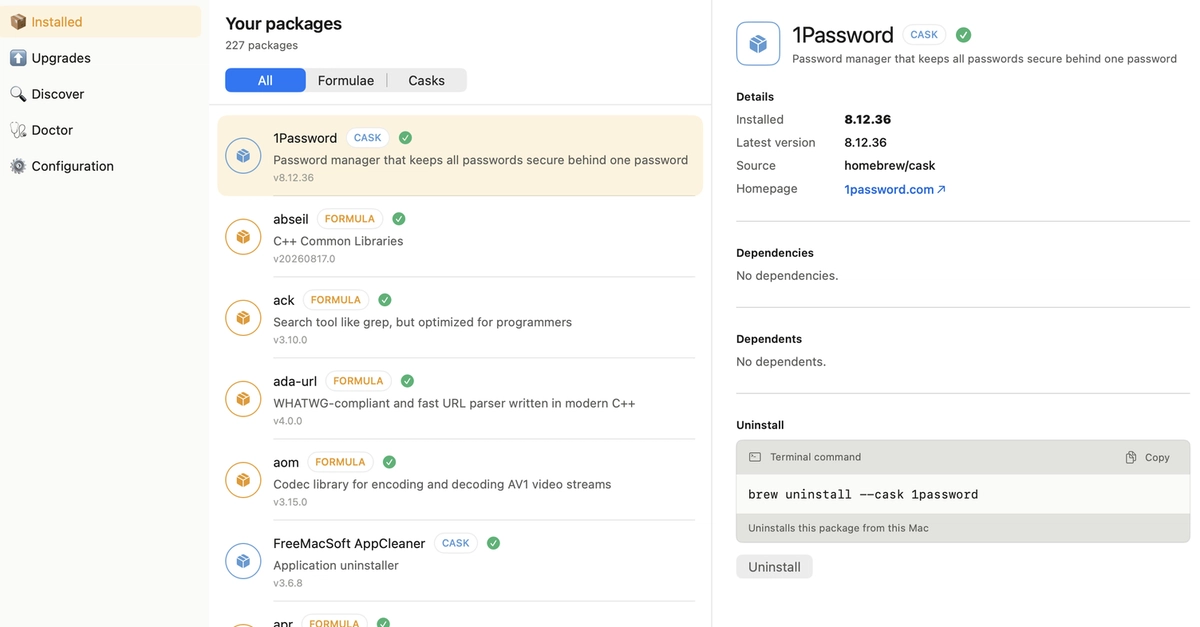
Recognizing this accessibility gap, the Homebrew team is actively developing BrewUI, an official, native macOS application. BrewUI is designed to offer a graphical user interface (GUI) for managing Homebrew packages, aiming to democratize access to this powerful package manager. The project is open-source and its development can be followed on GitHub at github.com/Homebrew/BrewUI.
It's crucial to understand that BrewUI is currently in its nascent stages. The development team explicitly describes the current phase as laying the foundational elements of the application. Therefore, this overview should be viewed as a look into a project under active construction, not a review of a finished product. The core objective is to provide a visual, intuitive way to interact with Homebrew, mirroring the functionality of the CLI but within a familiar graphical paradigm.
Architectural Foundations and Core Concepts
BrewUI is being built with a focus on native macOS integration and developer experience. The underlying architecture leverages modern macOS development frameworks to ensure a responsive and familiar user experience. While specific implementation details are still evolving, the project's direction suggests a commitment to performance and ease of use.
The goal is to translate common Homebrew operations into intuitive GUI actions. This means users will eventually be able to search for packages, view their details, install them, update existing ones, and uninstall unwanted software, all through a point-and-click interface. The underlying Homebrew CLI will still be the engine driving these operations, but BrewUI will act as a user-friendly facade.
The team's approach emphasizes building a solid, extensible foundation. This iterative development process allows for flexibility as they gather feedback and refine the application's features. Early adopters and contributors can observe the project's progress and even participate in its development by exploring the GitHub repository. This transparency is characteristic of the Homebrew community's open-source ethos.
The 'Why' Behind BrewUI
The decision to build an official GUI stems from a clear need within the Homebrew user base. Homebrew itself is a testament to the power of community-driven open-source software, but its reliance on the terminal has inadvertently excluded segments of its potential audience. Homebrew's popularity extends far beyond hardcore developers; it's used by data scientists for installing libraries like Python and R, by designers needing specific tools, and by students learning to code.
For these users, the command line can feel like an alien landscape. Navigating it requires learning specific commands, understanding syntax, and troubleshooting cryptic error messages. BrewUI aims to abstract away this complexity. By providing a visual representation of installed packages, available software, and installation status, it lowers the barrier to entry significantly.
Think of BrewUI less like a direct replacement for the CLI and more like a user-friendly dashboard for your Mac's software ecosystem, powered by Homebrew. It’s for the user who wants to manage their development tools efficiently but prefers not to live in the terminal. The team's commitment to an official, native macOS app signals a desire to provide a polished and well-integrated experience that aligns with the macOS design language.
What's Next for BrewUI?
As BrewUI is in its early development, the immediate focus remains on solidifying the application's core architecture. This involves building out the essential components that will allow for reliable package management through the GUI. Users can expect the feature set to expand gradually as development progresses. The team is taking a measured approach, prioritizing stability and a robust foundation over rapid feature deployment.
The broader implications of BrewUI could be substantial. By making Homebrew more accessible, it has the potential to onboard a new wave of users who might have previously shied away from command-line tools. This could foster a more diverse and inclusive community around Homebrew. For developers, it might offer a convenient alternative for quick package checks or installations when a terminal session isn't readily available or preferred.
What remains to be seen is how effectively BrewUI will handle the more complex aspects of package management, such as managing different versions, handling dependencies that require manual intervention, or dealing with formula conflicts. The success of BrewUI will hinge on its ability to translate these intricate CLI operations into a seamless and understandable GUI experience. The Homebrew team's track record suggests a thoughtful approach, but the proof will be in the user experience as features mature.