Beyond Simple Copy-Paste: Intelligent Clipboard History
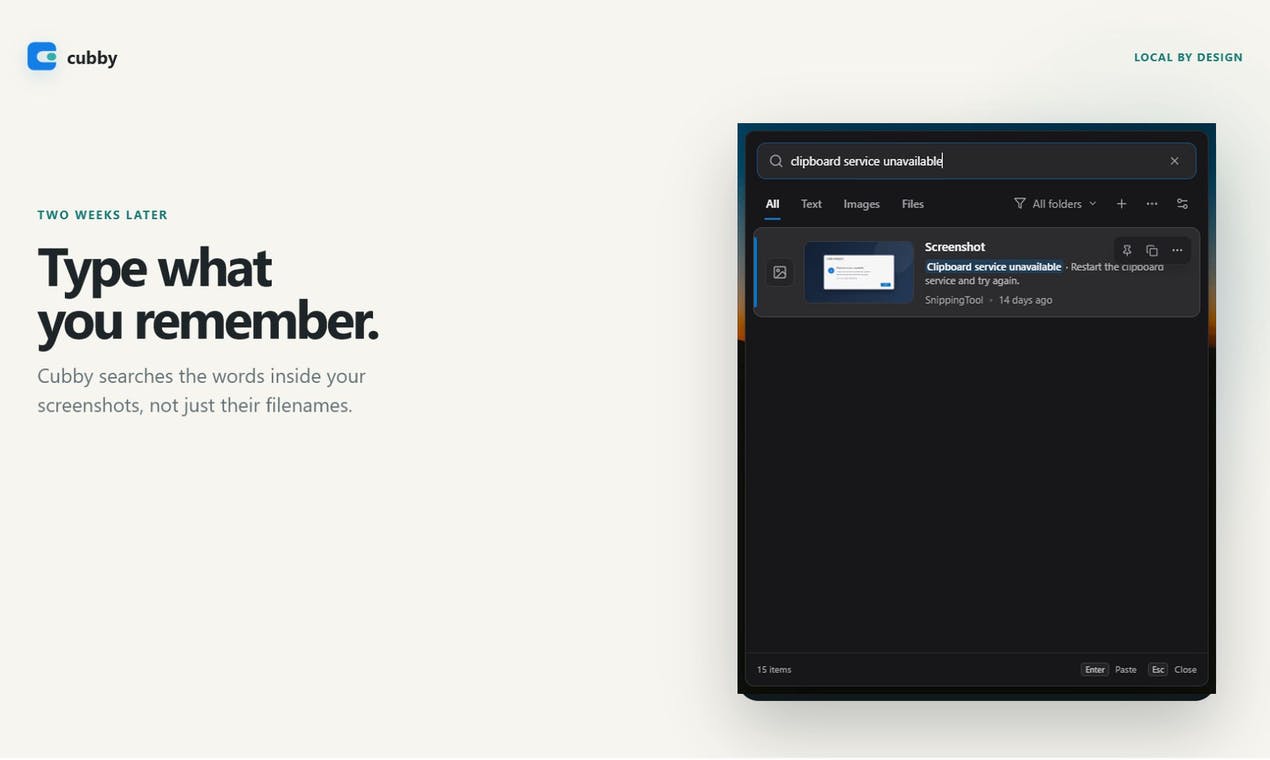
The humble clipboard, a fundamental component of modern operating systems, has long served as a temporary holding space for copied text, images, and files. While Windows has evolved its clipboard to offer history functionality, it remains a largely linear and unsearchable archive. Cubby Clipboard introduces a significant leap forward by enabling users to search the actual content of screenshots stored in their clipboard history, transforming a passive log into an active knowledge base.
For developers, designers, and anyone who frequently captures information visually, the ability to retrieve specific snippets from past screenshots without manually sifting through them represents a substantial productivity gain. This isn't just about remembering what you copied; it's about remembering what was *in* the image you copied.
How Cubby Clipboard Indexes Visual Content
Cubby Clipboard operates as a background utility on Windows. When a user copies content to the clipboard, Cubby captures it. For text, this is straightforward. However, its core innovation lies in its ability to process images, specifically screenshots. The tool employs optical character recognition (OCR) to extract any readable text embedded within screenshots. Beyond text, Cubby Clipboard also utilizes object detection algorithms to identify and index common visual elements present in the images.
This dual indexing approach means that a user could search for a specific error message that appeared in a terminal screenshot from last week, or even find a screenshot containing a particular icon or UI element. The search capabilities are designed to be intuitive, allowing users to type keywords, phrases, or descriptions of objects they remember seeing in a captured image.

Use Cases for Enhanced Clipboard Management
The implications for productivity are immediate and widespread. Consider a developer debugging an application. They might take multiple screenshots of error messages or application states throughout a complex session. With Cubby Clipboard, they can later search for a specific error code or a UI element that was present in one of those screenshots, instantly retrieving the relevant capture without having to recall the exact time or context it was taken.
For designers, this could mean searching for a specific UI component or color palette from a design mockup they previously copied. Support professionals could quickly find screenshots of specific bug reports or user interface states shared by customers. Even casual users might find it invaluable for locating a screenshot of a product they saw online or a piece of text that was part of an image.
Think of it less like a simple history log and more like a personal, searchable visual memory assistant. It bridges the gap between ephemeral visual information captured on screen and persistent, retrievable data.
Technical Underpinnings and Future Potential
The effectiveness of Cubby Clipboard hinges on the accuracy and speed of its OCR and object detection models. While the current iteration focuses on common use cases, the underlying technology has the potential for significant expansion. Future versions could incorporate more sophisticated image analysis, such as identifying specific software interfaces, recognizing handwritten notes within screenshots, or even categorizing images based on their content (e.g., code, diagrams, user interfaces).
The tool’s integration into the Windows ecosystem is seamless, running unobtrusively in the background and presenting search results through a dedicated interface. As AI-powered image analysis continues to advance, utilities like Cubby Clipboard are poised to redefine how users interact with their digital information, moving beyond simple text-based operations to embrace the rich context found within visual data.
What remains to be seen is how effectively Cubby Clipboard scales with extremely large volumes of screenshots and whether its object detection can be trained or customized for highly specialized professional domains, such as medical imaging or engineering schematics. The promise, however, is clear: a smarter, more accessible clipboard that understands the visual content you capture.