The SMTP Tweak: A Double-Edged Sword
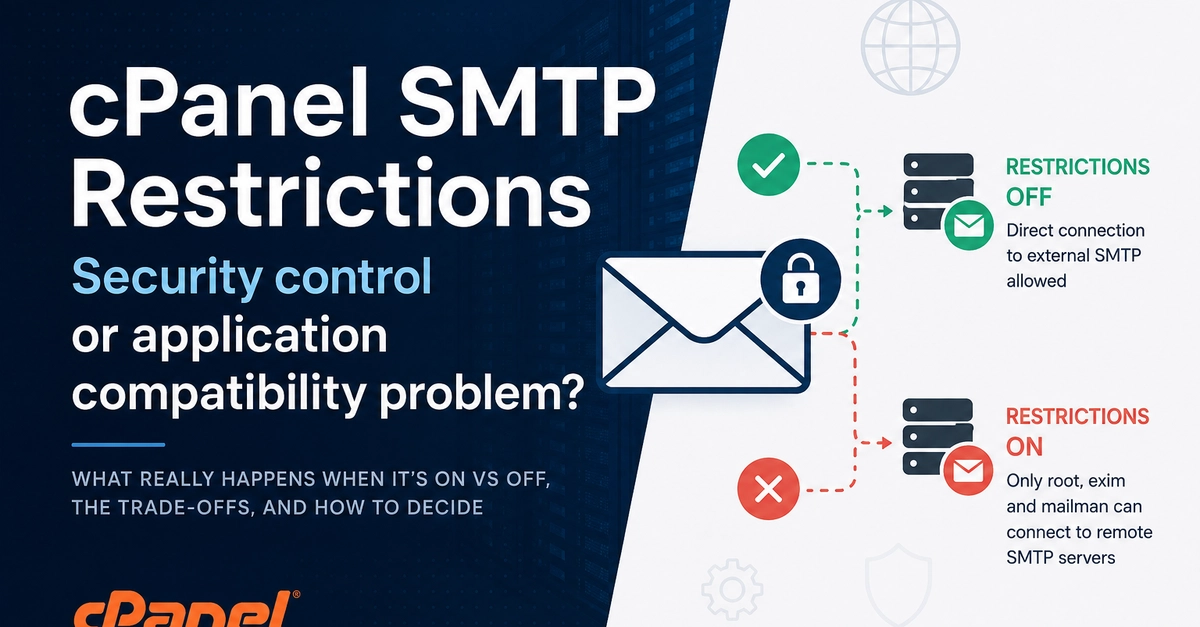
cPanel, a ubiquitous web hosting control panel, offers a setting known as "Restrict outgoing SMTP to root, exim, and mailman." This feature, sometimes referred to as the "SMTP Tweak," appears straightforward: enable or disable. However, its impact ripples through application compatibility, email abuse mitigation, troubleshooting complexity, and the ability for hosted applications to connect to external email services like Microsoft 365 or Gmail.
At its core, the restriction aims to enhance security and control by limiting which system processes can send outgoing mail. By default, or when disabled, cPanel's Exim Mail Transfer Agent (MTA) allows any application or script running on the server to send emails using the server's IP address. This is convenient for many web applications that need to send notifications, password resets, or transactional emails directly.
Enabling the restriction, however, fundamentally changes this behavior. When activated, only specific, system-level processes (root, exim itself, and mailman for mailing lists) are permitted to initiate outgoing SMTP connections. This means that any application or script running under a different user account on the server will be blocked from sending emails directly through the server's configured mail server. This creates a critical trade-off: increased security and reduced risk of IP blacklisting versus potential application failures and complex workarounds.

Security Benefits and Abuse Prevention
The primary driver behind the "Restrict outgoing SMTP" setting is security. When any script on a shared hosting environment can send emails, it opens the door to abuse. A compromised website, a poorly written script, or even malicious code injected into a legitimate application can turn the server into a spam relay. This can lead to the server's IP address being blacklisted by major email providers, rendering all websites hosted on that server unable to deliver emails reliably.
By restricting outgoing SMTP to known, trusted system processes, the likelihood of a compromised application launching a spam campaign is significantly reduced. Exim, the default MTA for cPanel, is a robust and well-maintained mail server. Allowing only Exim to handle outgoing mail, or specific system daemons, means that email sending is channeled through a more controlled and monitored path. This approach helps maintain the server's reputation and ensures that legitimate emails have a better chance of reaching their destination.
This setting acts as a gatekeeper. Instead of a wide-open door where any process can shout emails into the void, it becomes a single, secure exit point managed by the system administrators. For hosting providers, this is invaluable for maintaining the overall health and deliverability of emails from their entire network of servers.
Application Compatibility Challenges
The security benefits come at a cost: application compatibility. Many popular web applications, content management systems (CMS), and custom-built scripts are designed with the assumption that they can initiate direct SMTP connections to send emails. When the "Restrict outgoing SMTP" setting is enabled, these applications will suddenly find themselves unable to send any outbound mail.
This can manifest in various ways:
- Notification failures: Users might stop receiving important notifications, such as new comment alerts, order confirmations, or password reset emails.
- Form submission issues: Contact forms or application submission processes that rely on email notifications may fail silently.
- Cron job errors: Scheduled tasks that send reports or alerts via email will cease to function.
Developers and system administrators often discover this issue only when users report missing emails or when application functionality breaks. Troubleshooting can be complex, as the problem isn't immediately obvious. The application itself might appear to be working correctly, but the email delivery mechanism is silently failing due to the cPanel restriction.
This incompatibility forces a decision: either disable the security feature to restore application functionality or reconfigure the application to use an external SMTP service.
The External SMTP Workaround
When the "Restrict outgoing SMTP" setting is enabled, the most common solution for applications requiring email functionality is to configure them to use an external SMTP service. This involves pointing the application's email settings to a third-party email provider, such as:
- Gmail/Google Workspace
- Microsoft 365
- SendGrid
- Mailgun
- Amazon SES
These services provide dedicated mail servers with high deliverability rates and robust anti-spam measures. The application connects to these external servers using their provided SMTP credentials (host, port, username, password, and encryption method).
This approach decouples the application's email sending from the hosting server's IP address. It offloads the burden of email deliverability to specialized providers. For developers, this often means updating configuration files or database settings within their application to reflect the new SMTP server details.
However, this workaround is not without its own considerations. It requires managing external credentials, potentially incurring costs for higher sending volumes, and ensuring that the application's firewall or server configurations allow outbound connections to the external SMTP server's ports (typically 587 for submission with TLS, or 465 for SMTPS).
Trade-offs and Decision Making
The decision to enable or disable "Restrict outgoing SMTP" is a classic security versus convenience trade-off. There is no single right answer; it depends entirely on the hosting environment, the types of applications being run, and the risk tolerance of the administrator or user.
Enable the restriction if:
- Your primary concern is preventing the hosting server's IP from being blacklisted due to spam originating from compromised applications.
- You are running a secure, well-maintained environment where direct application email sending is not a critical requirement, or all applications are configured for external SMTP.
- You are a hosting provider aiming to protect the reputation of your entire server infrastructure.
Disable the restriction if:
- You have numerous applications that rely on direct SMTP sending and reconfiguring them for external SMTP is impractical or too costly.
- You have robust security measures in place to prevent application compromise and monitor for suspicious outbound email activity.
- The risk of IP blacklisting is deemed acceptable compared to the operational burden of managing external SMTP services for all applications.
Ultimately, understanding this setting is crucial for anyone managing a cPanel server. It's not merely a toggle switch but a configuration choice with tangible impacts on both security posture and application functionality. The choice requires a careful assessment of the specific needs and risks of the hosting environment.