The Friction of Working in a Non-Native Language
For many professionals, English is the lingua franca of business and technology. Yet, for those for whom English is not their first language, this presents a constant, subtle friction. Understanding dense or specialized incoming text takes more cognitive load. Crafting clear, precise outgoing messages requires meticulous self-editing for grammar, phrasing, and tone. The desire to express a complex idea can be far easier verbally than to articulate it perfectly in writing.
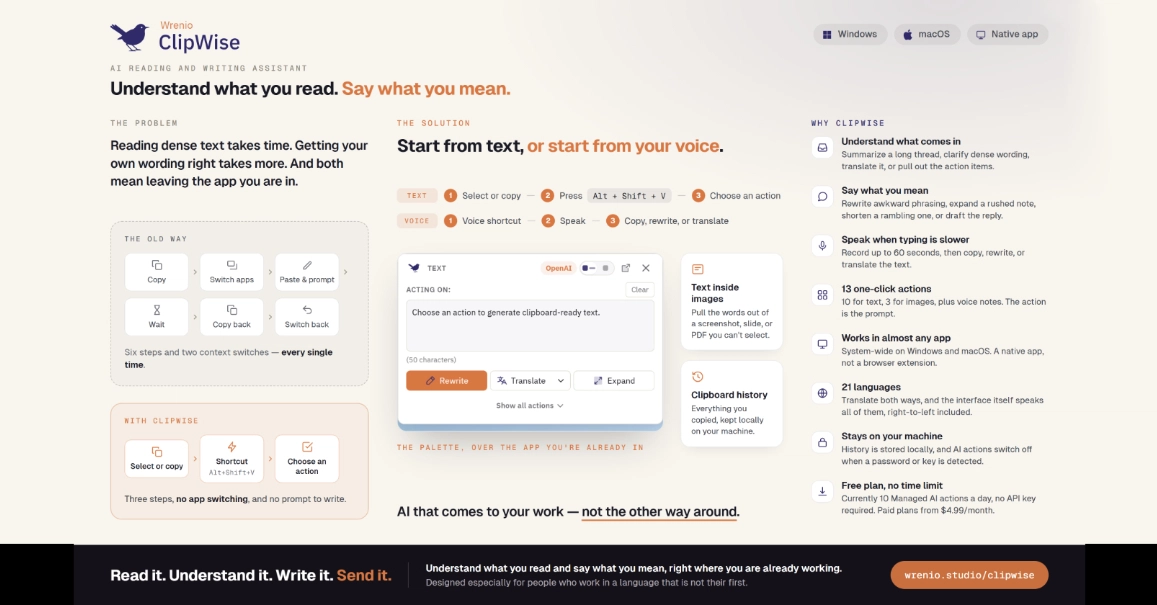
This challenge is deeply personal for many. One founder, working daily in English, found this friction so pervasive that they decided to build a solution. The existing tools — grammar checkers, translation apps, dedicated chatbots for email, OCR utilities for screenshots, speech-to-text software, and clipboard managers — each addressed a piece of the puzzle. However, relying on this stack meant multiple subscriptions, a complex web of keyboard shortcuts, and a workflow dominated by constant switching, prompting, copying, and pasting. This disjointed approach was inefficient and frustrating.
Introducing ClipWise: An Integrated Solution
Recognizing this gap, the founder developed ClipWise, an AI-powered reading and writing assistant designed for Windows and macOS. The core philosophy behind ClipWise is integration. Instead of juggling disparate tools, ClipWise aims to provide a unified experience for overcoming the challenges of working in a non-native language.
ClipWise offers several key functionalities aimed at streamlining communication and comprehension:
- AI Reading Assistant: This feature helps users understand complex or unfamiliar text more quickly. It can simplify sentences, define jargon, and provide contextual explanations, reducing the cognitive burden of comprehension.
- AI Writing Assistant: For outgoing communication, this tool assists with grammar, spelling, phrasing, and tone. It helps ensure messages are clear, professional, and convey the intended meaning accurately.
- OCR for Screenshots: Text often exists outside of directly copyable documents, trapped in images or screenshots. ClipWise includes Optical Character Recognition (OCR) to extract text from these visual formats, making it accessible for editing or analysis.
- Speech-to-Text: For those who find speaking their thoughts easier than typing them, the integrated speech-to-text functionality allows for quick capture of ideas that can then be refined in writing.
- Clipboard Management: A robust clipboard manager is essential for any workflow involving copy-pasting. ClipWise integrates this functionality to keep track of snippets and facilitate easy retrieval.
The goal is to reduce the context-switching and manual effort that comes with using separate tools. By bringing these capabilities under one roof, ClipWise aims to significantly improve productivity and reduce the stress associated with communicating in a second language.
Deliberate Omissions: The Power of Focus
What sets ClipWise apart is not just what it includes, but also what it deliberately excludes. In a market saturated with AI tools promising universal capabilities, ClipWise focuses on its core user problem: the friction of working in a non-native language. This means the tool does not attempt to be a general-purpose chatbot or a content generation engine for creative writing.
The founder explicitly states that ClipWise is not designed for tasks like writing a novel or generating marketing copy from scratch. This focused approach allows the development team to concentrate on refining the features that directly address the pain points of non-native English speakers. By avoiding feature bloat, ClipWise can offer a more polished and effective experience for its intended audience.
This deliberate limitation serves a critical purpose: it ensures that the AI models and user interface are optimized for the specific use cases of comprehension assistance, grammar correction, tone adjustment, and text extraction. It also signals a clear understanding of the user’s workflow and avoids diluting the product’s core value proposition with tangential features. For users who need a specialized assistant for professional communication in English, this focus is a strength, not a weakness.
Target Audience and Future Outlook
ClipWise is positioned as a productivity tool for professionals, students, and anyone who regularly communicates in English but finds it challenging. The desktop application for Windows and macOS suggests a target user who values a dedicated, integrated solution over web-based or mobile-only apps. The emphasis on reducing friction implies a user base that experiences this pain point daily and seeks a reliable, efficient solution.
The market for AI writing and reading assistants is crowded. However, ClipWise carves out a niche by addressing the specific needs of non-native English speakers. Many existing tools are either too general or require significant prompt engineering to achieve nuanced results. ClipWise’s integrated approach and focused feature set could appeal to users overwhelmed by the complexity of current AI offerings.
The success of ClipWise will likely depend on its ability to deliver a demonstrably better workflow than the cobbled-together solutions users currently employ. Its deliberate focus on a specific user pain point, rather than attempting to be all things to all people, positions it as a potentially powerful tool for a significant segment of the global workforce.