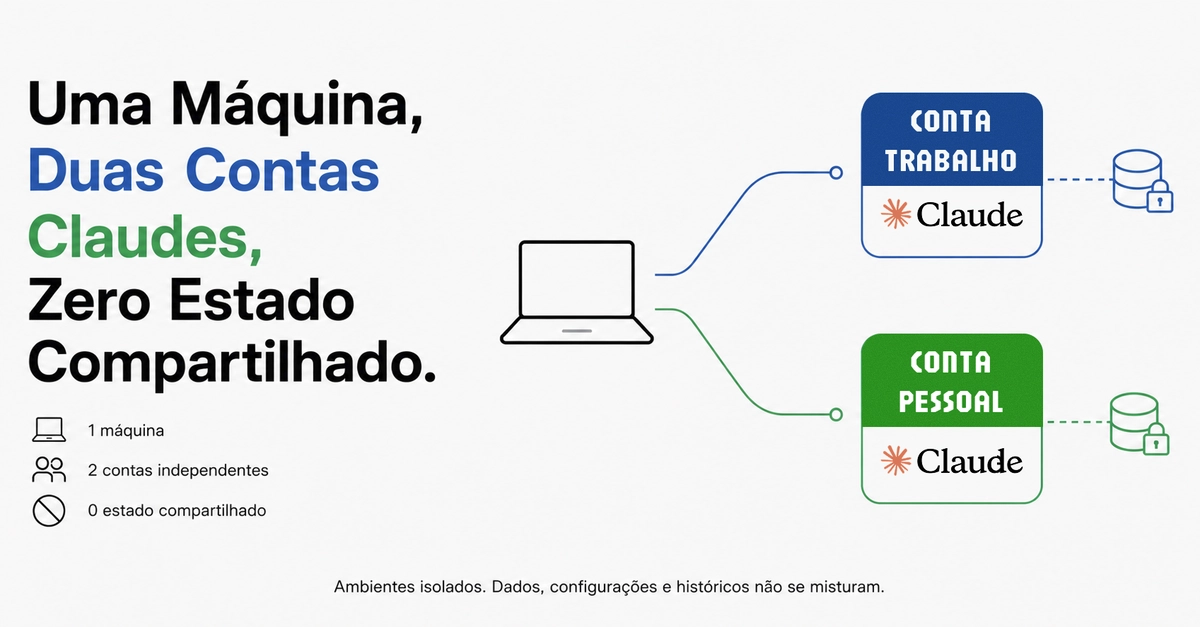
The Rationale for Separate Claude Code Accounts
In the rapidly evolving landscape of AI-powered development tools, managing multiple instances of powerful assistants like Claude Code presents a unique challenge. While some developers advocate for consolidating all functionalities into a single, unified setup, a strong counter-argument emerges for maintaining distinct, isolated environments for work and personal use. This approach, prioritizing separation over sharing, is crucial for safeguarding sensitive project data, maintaining workflow focus, and preventing the cross-contamination of personal and professional contexts.
The core of this strategy lies in Claude Code's configuration management. By default, Claude Code stores its configuration, including server information, skills, and hooks, within a specific directory, typically ~/.claude. This directory acts as the central hub for all operational data. The tool respects the CLAUDE_CONFIG_DIR environment variable, allowing users to specify an alternative location for this configuration. This flexibility is the key enabler for running multiple, independent Claude Code instances on a single machine.
Consider the alternative: a single setup where personal and work-related projects intertwine. This scenario poses significant risks. Imagine a personal coding session accidentally accessing or exposing proprietary work code, server configurations, or sensitive project history. The implications for intellectual property, client confidentiality, and professional reputation could be severe. Furthermore, the cognitive load of switching between vastly different project contexts within the same tool can lead to reduced productivity and increased errors. Distinguishing between a personal project exploring a new language feature and a critical work task requiring precise adherence to company standards becomes blurred, diminishing the effectiveness of the AI assistant.
The choice to maintain separate accounts is not about redundancy; it's about deliberate isolation. This is akin to having separate physical workspaces for different types of activities – a quiet library for focused research and a bustling workshop for hands-on creation. Each space is optimized for its purpose, minimizing distractions and preventing interference. Similarly, separate Claude Code configurations ensure that work-related AI interactions remain confined to a professional context, free from the influence or potential leakage of personal projects, and vice-versa.
Setting Up Isolated Claude Code Instances
Implementing this separation requires a systematic approach to managing the CLAUDE_CONFIG_DIR environment variable for each instance. The process involves creating distinct directories for each Claude Code setup and ensuring that the correct directory is active when launching the tool.
For a work-focused instance, one might create a directory like ~/claude_work. This directory would house all configurations related to professional projects. When launching Claude Code for work, the command would be prefixed with the environment variable:
CLAUDE_CONFIG_DIR=~/claude_work claude-codeThis command ensures that Claude Code reads and writes its configuration, including any custom skills or server connections pertinent to the job, exclusively within the ~/claude_work directory. This prevents any work-related data from spilling into the default user configuration.
Conversely, a personal instance would utilize the default configuration directory or another dedicated path. If a separate directory is preferred for personal use, for example, ~/claude_personal, the launch command would be:
CLAUDE_CONFIG_DIR=~/claude_personal claude-codeIf the default ~/.claude is sufficient for personal use, no explicit environment variable is needed, as Claude Code will fall back to its default location:
claude-codeThis simple mechanism ensures that each instance operates with its own isolated set of preferences, history, and integrations. The AI assistant's learning and context for work tasks will not be influenced by personal coding experiments, and vice-versa.
Managing Multiple Instances and Workflows
The practical application of this setup extends to daily workflows. Developers can create simple shell scripts or aliases to quickly switch between their work and personal Claude Code environments. For instance, a script named claude-work could contain the command CLAUDE_CONFIG_DIR=~/claude_work claude-code, and a script named claude-personal could contain CLAUDE_CONFIG_DIR=~/claude_personal claude-code. These scripts can be placed in the system's PATH for easy access from any terminal location.
The "So What?" Perspective
Developers can now run isolated Claude Code instances for work and personal projects by leveraging the CLAUDE_CONFIG_DIR environment variable. This prevents cross-contamination of sensitive project data and configurations. Consider creating shell scripts or aliases to easily switch between your dedicated work and personal Claude Code environments, ensuring a cleaner, more focused development workflow.
Maintaining separate configurations for work and personal Claude Code accounts significantly reduces the risk of accidental data leakage. Sensitive work-related server configurations, API keys, and project history remain isolated from personal sessions, bolstering the security posture of professional projects and adhering to potential company data handling policies.
Founders and team leads should consider this setup for their development teams to enforce data segregation and maintain professional focus. It offers a straightforward, low-overhead method to prevent intellectual property leaks and ensure that AI assistant usage aligns with company policies. This approach supports a more controlled and secure integration of AI tools into the development lifecycle.
For creators using Claude Code across diverse projects, maintaining separate instances ensures that personal creative explorations do not interfere with or expose data from professional client work. This isolation allows for distinct AI personas and contexts, enabling tailored assistance for each type of creative endeavor without risk of data bleed or cognitive dissonance.
This separation ensures that the data Claude Code learns from in a work context remains distinct from personal usage data. For teams, this means more reliable and contextually appropriate AI assistance for specific tasks, as the model's learned behaviors and historical interactions are not conflated. This finer-grained control over AI context can lead to more precise and efficient code generation and problem-solving.
Sources synthesised
- 4% Match