Streamlining Video Creation for Developers
The bottleneck in creating short product demos or visual explanations for README files is often the workflow, not the idea. Developers typically have to leave their terminal, switch to a separate video editing tool, and translate a coding task into a complex video production process. This friction slows down content creation and integration.
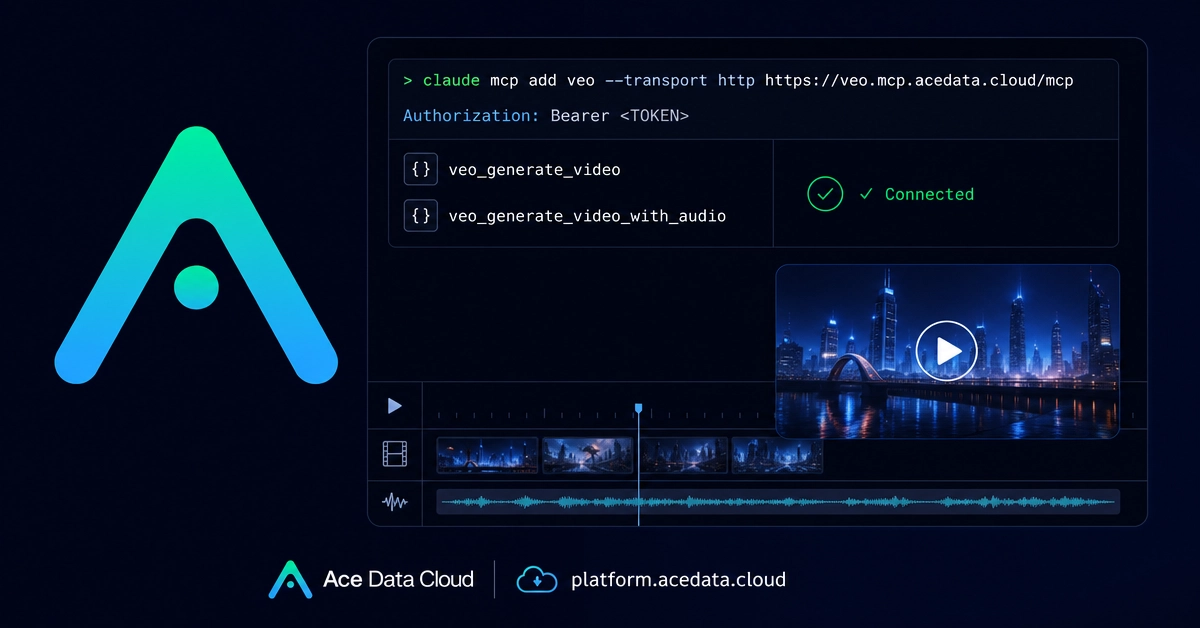
A new integration aims to eliminate this friction by connecting Claude Code, an AI coding assistant, with Veo MCP, a server for AI video generation. This setup allows developers to generate high-definition AI videos using natural language commands directly from their terminal, keeping them within their project workspace. The workflow is inspired by the Ace Data Cloud documentation for Claude Code and Veo MCP.
Veo itself is described as an AI video generation model developed by Google, capable of producing 1080p output with accompanying audio. However, the true innovation for developers lies not just in the model's capabilities but in the Model Composition Protocol (MCP) layer. This layer enables Claude Code to directly invoke video generation tools during a coding session, treating video creation as another callable function within a development context.
Unlocking Veo's Capabilities via Claude Code
Once the Veo MCP server is connected and configured, Claude Code gains access to two primary tools for video generation:
veo_generate_video: This is the core function for creating AI-powered videos. Developers can specify parameters such as the desired video content, style, duration, and resolution. The tool leverages the underlying Veo model to render these specifications into a video file.veo_generate_video_with_audio: An extension of the primary tool, this function allows for the generation of videos that include synchronized audio. This is crucial for explanatory videos, demos, or any content where spoken narration or sound effects enhance the message.
The integration essentially abstracts the complexities of video editing software and AI model APIs into simple, callable functions within Claude Code. Developers can describe the video they need in plain language, and Claude Code, by understanding the request and knowing how to interact with the Veo MCP server, translates this into a video output. This could range from generating a quick animated GIF for a commit message to a polished 1080p explanation of a new feature for a project's documentation.
Technical Underpinnings and Setup
The integration relies on the Model Composition Protocol (MCP), which acts as an intermediary layer. MCP enables different AI models and tools to communicate and be orchestrated. In this scenario, Claude Code, acting as the orchestrator, calls the Veo MCP server. The server then interfaces with the Veo video generation model to produce the desired output.
Setting up this integration typically involves several steps:
- Deploying or Accessing Veo MCP Server: Developers need access to a running instance of the Veo MCP server. This might involve deploying it themselves or using a managed service if available. The server exposes API endpoints that Claude Code can communicate with.
- Configuring Claude Code Tools: Within Claude Code's environment, specific tools or functions need to be defined that map to the Veo MCP API endpoints. This involves specifying the exact function names (like
veo_generate_video) and their expected parameters. - Authentication and Authorization: Securely connecting Claude Code to the Veo MCP server requires proper authentication. This could involve API keys, tokens, or other security mechanisms to ensure only authorized calls are processed.
- Crafting Prompts: Developers then interact with Claude Code by writing prompts that describe the video they want. The AI assistant interprets these prompts, identifies the relevant Veo tool, and constructs the necessary API calls with the appropriate arguments.
The efficiency gain comes from consolidating the entire process within a single interface. Instead of context-switching, developers can iterate on video content as rapidly as they iterate on code. For instance, after pushing a code change, a developer could immediately prompt Claude Code to generate a short video demonstrating the new functionality, and have it ready to embed in the pull request or documentation within minutes.
Implications for Developers and Content Creators
This integration represents a significant step towards a more integrated and efficient developer workflow. For individual developers and small teams, it lowers the barrier to entry for creating professional-looking video content. The ability to generate HD videos from the terminal means that creating demos, tutorials, or explanatory visuals becomes a standard part of the development process, akin to writing code or running tests.
For larger organizations, it offers a standardized way to produce consistent visual assets for product launches, marketing materials, and internal training. By defining templates or common prompts, teams can ensure brand consistency and quality across all generated videos. The MCP layer's extensibility also hints at future possibilities where Claude Code could orchestrate a chain of AI models, not just for video, but for other complex media generation tasks.
The surprising detail here is not the existence of AI video generation, which is rapidly advancing, but the seamless integration into a developer's primary work environment – the terminal. It treats video creation as a development task, not a separate creative discipline requiring specialized tools and expertise. This shift could fundamentally change how technical documentation and product demonstrations are created and consumed, making them more dynamic and accessible.
Future Possibilities and Unanswered Questions
While this integration is a powerful step, it raises further questions. What happens to the vast libraries of existing video assets and the skills required to edit them? Will AI-generated videos eventually replace traditional video production workflows entirely, or will they serve as a complementary tool for rapid prototyping and initial drafts? Furthermore, as these models become more sophisticated, the line between human-generated and AI-generated content will continue to blur, presenting new challenges for authenticity and intellectual property.
The development of such integrated AI workflows is likely to accelerate. We can anticipate Claude Code and similar assistants becoming capable of orchestrating more complex multi-modal AI tasks, further blurring the lines between coding, content creation, and workflow automation.