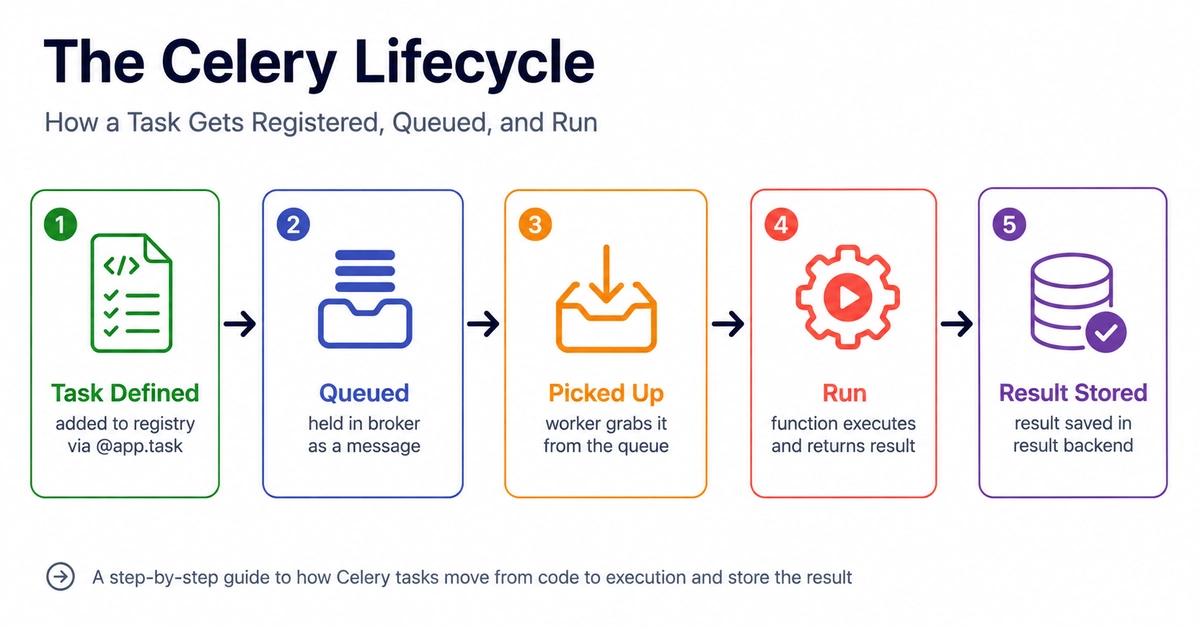
Celery is a powerful distributed task queue system that enables developers to run background jobs asynchronously. This is crucial for applications that need to perform operations like sending emails, processing payments, or generating reports without blocking the main application thread, ensuring a responsive user experience. Understanding Celery's lifecycle—how tasks are registered, queued, and executed—is fundamental to effectively leveraging its capabilities and troubleshooting potential issues.
The Core Components of Celery
At its heart, Celery orchestrates tasks through several key components:
- The Producer (Client): This is your application code. When you need to perform a background task, your application acts as the producer, creating a task message.
- The Broker: This is the intermediary message queue. It stores the task messages sent by the producer and makes them available to the workers. Common brokers include RabbitMQ, Redis, and Amazon SQS. The broker ensures tasks are reliably delivered to workers.
- The Worker: These are the processes that execute the actual tasks. A worker constantly monitors the broker for new tasks. When a task arrives, the worker picks it up, processes it, and reports its status.
- The Result Backend: This is an optional component that stores the results of executed tasks. This allows producers or other parts of the application to check the status of a task and retrieve its return value. Common result backends include databases, Redis, and Memcached.
Think of Celery like a restaurant kitchen. Your application (the waiter) takes an order (a task) from a customer. Instead of preparing the meal itself, the waiter places the order on a kitchen order rail (the broker). A cook (the worker) then picks up the order from the rail and prepares the meal. Once ready, the meal can be picked up from a counter (the result backend) where anyone can check its status.
Task Registration and Definition
Before a task can be executed, it must be defined and registered within your Celery application. This involves writing Python functions that will perform the desired background work. These functions are then decorated with the @app.task decorator provided by Celery. This decorator transforms a regular Python function into a Celery task, making it callable asynchronously.
When you define a task, Celery essentially creates a proxy object. Calling this proxy object does not execute the function directly. Instead, it serializes the function name and its arguments into a message and sends this message to the broker. The actual function execution is deferred to a worker process.
For example:
from celery import Celery

app = Celery('tasks', broker='redis://localhost:6379/0')

@app.task
def add(x, y):
    return x + y
In this snippet, the add function is registered as a Celery task. When add.delay(4, 4) is called, it doesn't compute 8 immediately. Instead, it creates a task message like {'task': 'tasks.add', 'args': [4, 4], ...} and sends it to the Redis broker.
Task Queuing and Broker Interaction
Once a task is created by the producer, it is sent to the broker. The broker's primary role is to act as a reliable message queue. Producers send task messages to specific queues, and workers consume tasks from these queues.
Celery supports various routing mechanisms. By default, tasks are sent to a default queue. However, you can configure Celery to use different queues for different types of tasks. This allows for better workload management and prioritization. For instance, high-priority tasks can be sent to a dedicated queue that workers monitor more aggressively.
The broker ensures that tasks are stored durably (depending on the broker's configuration and capabilities) until a worker is ready to process them. This decoupling is what makes Celery resilient to temporary worker downtime. If a worker goes offline, tasks remain in the broker and can be picked up once the worker comes back online or by another available worker.
Task Execution by Workers
Celery workers are long-running processes that continuously poll the configured queues in the broker for new tasks. When a worker detects a new task message:
- Consumes the message: The worker retrieves the task message from the queue. This is typically done in an atomic operation to prevent other workers from picking up the same task.
- Deserializes the task: The worker unpacks the message, extracting the task name and arguments.
- Executes the task: The worker calls the corresponding Python function with the provided arguments. This is where the actual background processing happens.
- Reports the status: After execution, the worker updates the task's status (e.g., SUCCESS, FAILURE) and, if a result backend is configured, stores the return value or any exceptions raised.
Workers can be configured to run multiple concurrent processes or threads to handle multiple tasks simultaneously, significantly increasing throughput. The concurrency model (e.g., prefork, eventlet, gevent) can be chosen based on the nature of the tasks being processed.
If a task fails during execution (e.g., due to an unhandled exception), the worker will mark the task as failed. Celery provides mechanisms for retrying failed tasks, either immediately or after a delay, which is essential for handling transient errors or network issues.
Result Handling and Monitoring
The result backend plays a critical role in making task execution visible and actionable. Once a worker completes a task, it sends the result (or failure status and exception) to the result backend. This allows other parts of your application, or even external monitoring tools, to query the status of any given task using its unique task ID.
This capability is invaluable for several reasons:
- Status Tracking: You can check if a task is pending, running, succeeded, or failed.
- Retrieving Results: If a task returns a value, you can fetch it from the backend. This is useful for tasks that generate data needed by the main application.
- Debugging: Examining the exception details stored in the result backend is crucial for diagnosing task failures.
Celery also offers tools like Flower, a real-time web-based monitor for Celery clusters. Flower provides insights into worker status, task execution rates, and task history, making it easier to manage and observe your distributed task system.
The Unanswered Question: Scalability Bottlenecks
While Celery provides a robust framework for distributed task processing, a critical question remains for high-throughput applications: what are the most common and hardest-to-diagnose scalability bottlenecks in large-scale Celery deployments? Is it the broker's capacity under extreme load, the efficiency of worker deserialization, or perhaps the overhead of result backend writes impacting task completion times? Pinpointing these subtle limits often requires deep profiling and understanding of the specific workload and infrastructure.