Why Paper Trading?
Deploying a real-money trading bot is a high-stakes environment to discover fundamental flaws in your logic. Issues with signal generation, order book management, or even basic position accounting can lead to significant financial losses. A paper trading bot offers a crucial safety net. It allows you to consume live market data, test your signal generation algorithms, simulate order execution and fills, and rigorously measure hypothetical performance. This simulated environment is essential before committing real capital.
The key distinction of effective paper trading lies in its fidelity to the execution layer. It should simulate how orders would actually be placed and filled in the live market, not invent market conditions. Polymarket provides public market data access and a real-time WebSocket channel for order book and price updates, making it an ideal platform for this type of simulation.
This article outlines the architecture and Python code necessary to build such a paper trading bot on Polymarket.
Architecture Overview
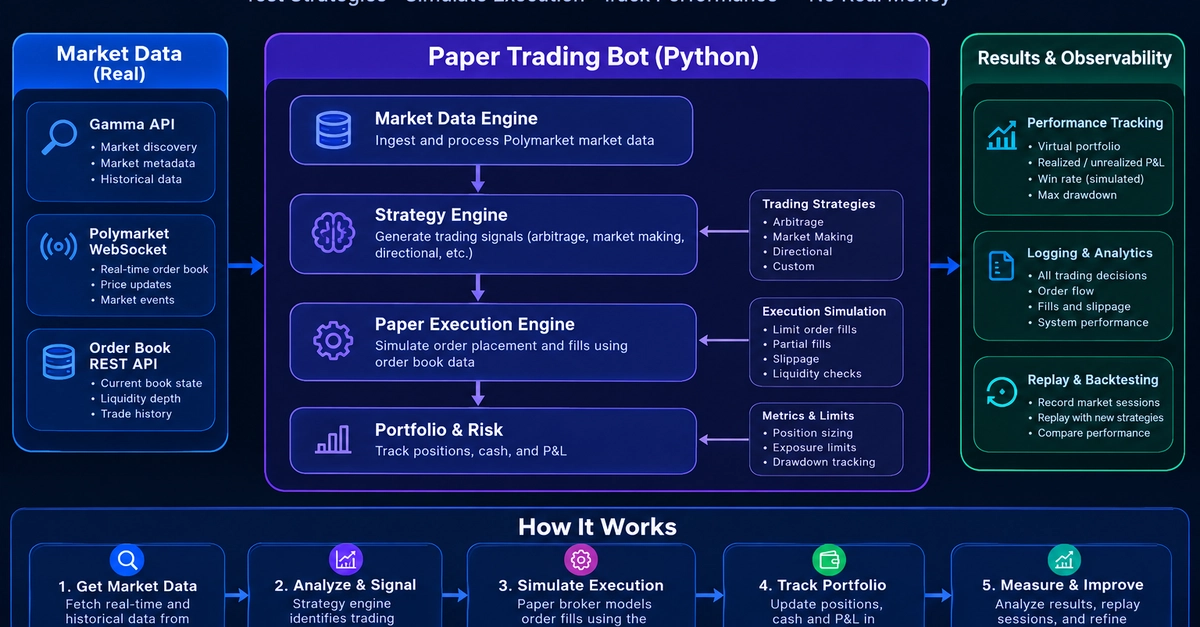
The core components of a Polymarket paper trading bot include:
- Market Data Connector: Connects to Polymarket's public WebSocket API to receive real-time market data, including order book updates and trades.
- Market Discovery Module: Utilizes Polymarket's public REST API to discover available markets and their details (e.g., current prices, liquidity, contract information).
- Signal Generator: Implements your trading strategy logic. This module takes market data as input and generates buy/sell signals based on predefined criteria.
- Order Simulator: Mimics the order placement and execution process. It takes signals and simulates placing orders (limit, market) into the order book, calculating hypothetical fills based on current liquidity and price.
- Position Manager: Tracks simulated positions, P&L, and account balances. It accounts for simulated fills from the Order Simulator and updates the hypothetical portfolio.
- Performance Tracker: Logs all simulated trades, fills, and P&L over time to provide performance metrics.
- Configuration Manager: Handles API keys (even for public access, good practice), strategy parameters, and simulation settings.
Building the Market Data Connector
The first step is establishing a connection to Polymarket's real-time data feed. This involves using a WebSocket client library in Python, such as websockets or websocket-client.
You'll need to subscribe to the relevant market data channels. Polymarket's public WebSocket API provides access to order book snapshots and real-time updates. The structure of these messages will dictate how your connector parses and processes incoming data. It's crucial to handle connection drops and reconnections gracefully, ensuring continuous data flow.
For example, a simplified subscription might look like this:
import websockets
import asyncio
import json

async def connect_polymarket_ws():
    uri = "wss://api.polymarket.io/v1/markets/stream"
    async with websockets.connect(uri) as websocket:
        # Example: Subscribe to a specific market's order book updates
        subscribe_message = {
            "op": "subscribe",
            "args": ["order_book:0xabc123..."]
        }
        await websocket.send(json.dumps(subscribe_message))

        while True:
            message = await websocket.recv()
            data = json.loads(message)
            print(f"Received: {data}")
            # Process incoming data here (e.g., update order book)

# asyncio.run(connect_polymarket_ws())
Discovering Markets with the Public API
Before you can trade, you need to know what markets are available. Polymarket's REST API allows you to query for active markets. You can filter by status, sort by liquidity, and retrieve detailed contract information. This module is essential for identifying trading opportunities.
A typical request might involve fetching a list of all markets, then filtering them based on criteria like trading volume, last traded price, or even specific keywords in the market description.
Consider this Python snippet using the requests library:
import requests

def discover_markets():
    url = "https://api.polymarket.io/v1/markets"
    params = {
        "limit": 100,
        "offset": 0,
        "status": "active"
    }
    try:
        response = requests.get(url, params=params)
        response.raise_for_status() # Raise an exception for bad status codes
        markets = response.json()
        # Process and filter markets here
        for market in markets['markets']:
            print(f"Market: {market['title']}, ID: {market['id']}")
        return markets['markets']
    except requests.exceptions.RequestException as e:
        print(f"Error discovering markets: {e}")
        return []

# discover_markets()
Simulating Orders and Fills
This is where the paper trading aspect truly comes to life. When your signal generator produces a buy or sell signal, the order simulator must determine how that order would realistically execute. This requires understanding the current state of the order book.
For a buy order, the simulator checks the lowest ask prices. If the order is a market buy, it will fill against the available asks until the order quantity is met. For a limit buy, it will only fill at or below the specified limit price. The simulation needs to account for partial fills and the impact of your simulated order on the order book itself (i.e., if your limit order becomes the new best bid/ask).
Similarly, for a sell order, it checks the highest bid prices. A market sell consumes the best bids, while a limit sell only executes at or above the specified price.
The complexity here can vary. A basic simulation might just use the current best bid/ask. A more advanced simulation would consider the depth of the order book, slippage, and even trading fees. The simulated fill price and quantity are then reported to the Position Manager.
Position Management and Performance Tracking
The Position Manager is the bot's ledger. It receives confirmed simulated fills from the Order Simulator and updates the hypothetical account state. This includes tracking:
- Current holdings (quantity and average entry price for each asset)
- Unrealized P&L
- Realized P&L (from closed positions)
- Available capital
The Performance Tracker logs every significant event: signals generated, simulated orders placed, partial or full fills, and position updates. This data is crucial for backtesting and evaluating the trading strategy's effectiveness. Metrics to track include:
- Total return
- Sharpe ratio
- Maximum drawdown
- Win rate
- Average win/loss
This historical data, generated purely from simulated trades, provides invaluable insights into whether a strategy is viable before risking real funds.
Conclusion: A Safer Path to Live Trading
Building a paper trading bot on Polymarket offers a robust engineering environment. It allows developers and traders to refine their strategies, test their execution logic, and gain confidence in their bot's performance using real market data without the immediate financial risk. The architecture described provides a solid foundation for developing sophisticated trading bots, ensuring that when you are ready to go live, your system has already been thoroughly vetted in a simulated, yet realistic, market environment.