The Temptation of Proximity
Many Spring Boot services accumulate scheduled jobs. These might be nightly reconciliations, report generation, or data exports to partner systems. The initial impulse is to place these tasks within the main application. This approach offers undeniable advantages: a single artifact, a unified deployment process, and a consolidated CI/CD pipeline. For many teams, this simplicity is the primary driver, keeping the domain code and its associated background tasks in one place. However, this convenience has a shelf life. As applications grow and workloads diversify, the shared environment can become a liability, impacting performance and stability.
The Memory Footprint Mismatch
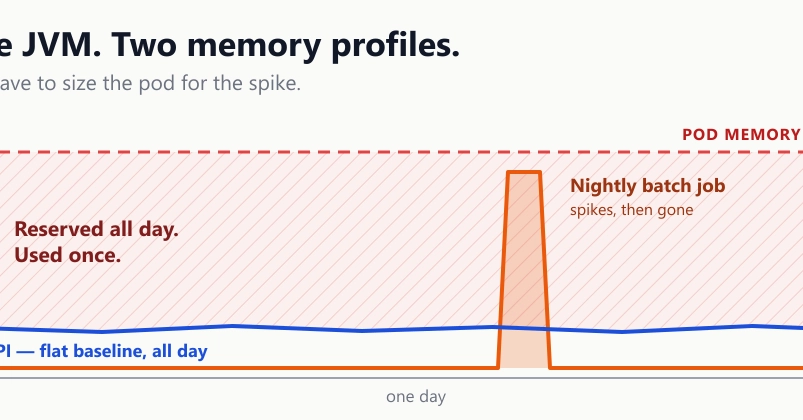
A critical factor in deciding where to host batch jobs is their memory consumption profile. Typically, a web API or service maintains a relatively stable memory footprint throughout the day. Its heap is warm, connection pools are active, and caches are populated. While memory usage might fluctuate with traffic, it generally remains within a predictable range.
Batch jobs, on the other hand, exhibit a drastically different pattern. For the vast majority of the day, they consume negligible resources. Then, during their scheduled execution window, they can spike dramatically, consuming significant memory and CPU. This peaks and troughs pattern is fundamentally at odds with the steady-state requirements of a user-facing application. When these two workloads share the same memory space, the batch job's peak demand can starve the API of resources, leading to slowdowns, timeouts, and outright failures for users. Imagine trying to run a marathon on a treadmill already maxed out by someone doing a HIIT workout – the treadmill (your server's memory) simply can't handle both simultaneously without severe performance degradation.
CPU Contention and Resource Starvation
Beyond memory, CPU contention is another significant issue. A batch job might require sustained, heavy CPU cycles to process large datasets, perform complex calculations, or orchestrate multiple external API calls. If this job runs within the same process as your API, it can monopolize the CPU cores, leaving insufficient processing power for incoming user requests. This leads to increased latency for your application's primary function. Users experience sluggish responses, and critical operations may fail to complete within acceptable timeframes. The batch job, intended for background processing, inadvertently hijacks the foreground application's resources.
Operational Complexity and Deployment Risks
While initially appealing for its simplicity, co-locating batch jobs can introduce subtle operational complexities. Deploying a new version of the application now carries a dual risk: not only could it break the API functionality, but it could also disrupt or fail the batch job. Rollbacks become more complicated, requiring careful coordination to ensure both aspects of the application are restored correctly. Furthermore, monitoring becomes more challenging. Distinguishing between performance issues caused by API traffic surges and those caused by a runaway batch job requires sophisticated instrumentation. This lack of clear separation can obscure the root cause of problems, making troubleshooting a tedious and error-prone process.
When to Consider Decoupling
The decision to decouple a batch job hinges on several factors:
- Resource Intensity: If your batch job consumes significant CPU or memory, especially during peak hours or if its usage is unpredictable, it's a strong candidate for decoupling.
- Execution Duration: Jobs that run for extended periods (tens of minutes to hours) are prime candidates. Long-running processes tie up resources that could otherwise serve user requests.
- Frequency and Scheduling: While daily jobs are common, more frequent or critical batch processes that demand guaranteed execution without impacting the main application should be separate.
- Dependencies: If the batch job requires specific libraries or configurations that differ from the main application, or if it needs to scale independently, separation is beneficial.
- Team Structure and Ownership: Sometimes, different teams own the core application and the batch processing logic. Decoupling aligns with distinct ownership models.
Decoupling Strategies
Several architectural patterns facilitate decoupling batch jobs:
- Separate Service: Deploy the batch job as its own microservice. This service can be independently scaled, deployed, and monitored. It can be triggered via a scheduler (like cron or a managed service) and communicate with the main application or other services via APIs or message queues.
- Dedicated Worker/Queue System: Utilize a message queue (e.g., RabbitMQ, Kafka, SQS) and a pool of dedicated worker processes. The main application places tasks onto the queue, and the separate worker processes pick them up and execute them. This provides excellent scalability and resilience.
- Serverless Functions: For jobs that are event-driven or have highly variable execution times, serverless functions (e.g., AWS Lambda, Azure Functions) can be an efficient solution. They automatically scale and you only pay for the compute time consumed.
The Trade-offs of Separation
Decoupling is not without its own set of challenges. It introduces additional infrastructure to manage, potentially more complex deployment pipelines, and the need for robust inter-service communication. Debugging distributed systems can be more intricate than debugging a monolithic application. However, these complexities are often a necessary trade-off for improved performance, stability, and independent scalability of critical background processes. The key is to evaluate the long-term impact on your application's health and your team's operational burden.
Ultimately, the decision rests on a careful analysis of your batch job's characteristics and your application's operational requirements. While the allure of a single, simple deployment is strong, understanding the resource implications and potential for performance degradation is crucial for maintaining a healthy, scalable, and reliable system.