Automating Mac File Organization with AutoShelf 2.0
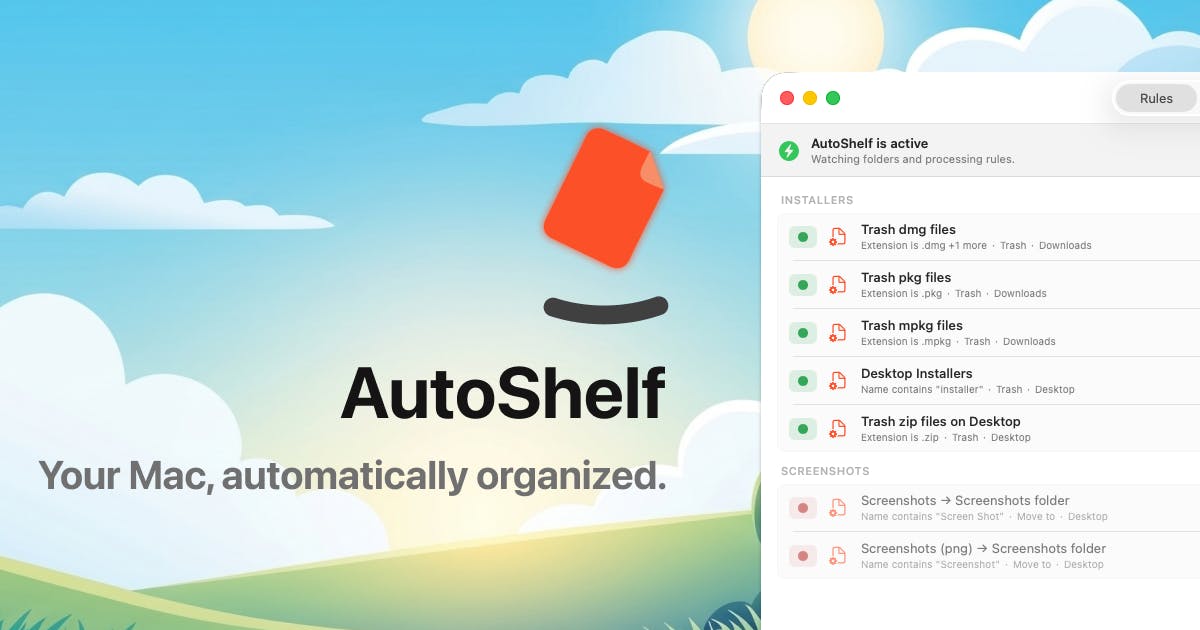
Managing digital clutter on macOS has long been a challenge for users who accumulate vast numbers of files across their desktops, downloads folders, and various project directories. AutoShelf 2.0, the latest iteration of a utility designed to tackle this problem, aims to provide a more automated and intelligent solution for file organization. Launched on Product Hunt, this update promises enhanced capabilities for Mac users seeking to streamline their digital workspaces.
At its core, AutoShelf is built around the principle of automatic file sorting. Users define rules and categories, and the application then moves files into designated folders based on these criteria. This can be based on file type, creation date, modification date, or custom metadata. The goal is to transform chaotic download folders and cluttered desktops into neatly organized archives, saving users time and reducing the mental overhead associated with searching for misplaced documents.
The previous version of AutoShelf laid the groundwork for this functionality, offering a graphical user interface (GUI) that made it accessible to a broad range of users. With AutoShelf 2.0, the developers have expanded its reach and power, particularly for those who prefer or require more advanced control over their system. The inclusion of support for the macOS Menu Command Palette (MCP) and a Command Line Interface (CLI) are the standout additions in this release.
Enhanced Control with MCP and CLI Support
For users familiar with productivity tools like Alfred or Raycast, the integration with MCP will be a welcome feature. This allows AutoShelf commands to be triggered directly from the system's spotlight-like search interface, enabling quick access to sorting functions or rule management without needing to open the main application window. This level of integration is crucial for power users who aim to keep their hands on the keyboard and minimize context switching. It transforms file management from a chore into a swift, integrated action.
The addition of a Command Line Interface (CLI) is perhaps the most significant advancement for technical users. A CLI opens up a world of possibilities for automation and integration with other scripts or workflows. Developers, system administrators, and advanced users can now incorporate AutoShelf's sorting logic into shell scripts, cron jobs, or even CI/CD pipelines. Imagine a script that automatically downloads reports, and then immediately passes them to AutoShelf via the CLI to be sorted into the correct project folders. This moves AutoShelf from a standalone utility to a programmable component within a larger automated ecosystem.
The CLI support means users can execute commands like `autoshelf sort --rule 'images' --path '/Users/user/Downloads'` directly from their terminal. This level of programmatic control allows for sophisticated automation scenarios that were previously impossible. For instance, a developer could set up a system where new code snippets are automatically saved to a temporary directory, and then a nightly script runs AutoShelf to categorize them by programming language and project, ensuring that research and development notes are always readily accessible and organized.
What This Means for Mac Users
AutoShelf 2.0 addresses a common pain point for Mac users: the ever-growing, unmanageable collection of digital files. By offering both a user-friendly GUI and powerful CLI/MCP integrations, the tool caters to a wider audience, from casual users seeking basic automation to advanced users who demand deep customization and integration capabilities.
The practical benefits are clear: reduced time spent searching for files, a cleaner digital workspace, and improved productivity. For creative professionals who deal with large volumes of assets, or researchers who manage extensive datasets, the ability to automatically categorize and sort files can be a significant workflow enhancer. Think of it less like a digital filing cabinet and more like an extremely efficient personal assistant who never forgets where anything is supposed to go.
The MCP integration means that initiating a sort or checking the status of AutoShelf can be done with a few keystrokes, seamlessly fitting into existing workflows. The CLI, on the other hand, empowers users to build custom automation solutions. This dual approach acknowledges that different users have different needs and levels of technical expertise. It’s a smart move that broadens the appeal and utility of the software.
The Future of File Management on macOS?
AutoShelf 2.0’s release signifies a trend towards more intelligent and integrated file management solutions for operating systems. As digital footprints grow, so does the need for tools that can proactively manage this data. The question remains whether this level of automation will become a standard feature in future operating systems or if specialized applications like AutoShelf will continue to carve out their niche by offering deeper customization and more advanced features than native OS capabilities.
For now, AutoShelf 2.0 presents a compelling option for Mac users looking to regain control over their digital files. Its blend of ease-of-use and powerful new features, particularly the MCP and CLI support, makes it a noteworthy update for anyone drowning in digital clutter.