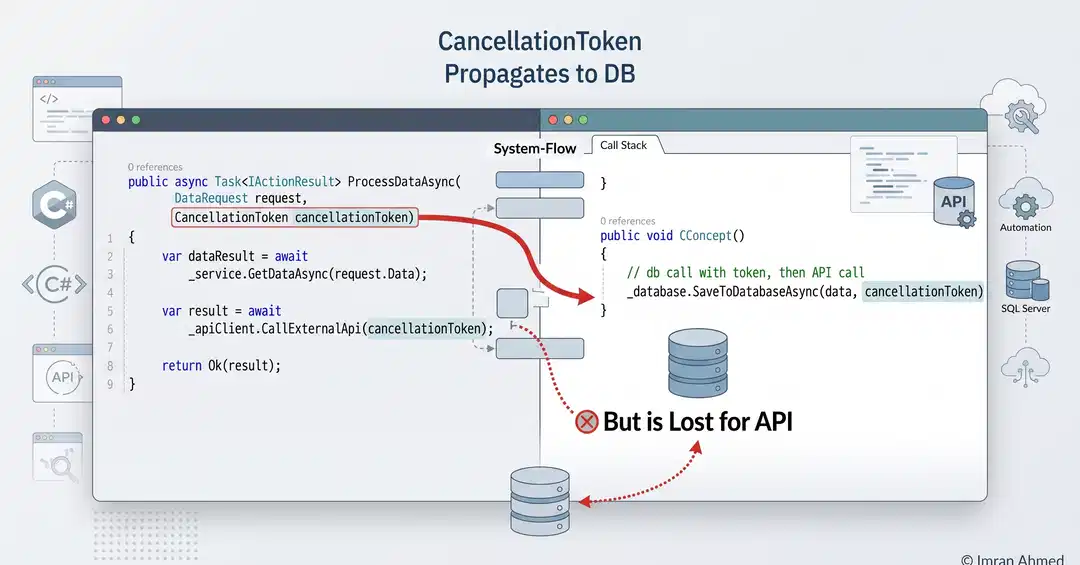
The Problem: Mysterious Latency Under Load
In the early stages of my career, I believed that if an HTTP request had a timeout set, the system was safe. I would configure HttpClient.Timeout or use RequestAborted, and I felt protected. I was wrong.
Recently, I reviewed a codebase for a .NET Core application that was experiencing mysterious latency spikes under load. The errors weren't immediate 500s; instead, the application felt sluggish, response times increased progressively, and eventually, the thread pool looked exhausted. This post breaks down that specific debugging journey and why CancellationToken propagation is more critical than simple timeouts.
The core issue stemmed from a misunderstanding of how timeouts and cancellation work in ASP.NET Core, particularly when dealing with asynchronous operations that involved external calls. It wasn't a straightforward crash, but a slow degradation of performance that could eventually bring the application to its knees.
The Setup: Long-Running Operations and Perceived Safety
We had an ASP.NET Core API endpoint that accepted a request, validated it, and then triggered a long-running operation. To keep the user experience snappy, we configured a timeout on the HttpClient used to call an external service. The expectation was that if the external service didn't respond within the configured time, the request would be aborted, and resources would be freed. This is a common pattern, and often it works as intended. However, this scenario hid a critical flaw.
The long-running operation itself involved calling an external API. The developer had correctly set a Timeout on the HttpClient instance used for this call. This timeout was intended to prevent the .NET Core application from waiting indefinitely if the external service became unresponsive. The logic looked something like this:
using var client = new HttpClient();

// Set a timeout for the HTTP request
client.Timeout = TimeSpan.FromSeconds(30);

try
{
    var response = await client.GetAsync("http://external.service.com/api/data");
    response.EnsureSuccessStatusCode();
    var content = await response.Content.ReadAsStringAsync();
    // Process content...
}
catch (TaskCanceledException ex)
{
    // Log timeout or cancellation
}
This setup seems robust on the surface. If the external service takes longer than 30 seconds, a TaskCanceledException is thrown, and the operation is effectively stopped. But this is where the subtlety lies. The HttpClient.Timeout property is essentially a convenience wrapper around a CancellationToken that gets automatically registered with the request. When this token is signaled, the underlying operation is canceled.
The Flaw: Timeout vs. True Cancellation
The problem emerged when the long-running operation was not just a single HttpClient call, but a sequence of operations, or when the cancellation token wasn't properly passed down the call chain. In this specific case, the HttpClient.Timeout would indeed trigger a cancellation for the GetAsync call. However, the ASP.NET Core request itself, represented by the HttpContext.RequestAborted token, might not have been canceled yet. This meant that while the HttpClient call might have timed out, the ASP.NET Core request was still considered active by the server.
The critical misunderstanding was that setting HttpClient.Timeout does not automatically propagate cancellation up to the ASP.NET Core request pipeline. If the external service was slow but not entirely unresponsive, it might have returned a response *after* the HttpClient.Timeout period, but before the overall ASP.NET Core request timeout (if one was even explicitly set on the server side for the client's request). More insidiously, if the external service *never* responded, the HttpClient call would time out, but the thread handling the ASP.NET Core request might still be occupied, waiting for the result or attempting to process partial data, without being properly signaled to stop.
This failure to propagate cancellation meant that even though an individual operation within the request handling timed out, the overall request context remained alive. The thread pool threads involved in handling these timed-out requests were not being released promptly. They remained blocked, waiting for operations that would never complete successfully or were already internally canceled. Under load, this leads to threads being depleted from the thread pool, causing new requests to queue up and leading to the observed latency spikes and eventual sluggishness.
Consider this analogy: You've asked a delivery driver to pick up a package and bring it to you. You tell the driver, "If you can't get it in 30 minutes, just give up on this package." The driver goes, but gets stuck in traffic. After 30 minutes, the driver internally decides, "Okay, I can't get this package," and stops trying for *that specific package*. However, the driver still has to drive back to the depot to report that they couldn't get the package, and *only then* are they free to take another job. If the driver never makes it back to the depot because they are perpetually stuck in traffic trying to get that one package, they can't take any new jobs. In our ASP.NET Core scenario, the HttpClient.Timeout is the driver giving up on the package, but the failure to propagate cancellation is the driver never returning to the depot to report completion (or failure), thus remaining unavailable.
The Solution: Explicit CancellationToken Propagation
The correct approach is to explicitly pass and handle CancellationTokens throughout the entire request lifecycle. When an ASP.NET Core request comes in, it carries an associated CancellationToken (HttpContext.RequestAborted). This token should be passed down to all asynchronous operations, including HttpClient calls. The HttpClient.GetAsync method overload that accepts a CancellationToken should be used.
using var client = new HttpClient();

// Pass the request's cancellation token to the HttpClient call
var response = await client.GetAsync("http://external.service.com/api/data", HttpContext.RequestAborted);

response.EnsureSuccessStatusCode(); // This will throw if the status code is an error
var content = await response.Content.ReadAsStringAsync(HttpContext.RequestAborted);
// Process content...
By passing HttpContext.RequestAborted to GetAsync, we ensure that if the client disconnects or the ASP.NET Core request is otherwise canceled, the HttpClient operation will also be canceled immediately. This prevents the thread from being held up unnecessarily. Furthermore, if you have multiple asynchronous steps, you should create a linked token:
// In your controller or handler
public async Task MyAction(CancellationToken cancellationToken)
{
    // Create a token that is canceled if the request is aborted OR if we explicitly cancel it
    using var linkedCts = CancellationTokenSource.CreateLinkedTokenSource(cancellationToken);
    var linkedToken = linkedCts.Token;

    // Pass linkedToken to the first async operation
    await FirstLongOperationAsync(linkedToken);

    // Pass linkedToken to the second async operation
    await SecondLongOperationAsync(linkedToken);

    // If either operation needs to trigger cancellation, call linkedCts.Cancel();
}

public async Task FirstLongOperationAsync(CancellationToken cancellationToken)
{
    using var client = new HttpClient();
    // Use the provided token for the HTTP call
    var response = await client.GetAsync("http://external.service.com/api/step1", cancellationToken);
    response.EnsureSuccessStatusCode();
    // ... more work ...
}
This explicit propagation ensures that cancellation signals flow correctly through the application stack. When a timeout occurs or a client disconnects, all related asynchronous operations are signaled to stop, freeing up threads and preventing resource exhaustion. The key takeaway is that relying solely on HttpClient.Timeout is insufficient; proper CancellationToken management is essential for robust asynchronous applications.
Why This Was Missed in Code Review
This bug was subtle because the code *appeared* correct. The HttpClient.Timeout was set, and it did indeed cancel the HTTP call. The problem wasn't that the HTTP call *didn't* get canceled, but that the cancellation of that specific call didn't properly signal the *overall request* to stop processing or release its resources promptly. Code reviews often focus on obvious logic errors, security vulnerabilities, or blatant performance anti-patterns. The intricate flow of cancellation tokens in asynchronous operations, especially across different layers of an application (ASP.NET Core request vs. internal `HttpClient` calls), can be easily overlooked. Developers might assume that setting a timeout on a component inherently cancels the entire operation it's part of, which is not always true without explicit token propagation. It requires a deeper understanding of the underlying asynchronous programming model and the ASP.NET Core request lifecycle.
Conclusion: Embrace Explicit Cancellation
The incident served as a stark reminder that implicit assumptions about how asynchronous operations and timeouts behave can lead to significant performance issues. For developers working with ASP.NET Core and HttpClient, always prioritize explicit CancellationToken propagation. Pass the HttpContext.RequestAborted token down the call stack to any asynchronous operations that could potentially take a long time. If you're orchestrating multiple asynchronous calls, use CancellationTokenSource.CreateLinkedTokenSource to manage cancellation across them. This ensures that your application remains responsive and resilient, even under load or when dealing with slow external dependencies.