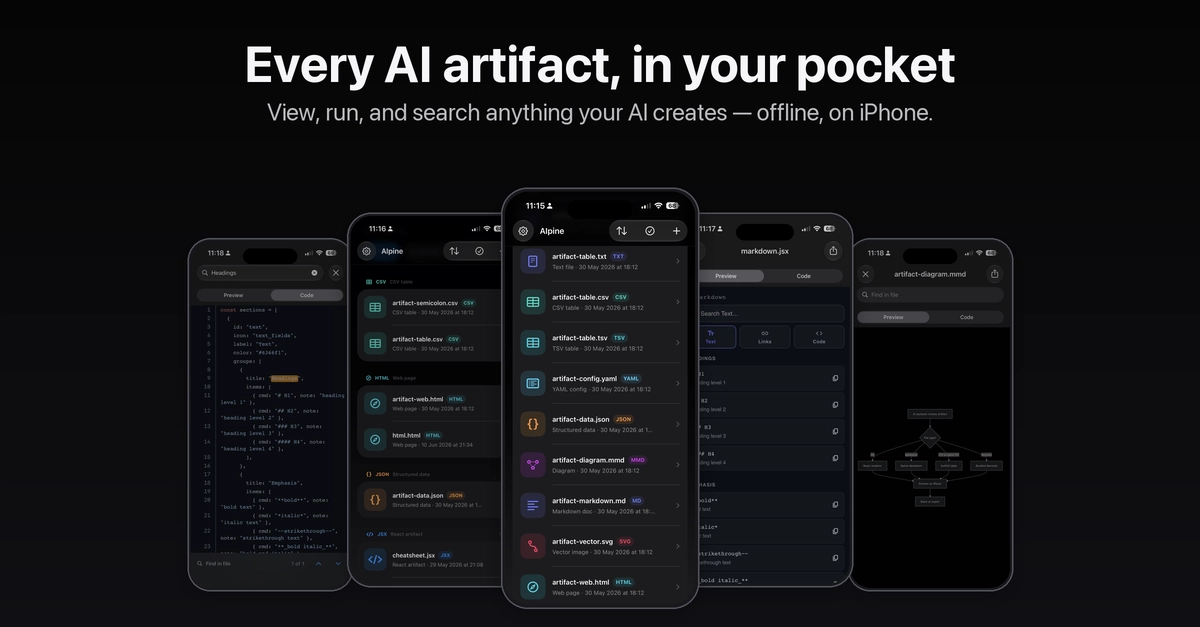
The Problem: AI-Generated Assets Vanish into Chat History
Developers and creators frequently use AI tools like Claude, ChatGPT, and others to generate useful artifacts. These can range from code components and Python scripts to Mermaid diagrams and Markdown files. The issue isn't the AI's ability to produce these items, but their ephemeral nature once generated. They are often buried within lengthy chat histories, making retrieval a tedious process of scrolling and keyword searching. This problem is exacerbated by the fact that users may not recall the specific AI used, the exact prompt, or even the date of generation, turning a potentially powerful workflow into a frustrating scavenger hunt.
This is precisely the problem Scott Pingry encountered. He found himself constantly losing valuable outputs from his AI interactions. A week after a productive chat, he might only vaguely remember creating a "CSV helper" or a "JSX tool," but locating the exact artifact would require sifting through potentially hundreds of past conversations. The chat interface, while excellent for interactive creation and iteration, is fundamentally unsuited for long-term storage and indexing of discrete, reusable assets.
Introducing AIpine: An iPhone Library for AI Creations
To solve this, Pingry developed AIpine (pronounced "AI-pine"), an iPhone application designed to act as a dedicated library for AI-generated content. AIpine provides a structured way to store, organize, and retrieve these valuable assets. Instead of relying on the AI's chat log, users can save their generated items directly into AIpine, tagging them for easier recall. This transforms the scattered output of AI conversations into a searchable, persistent knowledge base.
The core idea behind AIpine is to decouple the creation process from the storage and retrieval process. While the AI chat interface excels at the former, providing context, iteration, and explanation, it fails at the latter. AIpine addresses this by offering a purpose-built solution for managing the *results* of AI interactions. Users can save not just the final code or diagram, but also the prompt that generated it, any relevant explanations, and custom tags. This creates a rich metadata layer around each saved item, making it far more discoverable than a simple chat log entry.
How AIpine Works: Tagging, Searching, and Context
AIpine allows users to save various types of AI-generated content, including code snippets, scripts, diagrams, and text. When a user finds a piece of AI output they want to keep, they can copy it and paste it into AIpine. The application then prompts the user to add context: the original prompt, any explanations provided by the AI, and most importantly, custom tags. These tags are crucial for the application's search functionality. Users can create their own tagging system, categorizing items by project, function, AI model used, or any other relevant criteria.
Searching within AIpine is designed to be efficient. Users can search by keywords in the saved content, the original prompt, or the tags. This multi-faceted search capability ensures that even if a user only remembers a fragment of information, they can likely locate the desired asset. The application aims to be a personal archive, a single source of truth for all the useful things AI has helped them build.
The advantage of this approach is significant. Imagine needing a specific Python function for data validation that an AI provided months ago. Instead of searching through dozens of chat histories across different AI platforms, a quick search in AIpine using tags like "python," "validation," and "csv" would instantly surface the relevant snippet, along with the original prompt for context. This preserves the learning and utility of each AI interaction, preventing valuable work from being lost.
The Broader Implications for AI Workflows
AIpine highlights a growing need in the AI-powered development and creative landscape: robust asset management. As AI becomes more integrated into daily workflows, the ability to effectively manage and leverage its outputs becomes paramount. Current AI interfaces are largely focused on the conversational aspect of generation, not on the long-term archival and retrieval of structured, reusable assets.
This gap suggests a potential market for tools that bridge this divide. AIpine, as a personal library, addresses the individual developer's pain point. However, the problem extends to team collaboration, where sharing and managing AI-generated assets becomes even more critical. Future solutions might involve team-based AI asset repositories, version control for AI outputs, or even AI models that are designed with better indexing and export capabilities from the outset.
What nobody has addressed yet is how to standardize the export and metadata tagging of AI-generated assets across different AI models and platforms. If every AI tool exports its output in a slightly different format, or requires manual re-tagging, the friction remains. A universal format or a more intelligent metadata extraction process could streamline this significantly.
For now, AIpine offers a practical, albeit manual, solution for individuals. It’s a testament to the human capacity to adapt and build tools to overcome the limitations of existing technologies, ensuring that the productivity gains from AI are not lost to the digital ether. The app is available on the App Store, targeting iPhone users who leverage AI for their work and want to keep track of their generated assets.