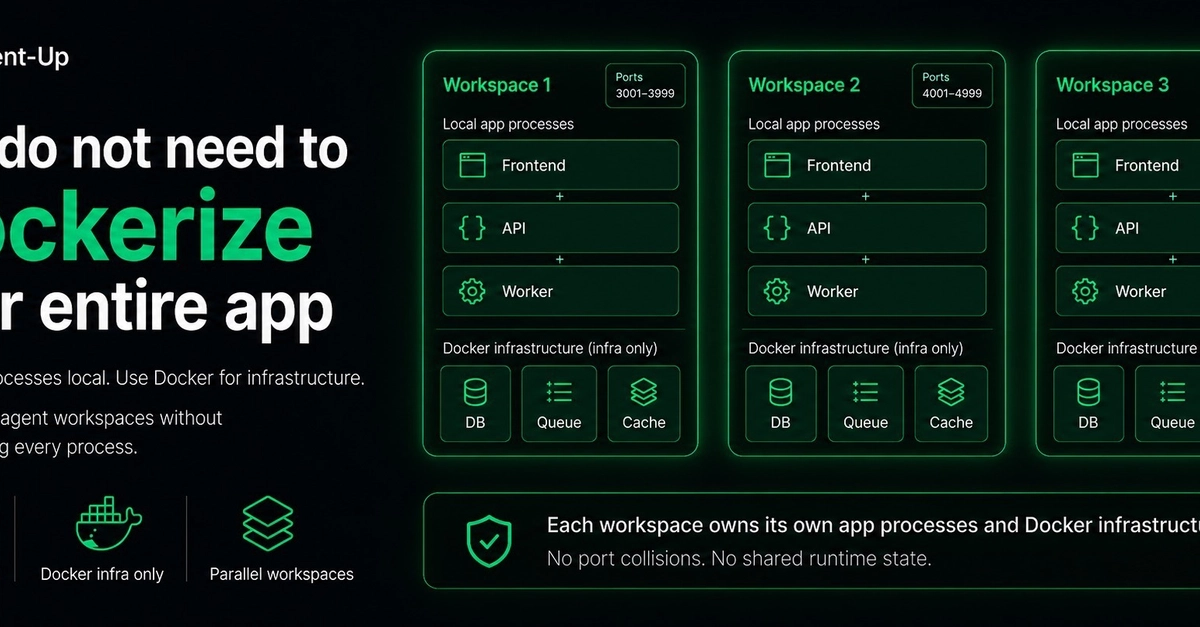
Beyond Docker: A Leaner Approach to Agent Workspaces
The default impulse when setting up multiple coding agents that rely on the same application stack is to reach for Docker. The logic seems sound: containerize each frontend, each API, and each worker process. This approach ensures isolation and reproducibility. However, this strategy quickly introduces significant friction as the number of agents scales. Stale Docker images can lead to developers working with outdated code, the rebuild process significantly slows down the feedback loop, caches can obscure the true nature of changes, and the sheer volume of images and layers clutters local storage. Debugging also gains an unnecessary layer of complexity. While this might be acceptable for a single workspace, managing multiple agents with this setup becomes a noisy, inefficient experience.
Fortunately, local isolation does not inherently require containerizing every single process. Many of the conflicts that arise when running multiple agents simultaneously stem from shared resources like network ports, running processes, Docker services, browser profiles, log files, and environment variables. A more streamlined approach focuses on isolating these specific elements directly. Tools like Agent-Up offer this capability, allowing your applications to run normally using their standard development commands (e.g., npm run dev, dotnet run, ./gradlew bootRun). The key innovation is that each workspace is assigned its own dedicated range of ports. When another agent requires access to the same application, it receives a different port range, effectively eliminating port collisions without the overhead of full containerization for every component.
The Problem with Over-Containerization
Docker offers powerful isolation, but its benefits come with trade-offs, especially in a development environment with numerous concurrent agents. The most common pain points include:
- Stale Images: Developers may inadvertently use old code if Docker images are not consistently rebuilt and updated across all agent environments.
- Slow Feedback Loops: Frequent rebuilds of container images can significantly extend the time it takes to see the results of code changes, hindering productivity.
- Obscured Changes: Caching mechanisms within Docker can sometimes hide the subtle but critical differences between code versions, making debugging harder.
- Storage Clutter: A proliferation of Docker images, layers, and volumes can consume substantial disk space, impacting local machine performance.
- Debugging Complexity: Adding another layer of abstraction (the container runtime) can complicate the process of diagnosing issues within the application itself.
When you have one or two agents, these issues might be manageable. But as you scale to five, ten, or even more agents, each potentially running the same core application but with different configurations or code branches, the cumulative effect of these problems becomes a significant bottleneck.
Agent-Up: Targeted Isolation for Development Workflows
Instead of a blanket containerization strategy, Agent-Up provides a more granular solution by focusing on isolating the specific resources that agents typically conflict over. These include:
- Ports: Each agent workspace is allocated its own distinct port range, preventing conflicts when multiple agents need to access the same service on different ports.
- Processes: Agent-Up ensures that each agent's processes run in isolation, preventing interference with other agents' operations.
- Browser Profiles: For agents interacting with web applications, separate browser profiles prevent cookies, cache, and session data from bleeding between workspaces.
- Logs: Each workspace maintains its own set of logs, making it easier to track and debug issues specific to that agent's environment.
- Environment State: Agent-Up manages environment variables and other stateful configurations on a per-workspace basis, ensuring consistency and preventing cross-contamination.
This targeted approach allows developers to continue using their familiar local development commands and workflows. For instance, a Python agent can run its Django application with python manage.py runserver, and a Node.js agent can start its Express server with npm start, all simultaneously and without interference. The underlying mechanism ensures that each of these commands operates within a sandboxed environment that manages its own network ports, process IDs, and other critical resources.
The "So What?" Perspective
Developers can now run multiple instances of the same application for different agents without full Dockerization. Agent-Up provides per-workspace port and process isolation, allowing standard `npm run dev` or `dotnet run` commands to coexist. This eliminates the overhead of managing numerous Docker images and speeds up local development feedback loops.
While not directly a security tool, avoiding unnecessary Docker images and complex container setups can reduce the attack surface on a developer's local machine. Proper isolation of ports and processes minimizes the risk of one agent's activity inadvertently exposing services used by another, though general secure coding practices remain paramount.
This approach offers a significant productivity boost for engineering teams building AI agents or similar multi-instance applications. By reducing the friction associated with managing development environments, teams can iterate faster, onboard new developers more quickly, and potentially reduce infrastructure costs associated with complex container orchestration for local development.
For creators building tools or workflows that involve multiple AI agents or simulated environments, this method streamlines setup and management. Instead of wrestling with Docker configurations for each agent instance, creators can focus on the agent logic and application behavior, leading to faster prototyping and more dynamic interactive experiences.
In data science workflows, especially those involving experimentation with different agent configurations or model versions running against the same backend, this isolation technique is crucial. It ensures that data pipelines and model serving endpoints for one agent do not interfere with another, maintaining the integrity of individual experiments and benchmarks.
Sources synthesised
- 17% Match