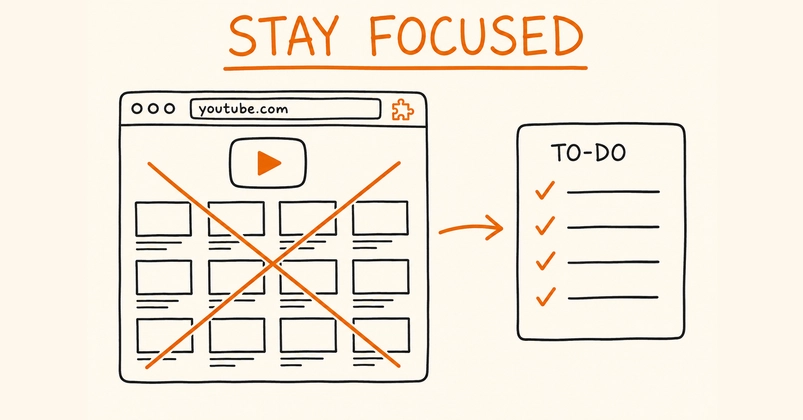
The YouTube Feed: An Attention Trap
YouTube's homepage feed is a masterclass in user retention, meticulously designed to ensnare viewers and prolong engagement. For users like Iurii Rogulia, who simply want to access a specific video, the feed becomes an unintended time sink, pulling them into a rabbit hole of recommendations that deviate from their original intent. This common frustration highlights a core tension: how to access YouTube's utility without succumbing to its addictive design.
Rogulia identified a critical flaw in common solutions. Blocking the entire youtube.com domain, for instance, is heavy-handed, removing essential features like search, video pages, subscriptions, and watch history alongside the feed. Similarly, comprehensive site blockers often demand broad permissions, background service workers, and data tracking, raising privacy concerns and adding unnecessary complexity. The goal was to create a solution that was the antithesis of these approaches: surgically remove only the feed, leave everything else intact, and require minimal user trust.
A Minimalist Approach: The 30-Line Extension
This led to the development of a Chrome extension built with approximately 30 lines of vanilla JavaScript. Crucially, it adheres to Manifest V3, the latest standard for Chrome extensions, which emphasizes improved security, privacy, and performance. Unlike many extensions that require complex build processes, dependencies, or persistent background service workers, this extension is remarkably simple. It operates directly on the DOM, targeting and removing the elements responsible for rendering the homepage feed.
The core of the extension's functionality lies in its ability to identify and manipulate the specific HTML elements that constitute the YouTube homepage feed. By targeting these elements, the extension effectively hides them from view, thereby eliminating the visual clutter and the temptation to click on recommended videos. This surgical approach ensures that users can still navigate to specific video URLs, utilize the search function, access their subscriptions, and manage their watch history without interruption.
How It Works: DOM Manipulation
The extension leverages basic JavaScript to interact with the Document Object Model (DOM) of the YouTube page. When YouTube's homepage loads, the script executes and searches for specific DOM elements that contain the video recommendations. These elements are typically identified by their class names or IDs, which are part of YouTube's internal structure. Once identified, the script can either set their display property to 'none', effectively hiding them, or remove them entirely from the DOM.
For developers familiar with web scraping or front-end development, this technique is straightforward. YouTube's feed is rendered using a series of nested `div` elements, often with classes like `ytd-rich-grid-renderer` or similar identifiers that change over time as YouTube updates its UI. The extension's script would look for these containers and nullify their content or hide the elements themselves. The simplicity of this approach means it requires no complex APIs or background processes, making it incredibly lightweight and efficient.
Manifest V3 Compliance and Permissions
A significant aspect of this extension is its compliance with Manifest V3. This latest iteration of the Chrome extension platform imposes stricter limitations on extensions, particularly concerning background scripts and network request modifications, aiming to enhance user privacy and security. Extensions that previously relied on persistent background workers or extensive network interception might face challenges under V3. Rogulia's extension side-steps these issues entirely by employing a declarative, DOM-manipulation-based approach that doesn't require a background service worker.
The permission model is equally lean. Typically, an extension like this would only require permission to 'Read and change your data on all websites' or more specifically, 'Read and change your data on youtube.com'. This is a minimal set of permissions compared to broader site blockers that might request access to browsing history or extensive site data. The extension doesn't need to monitor network requests or run continuously in the background; it acts only when the YouTube homepage is loaded, minimizing its footprint and potential for misuse.
The Trade-offs and Future Considerations
While the extension effectively removes the homepage feed, it's important to understand its limitations. It does not block recommendations that appear on video watch pages or within other sections of YouTube. Its sole focus is the main feed found at `youtube.com`. Furthermore, YouTube frequently updates its website structure and class names. This means that the extension may occasionally break and require minor updates to its selectors to continue functioning. Rogulia acknowledges this fragility, noting that such extensions are in a constant state of adaptation to platform changes.
The surprising detail here is not the simplicity of the code, but the effectiveness of such a minimal intervention. Many users might assume that combating YouTube's powerful recommendation engine requires a complex, feature-rich application. Instead, a few lines of JavaScript, carefully targeted, can achieve the desired outcome. This approach offers a clear path for users who want a focused YouTube experience without compromising their privacy or system resources. The question remains: will YouTube's UI changes eventually render such simple DOM manipulation tools obsolete, or will developers find increasingly creative ways to maintain user control?