Ooor: Local LLM Power in a Tiny Package
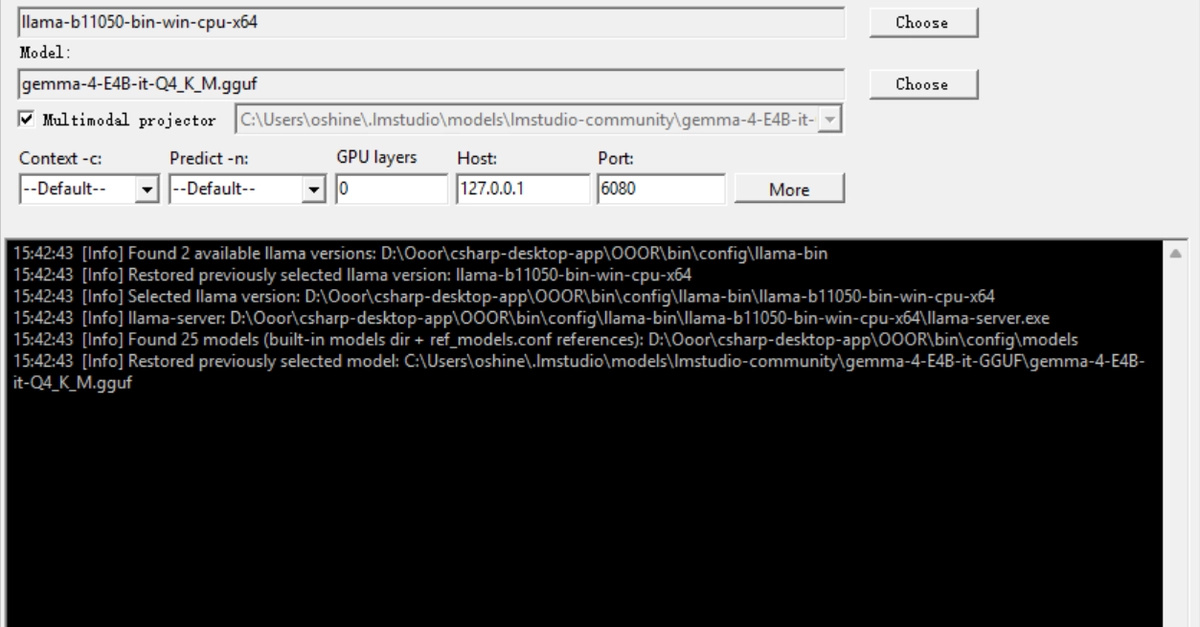
The landscape of running Large Language Models (LLMs) locally has become increasingly accessible, yet managing the underlying tools and models can still feel like navigating a command-line labyrinth. Enter Ooor, a new open-source Windows desktop application designed to streamline this process. Weighing in at a remarkable 1.5MB, Ooor transforms the powerful llama.cpp engine into a user-friendly, complete desktop AI workstation, shedding the need for Electron frameworks, cloud services, telemetry, or even user accounts. Its core promise is simple: double-click and go.
The motivation behind Ooor is clear. Many users, even those comfortable with the command line, find themselves repeatedly consulting documentation for `llama.cpp` flags, painstakingly typing lengthy commands, and restarting services just to tweak parameters like GPU layer counts. While tools like Ollama offer a more abstracted experience, Ooor aims for a middle ground: direct control over llama.cpp without the command-line friction, combined with essential management features.
Integrated Engine and Model Management
Ooor's primary function is to act as a central hub for your local LLM operations, built directly upon the robust llama.cpp backend. It meticulously manages the llama.cpp engine, providing users with an intuitive graphical interface to interact with its capabilities. This eliminates the need to manually download, compile, or configure the llama.cpp binaries, which can be a significant hurdle for less technical users. The application handles the underlying engine management, ensuring that the latest stable versions are ready to use or allowing users to select specific versions if required.
Beyond engine management, Ooor integrates a comprehensive GGUF model library. GGUF is the de facto standard format for quantized LLMs compatible with llama.cpp, and Ooor makes discovering and managing these models effortless. Users can browse their local collection of GGUF files directly within the application, with clear indications of model compatibility and resource requirements. This visual library approach replaces the need to manually organize model files in specific directories or remember their filenames.
Hugging Face Marketplace and Smart Downloading
For users looking to expand their model selection, Ooor integrates a direct connection to a Hugging Face model marketplace. This feature allows users to browse and discover a vast array of GGUF-quantized models available on Hugging Face without leaving the Ooor application. The integration is designed to be seamless, presenting models with relevant metadata such as parameter count, quantization type, and user ratings where available.
Downloading these models is further enhanced by Ooor's resumable, chunked downloader. Large model files can be prone to interruptions during download, especially on unstable connections. Ooor's downloader intelligently breaks models into smaller chunks and supports resuming interrupted downloads. This means users can start a large model download, pause it, or have it interrupted by a network issue, and then simply resume from where they left off, saving time and bandwidth. This feature alone addresses a significant pain point for users downloading multi-gigabyte model files.
Streaming Chat Console and Agent Capabilities
Once models are downloaded and managed, Ooor provides a streaming chat console for direct interaction. This console mirrors the experience of interacting with LLMs through web interfaces but is entirely local. It displays model responses in real-time as they are generated, offering a smooth and responsive chat experience. Users can easily switch between different loaded models, adjust inference parameters on the fly via the GUI, and manage conversation history without complex session management.
Perhaps the most advanced feature integrated into Ooor is its Agent tool-calling layer. This allows the local LLM to interact with external tools and APIs, effectively turning the desktop application into a rudimentary AI agent. This capability opens up possibilities for automating tasks, querying external data sources, or controlling other applications through natural language prompts. The agent layer is built to be extensible, suggesting that future versions could allow users to define and integrate custom tools, further enhancing the workstation's utility.
No Cloud, No Telemetry, Just Local Power
A critical aspect of Ooor's design philosophy is its commitment to local-only operation. Unlike many AI tools that rely on cloud infrastructure for processing or model hosting, Ooor keeps everything on the user's machine. This ensures privacy, reduces latency, and eliminates dependencies on internet connectivity or third-party services. The absence of cloud services also means no hidden costs, no data being sent off-device, and no need for account creation.
Furthermore, Ooor explicitly states no telemetry. This means the application does not collect or send any usage data back to the developers or any other entity. This focus on privacy and user control is a significant differentiator in an era where data collection is pervasive. The MIT license further underscores its open-source nature, allowing for transparency and community contribution.
The Ooor Advantage
Ooor addresses a specific niche: users who want the power and flexibility of llama.cpp and local LLMs without the steep learning curve or constant command-line fiddling. Its tiny footprint, comprehensive feature set, and commitment to local-only, privacy-focused operation make it a compelling option for developers, researchers, and AI enthusiasts looking to build a powerful, offline AI workstation on their desktop. The surprising detail here is not just its small size, but how much functionality it packs into that minimal package, effectively democratizing local LLM management.
What remains to be seen is how the extensible agent tool-calling layer will evolve and what third-party integrations will emerge. The potential for a truly self-contained, offline AI assistant on one's desktop is significant, and Ooor appears to be laying a robust foundation for it.