The Genesis: A Frustration with Online Tools
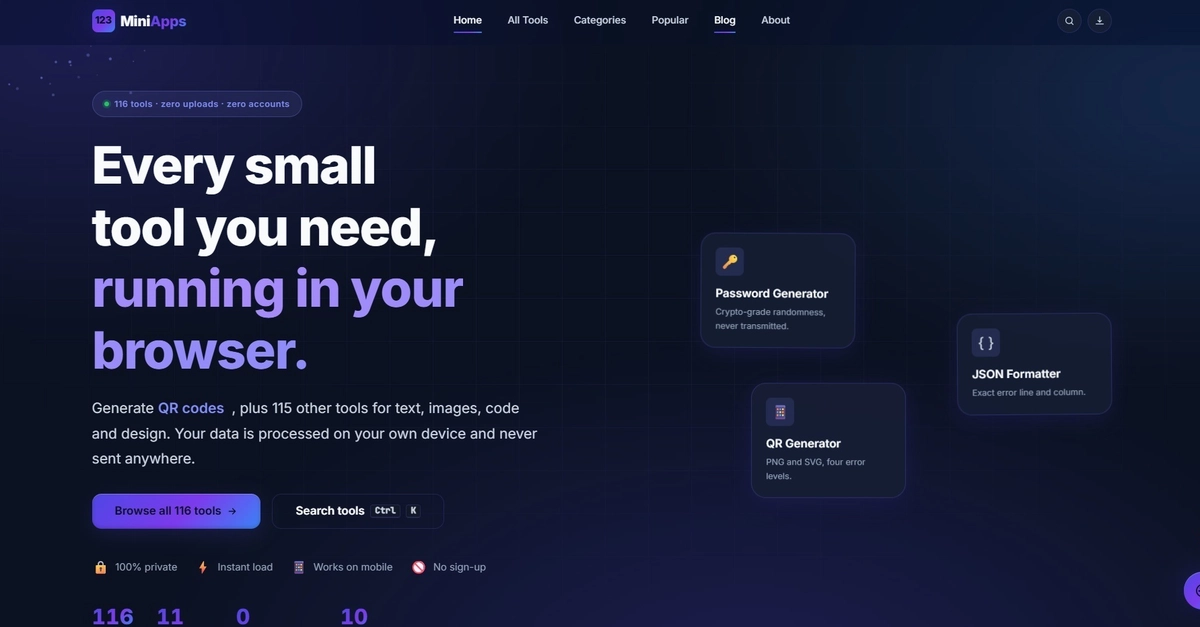
The genesis of 116MiniApps, a collection of 116 free browser tools, was a common developer frustration. While attempting a simple task – formatting a JSON blob – the creator encountered a frustrating user experience: a cookie wall, multiple ad reloads, and a mandatory account creation prompt, all for a task that should ideally be instantaneous and private. This experience sparked a simple, yet determined, idea: small, utility-focused tools should be fast, free, and, most importantly, private. They should not require sign-ups, uploads, or third-party integrations like "Continue with Google." The core philosophy became: open the page, use the tool, leave. No data leaves the user's device.
Architecture: Pure Client-Side Processing
The defining characteristic of 116MiniApps is its commitment to 100% client-side execution. Every single tool within the collection operates exclusively within the user's browser. Whether it's pasting JSON, dropping an image, or typing text, all processing occurs via JavaScript running locally. There is no backend server involved. This isn't a marketing claim; it's the fundamental architecture. The website itself is static, serving only the necessary HTML, CSS, and JavaScript files. Once loaded, the tools function independently of any external servers.
This architectural choice has profound implications. For users, it means instant access without the overhead of account creation or the privacy concerns associated with uploading sensitive data. For the developer, it simplifies deployment and maintenance significantly. There are no databases to manage, no APIs to secure, and no server infrastructure to scale. The entire operation is essentially a collection of self-contained web applications distributed as static assets.
What Makes a Tool "Browser-Native"?
The criteria for inclusion in the 116MiniApps collection are stringent. Each tool must adhere to the core principle of running entirely within the browser. This means leveraging the Web APIs available in modern browsers for tasks such as text manipulation, image processing, date and time conversions, and basic calculations. For instance, a text case converter uses JavaScript string methods. An image resizer might utilize the HTML5 Canvas API. A JSON formatter parses the input string using JavaScript's built-in `JSON.parse()` and then stringifies it with custom indentation.
The selection of tools is diverse, covering common developer needs and everyday utility tasks. Categories include text manipulation (case converters, word counters, text cleaners), code formatting (JSON, YAML, HTML), image editing (resizing, format conversion, color manipulation), date and time utilities (calculators, converters), and various other small, single-purpose applications. The emphasis is on utility and simplicity. If a task can be accomplished with a few lines of JavaScript without needing external data or complex state management, it's a candidate.
The Developer's Learning Journey
Building such a large collection of client-side tools provided valuable insights. One key learning is the sheer capability of modern browser JavaScript engines. Tasks that might have once required a server-side script can now be handled efficiently and instantly in the browser. This includes moderately complex operations like image manipulation or parsing structured data. The performance is often surprising, especially when optimized with efficient algorithms and minimal DOM manipulation.
Another significant learning pertains to user experience and trust. By eliminating all forms of data collection and server interaction, 116MiniApps builds immediate trust. Users don't have to worry about their data being stored, shared, or misused. This privacy-first approach resonates strongly in an era of increasing data breaches and privacy concerns. The absence of ads, cookies, and sign-up forms further enhances the user experience, making the tools feel genuinely free and accessible.
The project also highlighted the potential of static site hosting. Services like GitHub Pages, Netlify, or Vercel offer free or low-cost hosting for static sites, making it incredibly easy and cheap to deploy such a collection. The entire infrastructure cost for 116MiniApps is virtually zero, a stark contrast to traditional web applications with backend servers.
What's Next?
The success of 116MiniApps suggests a growing demand for simple, private, and fast online utilities. The model of client-side processing is not just a technical choice but a powerful user proposition. As browser capabilities continue to advance, the scope of what can be built and run entirely client-side expands. The challenge for developers looking to replicate this success lies in identifying genuinely useful, small-scale problems that can be solved efficiently with browser-based JavaScript, without compromising on performance or user experience. The future likely holds more such projects, empowering users with privacy-respecting tools directly in their browser.
The surprising detail here is not the sheer number of tools, but the consistent adherence to the "no server" rule across all of them. This discipline transforms a collection of utilities into a statement about digital privacy and user control.