The Problem: Detecting External Debugging
Developers building tools that monitor or interact with IDE behavior face a significant hurdle in Visual Studio 2026. The standard method for detecting if a debugger is attached, Debugger.IsAttached, only reports on the current process. This means that if your tool is running standalone, it cannot detect if Visual Studio is actively debugging another project or process on the same machine. This limitation fundamentally breaks tools designed to track coding activities, measure development time accurately, or enforce specific development workflows.
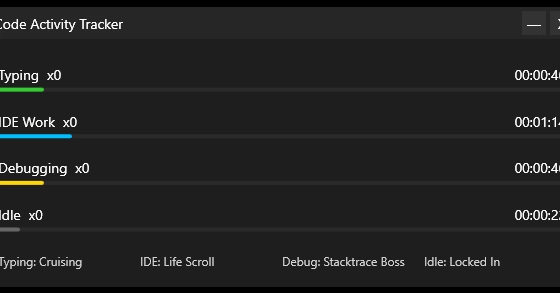
Consider the case of a developer creating a Coding Activity Tracker. The primary goal of such a tool is to provide realistic timing for all aspects of the coding process: typing, reading code, debugging, and even idle time. To achieve this, the tracker must accurately identify when Visual Studio is engaged in a debugging session. Breakpoints, stepping through code, and inspecting variables all represent distinct phases of development that significantly alter the developer's interaction with their environment. However, when the tracker itself is running as a separate application, Debugger.IsAttached will always return false, even if Visual Studio is actively debugging a different solution. This oversight renders the core functionality of such a tracker useless, as it fails to capture a crucial part of the development lifecycle.
Why `Debugger.IsAttached` Falls Short
The Debugger.IsAttached property, a static property within the System.Diagnostics namespace, is designed to answer a simple question: "Is a debugger currently attached to this process?". It queries the operating system or runtime environment for debugger attachment information specific to the process that is executing the code. This works perfectly for applications that are themselves being debugged. For instance, if you attach a debugger to your own application and then call Debugger.IsAttached within that application, it will correctly return true.
The issue arises when the code calling Debugger.IsAttached is *not* the process being debugged. A standalone application designed to monitor the developer's environment, like the aforementioned Coding Activity Tracker, operates independently. It launches, and then it needs to determine if the developer is *also* using Visual Studio to debug something else. Since the tracker's process is not the one with the debugger attached, Debugger.IsAttached returns false. There is no mechanism within this standard API to probe for debugger sessions attached to other running processes on the system. This is a fundamental design limitation, not a bug in the traditional sense, but a gap in functionality for a specific use case.
The Impact on Developer Tooling
This limitation has significant implications for the ecosystem of developer productivity tools. Tools that aim to:
- Track Development Time Accurately: As highlighted by the Coding Activity Tracker example, understanding when a developer is actively debugging is crucial for realistic time logging. Without this detection, such tools cannot provide a complete picture of a developer's day.
- Enforce Workflow Compliance: Some organizations might want to ensure developers are not debugging sensitive code outside of controlled environments or specific times. A tool needing to enforce such policies would fail if it cannot detect debugging sessions.
- Automate Testing or Analysis: Tools that need to perform actions only when a debugger is *not* attached (e.g., for performance testing that avoids debugger overhead) would incorrectly assume no debugger is present.
- Provide Contextual Assistance: Future AI-powered coding assistants might want to offer different suggestions or warnings based on whether the user is actively debugging, stepping through code, or simply writing new code.
The current state effectively leaves a blind spot for any tooling that needs to understand the broader developer environment beyond the process it inhabits. It forces developers of these tools to explore more complex, less reliable methods for detecting debugger presence.
Potential Workarounds and Future Solutions
Given the limitations of Debugger.IsAttached, developers are left to explore alternative, often more brittle, approaches. One could attempt to query the operating system for running processes and try to identify processes associated with Visual Studio that are in a debugging state. This might involve inspecting process names, command-line arguments, or even attempting to hook into Windows debugging APIs, which is significantly more complex and prone to breaking with future OS or IDE updates. This approach is akin to trying to determine if someone is reading a book by looking for a specific bookmark, rather than asking them directly.
A more robust solution would require Microsoft to enhance the debugging infrastructure within Visual Studio or the .NET runtime. This could involve:
- A new API: Introducing a new static API, perhaps
Debugger.IsAnyProcessDebugging()or similar, that queries the system for any active debugger sessions initiated by Visual Studio or other supported debuggers. - Inter-Process Communication (IPC): Visual Studio could expose a mechanism for other processes to query its debugging status, perhaps through a named pipe or a WMI provider.
- Event-Based Notifications: A system-level or IDE-level event that broadcasts when a debugging session starts or stops, allowing subscribed tools to react accordingly.
Until such a solution is provided by Microsoft, developers building sophisticated tooling for the Visual Studio ecosystem will continue to face this frustrating detection failure, forcing them to rely on workarounds that increase maintenance overhead and reduce reliability.
The Unanswered Question
What nobody has addressed yet is what happens to the thousands of developers who build specialized tooling for the Visual Studio ecosystem. Will Microsoft acknowledge this gap and provide a documented, supported solution, or will developers be left to maintain fragile, OS-dependent workarounds indefinitely?