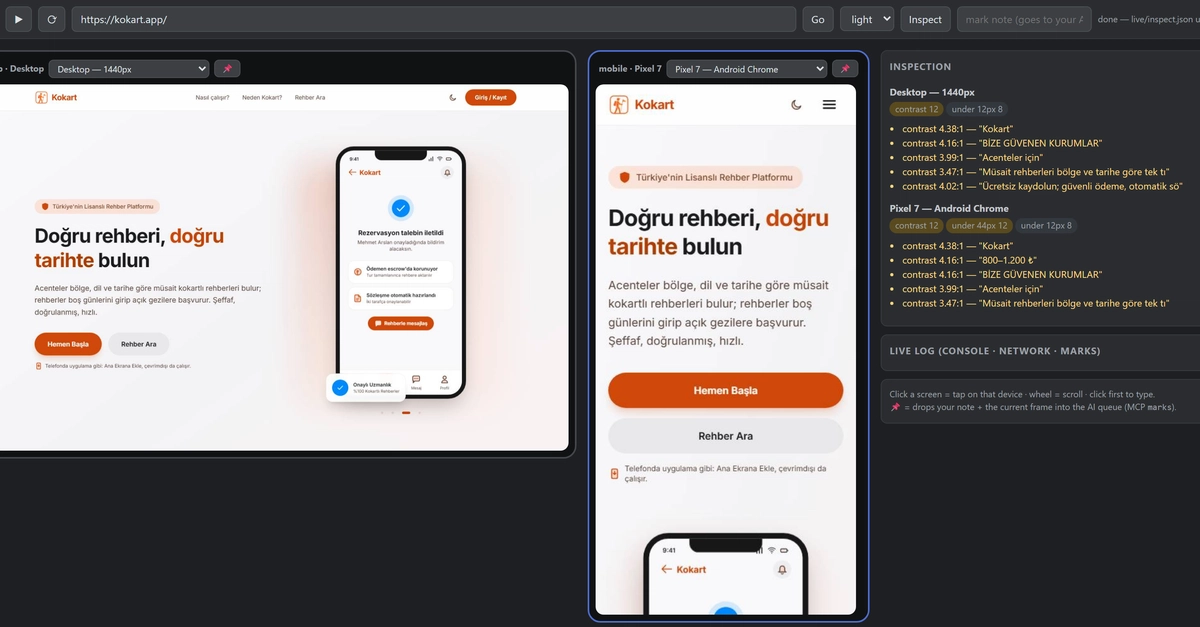
The Paradoxical Audit Report
The report landed with a thud: "Records with automated findings: 8/4." This cryptic message from a self-built UI auditing tool meant that more screens presented issues than were actually tested. For a tool designed to rigorously measure web UIs—checking contrast ratios, touch target sizes, overlapping controls, and clipped text—this was an embarrassing, almost comical, self-own. The tool, boasting 142 distinct tests, passed every single one of them while generating this nonsensical output. It’s a stark reminder that even the most meticulously crafted automated systems can harbor internal inconsistencies, especially when dealing with the complex, dynamic nature of modern web interfaces.
The developer, Yusuf Cemres, had pointed his tool at three new websites it had never encountered. The expectation was to uncover genuine UI/UX flaws on these external sites. Instead, the tool’s own internal logic or data handling produced the anomalies. This situation is less about a failure to detect external problems and more about a failure in the diagnostic process itself. It’s like a doctor’s thermometer reading its own temperature as a fever while examining a patient.
Deconstructing the Tool's Functionality
Cemres’ tool is designed to be comprehensive, performing a variety of automated checks crucial for accessibility and user experience. These include:
- Contrast Ratios: Verifying that text and background colors meet WCAG accessibility standards.
- Touch Target Size: Ensuring interactive elements are at least 44x44 pixels for easy mobile interaction.
- Overlapping Controls: Detecting instances where one UI element obscures another, hindering usability.
- Clipped Text: Identifying text that is cut off by its container, making it unreadable.
With 142 individual tests, the tool aims to provide a thorough, objective assessment. The goal is to automate the tedious, often subjective, process of UI auditing, freeing up human testers for more complex, nuanced usability studies. However, the incident highlights a critical blind spot in such automation: the system’s ability to accurately report its own findings and internal state.
The Root Cause: Internal Inconsistency
The specific error, "Records with automated findings: 8/4," points to a fundamental issue in how the tool counts or correlates its findings. It suggests a breakdown in the data aggregation or reporting logic. Possible causes include:
- Race Conditions: If the tool processes findings concurrently, it might miscount or misattribute them.
- Data Corruption: A temporary glitch could lead to incorrect counts being stored or processed.
- Logic Errors: The algorithm responsible for tallying findings might have a flaw, perhaps misinterpreting a state or failing to reset counters correctly between tests or pages.
- Environment Issues: Though less likely given the tool passed its own tests, subtle environmental differences during the audit could theoretically impact reporting.
The fact that all 142 tests *passed* while the reporting mechanism failed so spectacularly is the most surprising element. It implies the error isn't in the detection mechanism itself, but in the subsequent aggregation and presentation of those results. This is akin to a highly accurate sensor failing only when its display unit tries to show the data. The tool's internal consistency checks, if any, failed to catch this reporting anomaly before it was presented to the user.
Implications for Automated Auditing
This incident serves as a cautionary tale for anyone developing or relying on automated auditing tools. While automation offers speed and scale, it introduces its own set of potential failure modes. The primary implication is the need for robust self-validation and error reporting within these tools. An auditing tool must not only detect external issues but also ensure its own internal integrity and the accuracy of its output.
For developers building such tools, this means:
- Comprehensive Internal Testing: Beyond testing against known UI flaws, rigorously test the tool’s reporting and aggregation logic itself.
- State Management Verification: Ensure that internal counters and states are correctly managed and reset, especially in complex, multi-step processes.
- Sanity Checks on Output: Implement checks to ensure reported metrics are logically possible (e.g., findings cannot exceed the number of items tested).
- Detailed Logging: Provide granular logs that allow developers to trace the tool’s execution and pinpoint where errors occurred.
This self-inflicted bug underscores the challenge of building reliable systems that monitor other systems. The tool's failure wasn't in its core detection capabilities, but in its ability to accurately communicate what it found. It’s a subtle but critical distinction that impacts trust and utility.
The Unanswered Question: Trust in Automation
What remains unaddressed is how users should calibrate their trust in automated auditing tools after such an incident. If a tool can generate erroneous reports about its own performance, how can its findings about external websites be fully trusted without supplementary human verification? This incident prompts a re-evaluation of the confidence we place in purely automated checks, especially when the tool's own reporting mechanisms are opaque or prone to self-contradiction. The goal of automation is to increase reliability, but this case shows it can sometimes introduce new, unexpected failure vectors.