Introducing Supracorona Login Gate
For internal websites, client portals, development environments, and staging sites, maintaining public inaccessibility is often a primary concern. However, not every private WordPress website demands the complexity of a full-fledged membership system. Many scenarios do not require managing subscriptions, intricate membership plans, payment gateways, numerous user roles, or extensive content-access rules. Often, the requirement is far more basic: the website simply needs to be accessible only to logged-in users.
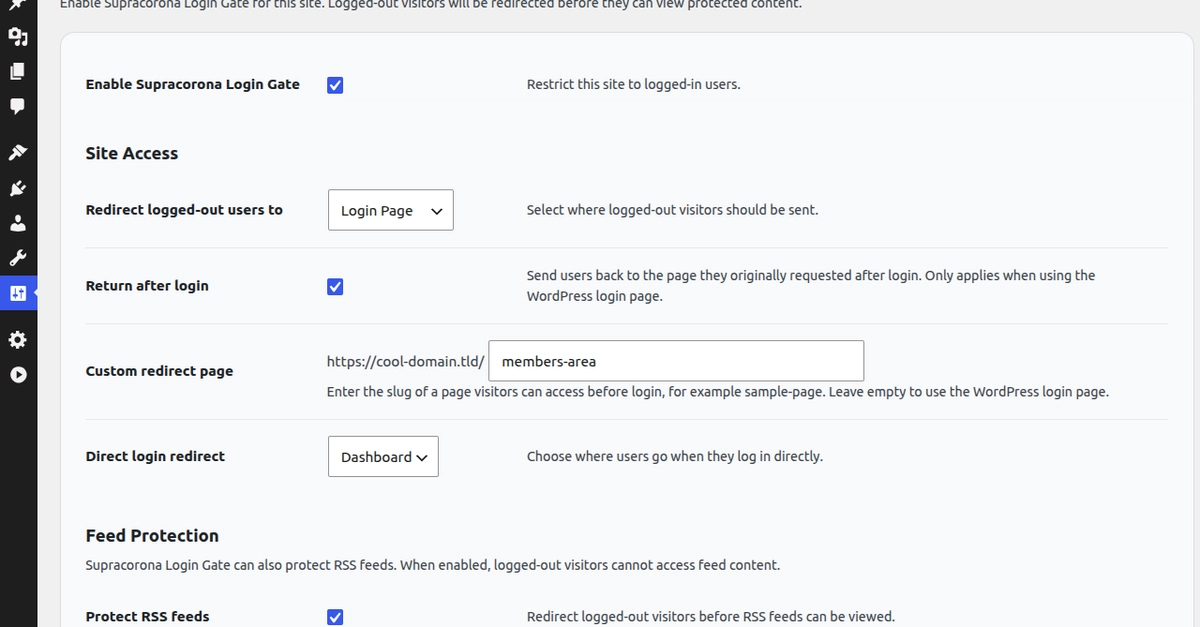
To address this specific need, Supracorona Login Gate has been developed. This lightweight WordPress plugin acts as a straightforward access gate, placing a simple barrier in front of a WordPress website. Once enabled, the plugin prevents logged-out visitors from browsing protected site content. Instead, they are automatically redirected to the standard WordPress login page. Site administrators also have the option to designate a custom page for redirection, offering a degree of flexibility in the user experience for unauthenticated visitors.
The plugin is now available on the official WordPress.org plugin repository, making it accessible to a wide range of WordPress users looking for a simple solution to private site access.
Core Functionality and Use Cases
The primary function of Supracorona Login Gate is to enforce a basic login requirement for site access. This is particularly useful in several common scenarios:
- Development and Staging Environments: Developers and clients often need to review site progress without exposing unfinished or experimental versions to the public internet. Supracorona Login Gate ensures these sites remain private until they are ready for launch.
- Client Portals: Businesses that provide private dashboards or resource areas for their clients can use this plugin to ensure only authorized clients can access their dedicated sections.
- Internal Company Websites: Intranets, internal documentation sites, or company resource hubs that should only be accessible by employees can be easily protected.
- Private Project Sites: For projects that are not intended for public consumption, such as private portfolios or specific event sites, this plugin provides an immediate layer of privacy.
The elegance of Supracorona Login Gate lies in its simplicity. It avoids the overhead and complexity associated with more robust membership plugins, focusing solely on the essential task of restricting public access. This makes it an ideal choice for users who find other solutions overly complicated for their needs.
Installation and Configuration
Installing Supracorona Login Gate is as straightforward as installing any other WordPress plugin. Users can search for it directly within the WordPress plugin directory from their site's admin dashboard or download it from WordPress.org and upload it manually. Once activated, the plugin introduces a new settings section within the WordPress admin area.
The configuration options are intentionally minimal to maintain the plugin's lightweight nature. Administrators can typically:
- Enable or disable the login gate functionality.
- Specify the redirection target: either the default WordPress login page or a custom URL.
This minimal configuration ensures that users can set up basic site protection within minutes, without needing to navigate through extensive settings or understand complex access control logic. The plugin's design prioritizes ease of use for administrators, allowing them to quickly secure their WordPress installations.
Distinguishing from Membership Plugins
It is crucial to understand what Supracorona Login Gate is not. It is not a membership plugin. It does not offer features such as:
- User registration forms
- Subscription management
- Payment gateway integration
- Tiered membership levels
- Content restriction based on user roles or membership status
- Forums or community features
These features are the domain of dedicated membership plugins, which are designed for e-commerce, online courses, and community platforms. Supracorona Login Gate serves a different, albeit common, need: to simply hide the entire site from the public internet, requiring a login to view anything. Think of it less like a bouncer at an exclusive club with a guest list and VIP sections, and more like a single locked door on the front of a building that requires a keycard to enter. Everyone needs a keycard; there are no special passes.
Potential Implications and Alternatives
For developers and site owners who require only basic private access, Supracorona Login Gate presents an attractive, no-fuss solution. Its minimal footprint means it is unlikely to introduce performance issues or conflicts with other plugins. The plugin's focus on a single task simplifies its maintenance and reduces the learning curve for users.
However, if the need evolves beyond simple public restriction, users will need to consider more comprehensive solutions. For instance, if specific pages or posts need to be restricted while others remain public, or if different user roles require access to different content, a full membership plugin or a role-based access control plugin would be necessary. For sites requiring single sign-on (SSO) capabilities with external identity providers, Supracorona Login Gate would also not be sufficient.
The surprising element here is the sheer simplicity of the solution to a common problem. Many users might assume that protecting a WordPress site requires a complex setup, when in reality, a plugin like Supracorona Login Gate fulfills the requirement with minimal effort and resource utilization. The question for site owners becomes: what is your exact requirement? If it's just