The Illusion of Stillness in 3D Graphics
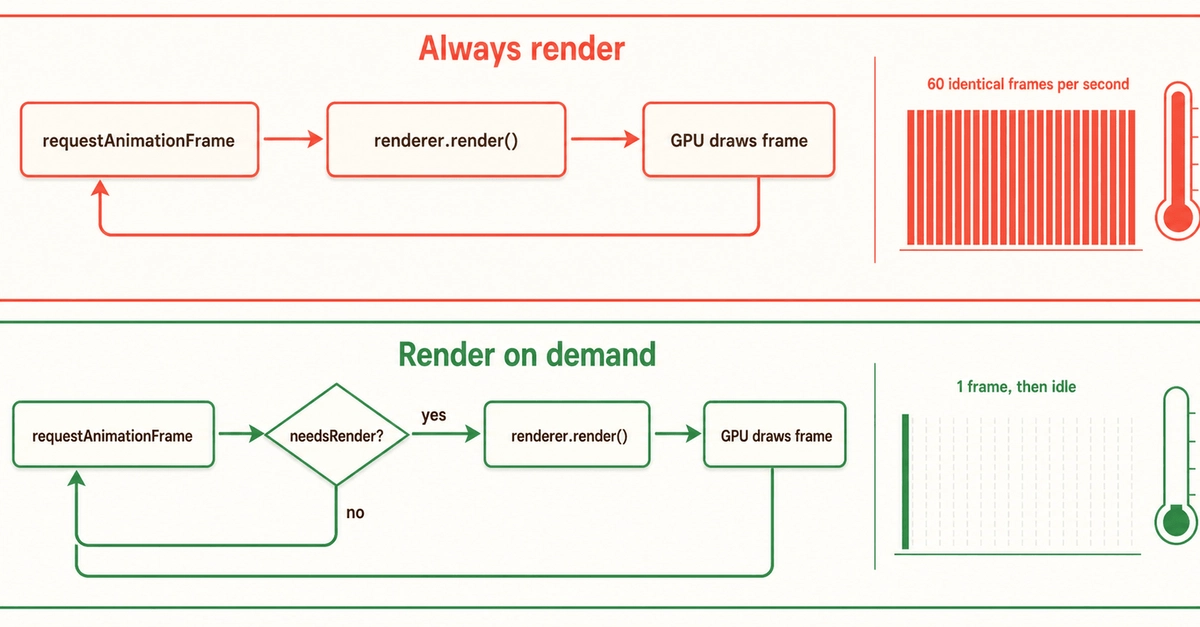
You might assume that a static 3D scene rendered in a web browser wouldn't tax a modern smartphone. The author of this piece certainly did, building small, seemingly simple games like Ludo and tic-tac-toe using Three.js. These are games that should, by all rights, run on a potato. Yet, testing them on an iPhone revealed a startling reality: the device became genuinely hot to the touch, even when the user was doing nothing—just waiting for their turn in a game of Ludo. The screen was static, nothing was visibly moving, and yet the phone was overheating.
This observation challenges a common, albeit lazy, assumption: that Three.js itself might be too heavy for such lightweight applications, prompting thoughts of switching to plain Canvas rendering. This instinct, however, is fundamentally backwards. The heat generated by a static Three.js scene isn't due to the complexity of what's being rendered, but rather how the rendering engine internally manages its state and the underlying graphics pipeline.
The core issue lies in the persistent, unnecessary communication between the JavaScript application and the GPU. Even when no visual changes occur, the Three.js render loop continues to execute. Within this loop, the engine often checks for changes in the scene's state—what's called the "dirty state." If any part of the scene, its materials, or its transformations are flagged as "dirty," even if they haven't actually changed, the renderer might still perform redundant operations. This constant polling and potential for unnecessary work, even on a static scene, keeps the GPU active and consumes power, leading to heat.
Think of it less like a database that only updates when data changes, and more like a meticulous butler who, even if you tell him nothing has changed in your study, still meticulously checks every book, every piece of furniture, and every window latch every hour, just in case. This constant, unnecessary vigilance consumes energy.
The "Dirty Flag" Problem
In graphics rendering, a "dirty flag" is a mechanism used to track whether a particular piece of data or state has been modified and needs to be re-processed or re-rendered. For instance, if a mesh's position changes, its "dirty flag" is set. When the render loop runs, it checks these flags. If a flag is set, the relevant data is sent to the GPU, and the GPU performs the necessary calculations and drawing operations.
The problem arises when this system isn't optimized for static scenes. Even if a mesh hasn't moved, its material hasn't changed, and its transformations are identical to the previous frame, the Three.js renderer might still go through the motions of checking the "dirty flags" for numerous components. In some configurations or with certain internal workings, this checking process itself can trigger downstream operations that result in redundant GPU commands being issued or unnecessary data being passed. It's like asking your butler to check if the books are in order, and even if they are, he still goes through the process of dusting them and ensuring they're aligned, which takes time and effort.
This constant cycle of checking and potentially re-applying the same state, frame after frame, prevents the GPU from entering a low-power idle state. The CPU is also kept busy managing the render loop and the state checks. The cumulative effect is a significant drain on battery power and, consequently, heat generation. This is precisely why a seemingly static Three.js scene can make your phone uncomfortably warm.
The Dirty-Flag Fix: Preventing Unnecessary Work
The solution, therefore, is to ensure that the render loop only performs work when absolutely necessary. This involves a deeper understanding of how Three.js manages its internal state and how to explicitly tell it when nothing has changed. The key is to avoid triggering the render cycle unnecessarily and to ensure that the renderer knows when it can skip expensive operations.
One effective strategy involves manually controlling the render loop and, crucially, managing the "dirty state" of scene elements. Instead of relying on an automatic render loop that might fire too often, developers can implement a custom loop. Within this loop, before calling renderer.render(scene, camera), one can check if any actual changes have occurred in the scene. If nothing has changed, the render call can be skipped entirely.
For materials, a common culprit for unnecessary rendering is the `needsUpdate` flag. If a material's properties (like color, texture, or shader uniforms) are not modified, setting `material.needsUpdate = false` (or ensuring it remains false) prevents Three.js from re-uploading texture data or re-compiling shaders to the GPU. Similarly, for geometries, `geometry.buffersNeedUpdate` and `geometry.attributesNeedUpdate` flags should only be set to `true` when the geometry data has genuinely changed.
Furthermore, for objects in the scene, setting `object.matrixWorldNeedsUpdate = false` after transformations have been applied and finalized for the current frame can prevent redundant matrix recalculations. The core principle is to be explicit about what has changed and what hasn't. If the renderer is not told that something needs updating, it should ideally skip that update. By meticulously managing these flags and controlling when the render function is called, developers can drastically reduce the workload on both the CPU and GPU.
The author's experience suggests that by carefully managing these internal states and only rendering when genuinely necessary, the excessive heat generation can be eliminated. This allows even complex libraries like Three.js to be used efficiently for simple, static scenes without compromising device performance or battery life.
Broader Implications for Web Graphics
This insight into the "dirty flag" mechanism and its impact on performance is not unique to Three.js; it's a fundamental concept in many graphics rendering pipelines. Understanding these low-level optimizations is crucial for any developer working with performance-sensitive graphics, whether in web development, game development, or other interactive 3D applications.
The takeaway for developers is clear: a still frame in a 3D scene is not necessarily a free frame. The underlying engine is always working, and its efficiency depends heavily on how well its internal state management is aligned with actual changes in the scene. By understanding and actively managing these states—the "dirty flags"—developers can unlock significant performance gains, reduce power consumption, and deliver a smoother user experience, especially on resource-constrained devices like mobile phones.