The Shift from Relational to Document Databases in Spring Boot
Migrating a Spring Boot application from a relational database like MySQL to a NoSQL document database such as MongoDB involves more than just changing connection strings. It requires a fundamental shift in how data is modeled and accessed. This guide details the specific code modifications necessary, acting as a practical checklist for developers undertaking this transition. The core challenge lies in moving from a table-based, structured query language (SQL) approach to a flexible, JSON-like document model.
The primary hurdle for many developers, myself included, is the lingering presence of Java Persistence API (JPA) annotations and configurations when the underlying database no longer supports them. A common oversight is having the correct dependency for MongoDB in the pom.xml while the entity classes remain decorated with JPA-specific annotations like @Entity, @Table, and @Id, leading to compilation errors such as "cannot find symbol: class Entity." This article outlines the exact code changes required to resolve these issues and successfully transition a project.
1. Dependency Management: Swapping JPA for Spring Data MongoDB
The first critical step involves updating the project's dependencies. For applications using MySQL with JPA, the spring-boot-starter-data-jpa dependency is essential. When moving to MongoDB, this needs to be replaced with spring-boot-starter-data-mongodb. This change signals to Spring Boot that the application will now interact with a MongoDB database and enables the use of Spring Data MongoDB's specific features and abstractions.
Before (MySQL + JPA):
<dependency>
    <groupId>org.springframework.boot</groupId>
    <artifactId>spring-boot-starter-data-jpa</artifactId>
</dependency>
After (MongoDB):
<dependency>
    <groupId>org.springframework.boot</groupId>
    <artifactId>spring-boot-starter-data-mongodb</artifactId>
</dependency>
It's also advisable to remove the JPA dependency to avoid conflicts and ensure the project exclusively uses MongoDB drivers and configurations. This explicit dependency change is the foundational step that enables all subsequent modifications.
2. Data Modeling: From JPA Entities to MongoDB Documents
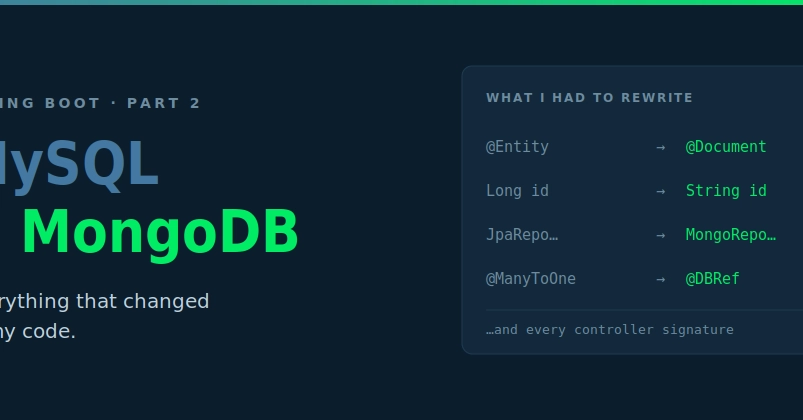
The most significant code transformation occurs in the data model. In JPA, entities are typically annotated with @Entity, specifying the persistence context. For MongoDB, the equivalent concept is a document, and Spring Data MongoDB uses annotations like @Document. The primary key, often an auto-generated integer or UUID in SQL, needs to be mapped to MongoDB's _id field. Spring Data MongoDB handles this mapping automatically if the ID field is annotated with @Id, but the type might need adjustment. For instance, if your MySQL primary key was a primitive type or a simple wrapper like Long, you might switch to String or ObjectId for MongoDB, especially if you are not using auto-generated IDs from Spring Data MongoDB.
Example JPA Entity (MySQL):
@Entity
@Table(name = "tasks")
public class Task {
    @Id
    @GeneratedValue(strategy = GenerationType.IDENTITY)
    private Long id;

    private String description;
    private boolean completed;

    // Getters and setters
}
Example MongoDB Document:
@Document(collection = "tasks")
public class Task {
    @Id
    private String id;

    private String description;
    private boolean completed;

    // Getters and setters
}
Notice the change from @Entity to @Document and the potential alteration of the ID type. The @Table annotation is replaced by @Document(collection = "collection_name"), where the collection name in MongoDB is analogous to a table name in SQL. Annotations like @Column, which specify column names and properties in SQL, are generally not needed for basic fields in MongoDB, as field names directly map to keys in the JSON-like BSON documents. Relationships, such as @OneToMany or @ManyToOne, require a different approach in MongoDB, often involving embedding related documents or using manual references (storing IDs of related documents).
3. Repository Layer: Adapting Spring Data JPA to Spring Data MongoDB
The repository layer also undergoes transformation. Spring Data JPA repositories typically extend interfaces like JpaRepository, which provides standard CRUD operations and allows for custom query methods defined by naming conventions or @Query annotations. For MongoDB, the equivalent is extending MongoRepository.
JPA Repository (MySQL):
public interface TaskRepository extends JpaRepository<Task, Long> {
    List<Task> findByCompleted(boolean completed);
}
MongoDB Repository:
public interface TaskRepository extends MongoRepository<Task, String> {
    List<Task> findByCompleted(boolean completed);
}
The generic types for the repository now reflect the MongoDB document class and its ID type (e.g., <Task, String>). The query method naming conventions often remain similar for basic operations, allowing Spring Data MongoDB to translate them into MongoDB queries. However, complex queries that relied on SQL's join operations or specific SQL functions will need to be re-implemented using MongoDB's query operators or aggregation framework. Spring Data MongoDB also supports custom query annotations like @Query, which can be used to specify MongoDB query syntax directly.
4. Configuration: Updating Database Connection Properties
The application's configuration file (typically application.properties or application.yml) must be updated to point to the MongoDB instance. For MySQL, properties like spring.datasource.url, spring.datasource.username, and spring.datasource.password are used. MongoDB uses different properties.
MySQL Configuration:
spring.datasource.url=jdbc:mysql://localhost:3306/mydatabase
sspring.datasource.username=user
sspring.datasource.password=password
MongoDB Configuration:
spring.data.mongodb.host=localhost
sspring.data.mongodb.port=27017
sspring.data.mongodb.database=mydatabase
spring.data.mongodb.username=user
sspring.data.mongodb.password=password
The MongoDB connection string format is also common and can be used: spring.data.mongodb.uri=mongodb://user:password@localhost:27017/mydatabase. These properties ensure that the Spring Data MongoDB driver connects to the correct MongoDB instance and database.
5. Querying and Operations: SQL vs. MongoDB Query Syntax
This is where the most significant divergence occurs. SQL queries are structured using SELECT, FROM, WHERE, JOIN, etc. MongoDB queries are typically expressed as JSON-like documents passed to methods like find(), findOne(), or aggregate(). For example, finding all tasks that are not completed in SQL might look like:
SELECT * FROM tasks WHERE completed = false;
In Spring Data MongoDB, if you have a repository method findByCompleted(false), Spring Data handles the translation. However, for more complex scenarios, you might use the MongoTemplate or write custom queries. A manual query using MongoTemplate to find incomplete tasks would look something like:
Query query = new Query();
query.addCriteria(Criteria.where("completed").is(false));
List<Task> incompleteTasks = mongoTemplate.find(query, Task.class);
Operations involving relationships also change drastically. SQL's JOINs are replaced by embedding related documents within a parent document or by storing the _id of a related document and performing manual lookups (similar to foreign keys but without database-level enforcement). The aggregation framework in MongoDB provides powerful capabilities for complex data processing, akin to complex SQL queries with GROUP BY and aggregations, but with a different syntax and paradigm.
6. Transactions and Concurrency
Relational databases have strong ACID (Atomicity, Consistency, Isolation, Durability) transaction support built-in. MongoDB also supports ACID transactions, but they are typically multi-document transactions and have different performance characteristics and scope compared to traditional RDBMS transactions. Developers must understand how to demarcate transactions in MongoDB using ClientSession and TransactionOptions if transactional integrity across multiple documents is required. For simpler operations, MongoDB's atomic operations on a single document are often sufficient.
7. Error Handling and Type Safety
Error handling strategies may need adjustment. SQL exceptions often signal issues with query syntax, constraints, or connection problems. MongoDB exceptions might relate to BSON conversion errors, network issues, or specific MongoDB command failures. The dynamic nature of MongoDB documents means that schema validation might need to be implemented at the application level or using MongoDB's schema validation features, especially if strict data integrity is crucial. The absence of a fixed schema can be a double-edged sword: it offers flexibility but can lead to inconsistent data if not managed carefully.
Transitioning from MySQL to MongoDB in Spring Boot is a comprehensive undertaking. It requires careful consideration of data modeling, repository patterns, query syntax, and configuration. By systematically addressing each of these areas, developers can navigate the migration process effectively, leveraging the benefits of a document database while maintaining application functionality.