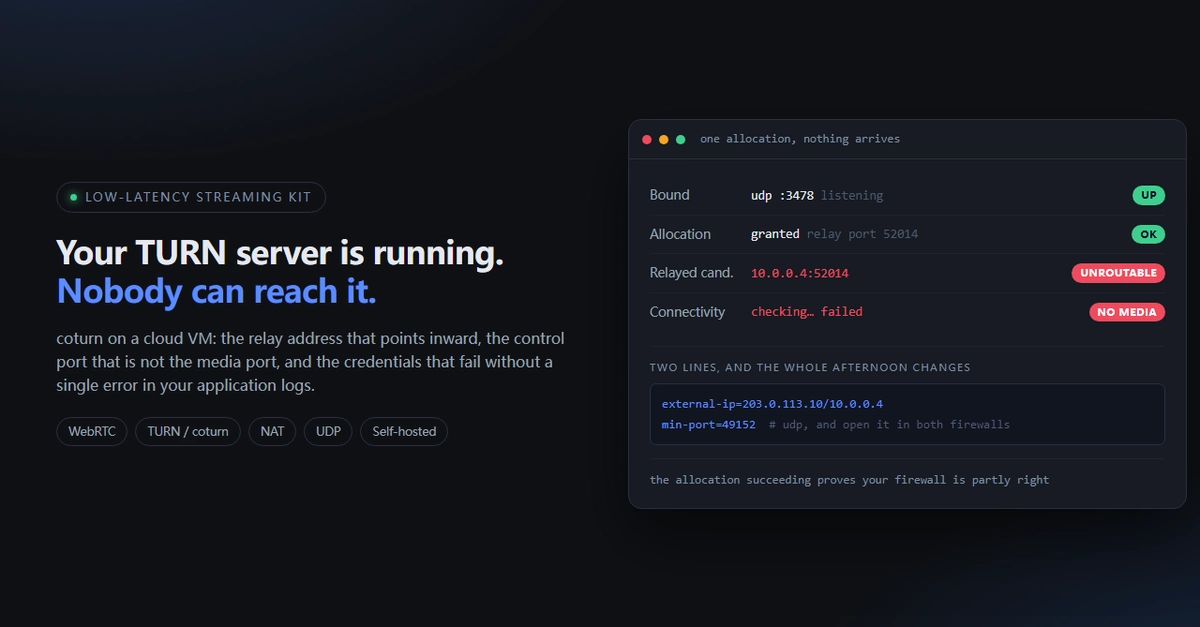
Is TURN Even Your Problem?
Before diving into TURN server specifics, confirm it's the actual culprit. Many WebRTC issues stem from other layers. Adding a TURN relay when the fault lies elsewhere only complicates debugging.
Perform these three checks in order:
- Network Connectivity: Ensure direct peer-to-peer (P2P) connections can be established without a relay. If P2P works, TURN is not needed for that specific connection.
- ICE Candidates: Verify that ICE (Interactive Connectivity Establishment) is properly gathering candidates. Issues here can prevent peers from finding a common path, even if TURN is configured.
- TURN Server Reachability: Confirm the TURN server itself is accessible from all clients. Firewalls, network address translation (NAT), and server configuration can all block access.
If P2P fails and ICE candidate gathering is problematic, the issue is likely upstream from TURN. Only proceed with TURN troubleshooting if these fundamentals are confirmed working.
Common TURN Server Failure Modes
When TURN is indeed the issue, failures often manifest without obvious error messages in logs. The relay passes basic health checks but fails to facilitate media flow. This is frequently due to subtle misconfigurations or environmental factors.
1. No Video/Audio After Initial Connection
Symptom: A WebRTC call connects, signaling appears to succeed, but no media (audio or video) is transmitted or received. The connection might even show as active.
Cause: This is often a classic symptom of a TURN server that is not properly relaying UDP traffic. The signaling channel works, but the media path, which relies on UDP, is blocked or misconfigured on the TURN server. Common culprits include:
- Incorrectly Configured `realm` and `credentials`: The client might authenticate successfully for signaling, but the relay credentials are not valid for media transfer.
- Firewall Blocking UDP Traffic: The TURN server's UDP ports (typically 3478 and a range of client ports) are blocked by an external firewall, preventing media packets from passing through.
- Reverse Proxy Interference: If a reverse proxy sits in front of the TURN server, it might be configured to time out idle UDP sockets, prematurely closing the media path.
- `no-udp-relay` Configuration: An explicit configuration setting might disable UDP relaying, forcing TURN to attempt TCP relaying which is often less efficient and can fail silently for media.
Fix:
- Double-check the `realm` and `credentials` in both the coturn configuration (`turnserver.conf`) and the client-side WebRTC configuration. They must match exactly.
- Ensure the firewall rules allow UDP traffic on the TURN server's listening port (default 3478) and the configured client port range (e.g., `min-port`, `max-port`).
- If using a reverse proxy, configure it to not time out UDP sockets or use a proxy specifically designed for TURN traffic if available.
- Verify the `no-udp-relay` setting is absent or set to `false` in `turnserver.conf` if UDP relaying is desired.
2. Authentication Failures Leading to No Relay
Symptom: Clients cannot establish a TURN connection, and logs show repeated authentication failures or a refusal to allocate relay addresses.
Cause: This is a more straightforward authentication issue. The client is sending incorrect credentials or the server is not configured to accept them.
- Mismatched `realm`: The `realm` specified by the client does not match the `realm` configured on the TURN server.
- Invalid Username/Password: The username or password provided by the client does not match the configured user/secret pairs or the authentication method.
- `use-auth-secret` or `use-auth-digest` Mismatch: The client is configured to use digest authentication while the server expects a shared secret, or vice-versa.
Fix:
- Ensure the `realm` is identical on both client and server.
- Verify the username and secret/password used by the client precisely match the configuration in `turnserver.conf` under the `static-auth-secret` or `user-info` directives.
- Align the authentication method. If the client uses digest, ensure `use-auth-digest` is enabled and configured correctly on the server. If using static secrets, ensure `use-auth-secret` is enabled.
3. High Latency or Packet Loss on Relayed Connections
Symptom: Calls using TURN experience significant lag, jitter, or dropped packets, making them unusable, even though direct P2P connections are stable.
Cause: This is usually not a configuration error but an infrastructure or performance issue.
- Server Under-provisioning: The TURN server hardware (CPU, RAM, network bandwidth) is insufficient to handle the volume of traffic. Each relayed packet consumes server resources.
- Network Congestion: The network path between the clients and the TURN server, or between the TURN server and the internet, is saturated.
- Geographic Latency: The TURN server is located far from one or both peers, introducing inherent network delay.
- Incorrect `min-port`/`max-port` Configuration: If the range of ports for client allocations is too small, the server may struggle to allocate new ports under load, or clients may fail to find available ports.
Fix:
- Scale Up Resources: Increase CPU, RAM, and network interface capacity on the TURN server. For high-traffic applications, consider a cluster of TURN servers.
- Optimize Network Path: Ensure the TURN server is deployed in a network environment with sufficient bandwidth and low latency. Choose server locations strategically close to your user base.
- Monitor Server Load: Use system monitoring tools to track CPU, memory, and network utilization on the TURN server. Adjust port ranges if necessary, ensuring they do not conflict with other services.
- Consider Multiple TURN Servers: For global deployments, deploy TURN servers in different geographic regions and have clients connect to the nearest one.
4. TURN Server Crashing or Becoming Unresponsive
Symptom: The `coturn` process stops unexpectedly, or the server becomes completely unresponsive to connection attempts.
Cause: This can be due to resource exhaustion, bugs, or external factors.
- Memory Leaks: Although less common in recent versions, older or specific configurations might have memory leaks that eventually lead to crashes.
- Too Many Concurrent Allocations: The server might hit limits on open file descriptors or other system resources if too many clients attempt to allocate relay ports simultaneously.
- Denial-of-Service (DoS) Attacks: Maliciously crafted requests could overwhelm the server.
- Underlying System Issues: Problems with the operating system, disk I/O, or network stack can affect the stability of any application.
Fix:
- Monitor System Resources: Keep an eye on memory, CPU, and file descriptor usage. Configure system limits (`ulimit`) appropriately for the expected load.
- Keep coturn Updated: Ensure you are running the latest stable version of coturn to benefit from bug fixes and performance improvements.
- Review Logs Carefully: When a crash occurs, examine system logs (`syslog`, `journalctl`) and coturn's own logs for any preceding error messages or warnings that might indicate the cause.
- Implement Rate Limiting: Consider using network-level firewalls or intrusion detection systems to mitigate DoS attacks.
The Unseen Cost of Misconfiguration
The most expensive failures are not the ones that throw loud errors, but those that silently prevent media flow. A TURN server that passes every `is_it_running?` check but yields no video is a perfect example. It masks the real problem, wastes valuable debugging time, and erodes confidence in the WebRTC stack. Treat TURN configuration not as a last-minute add-on, but as a critical component requiring careful setup and ongoing monitoring.