Project Setup with Vite and pnpm
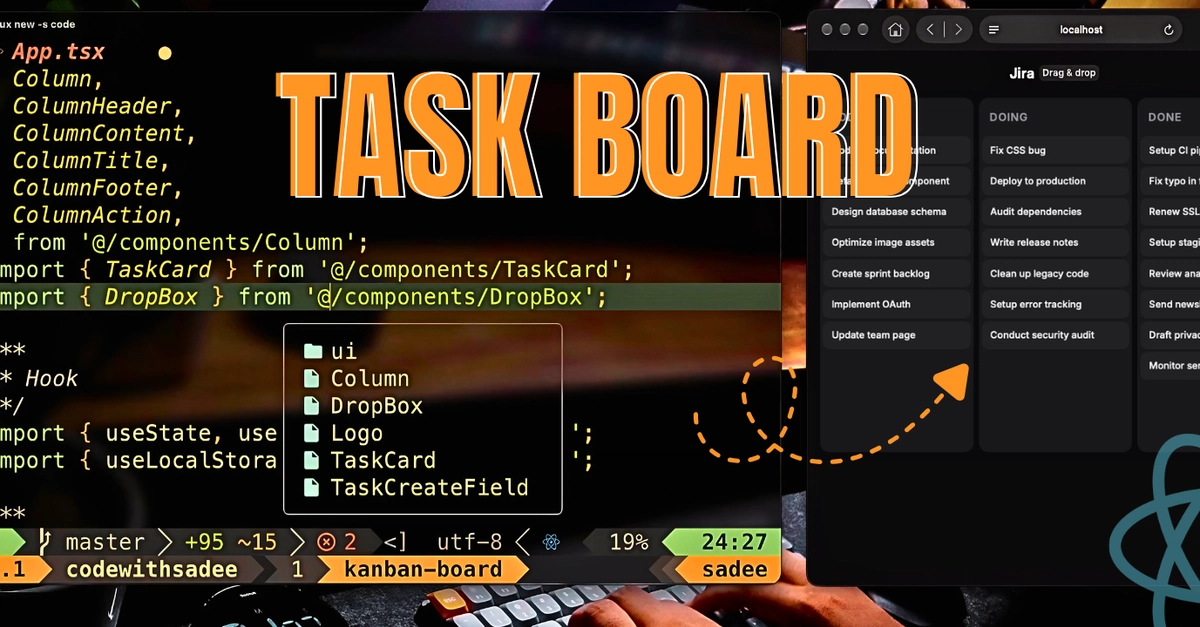
Building a dynamic task management application often involves complex state management and UI interactions. For developers aiming to create a Trello-like interface where tasks can be moved between columns using drag-and-drop, the key is to leverage modern frontend tools and native browser functionalities. This guide focuses on constructing such an application with React and TypeScript, emphasizing efficiency and avoiding heavy third-party libraries for drag-and-drop.
The project setup prioritizes speed and developer experience. Vite is chosen as the build tool and local development server, ensuring rapid hot module replacement and fast builds. Its configuration is managed through vite.config.ts. TypeScript is employed for its static typing benefits, enhancing code maintainability and reducing runtime errors; its configuration is defined in tsconfig.json. Package management is handled by pnpm, which offers faster, more efficient installations and disk space savings compared to npm or Yarn, with its lock file being pnpm-lock.yaml.
Core Application Structure and State Management
The application is structured around a clear separation of concerns, typically involving components for individual tasks, columns, and the main board. State management is crucial for handling task data, column states, and the user's interaction during drag-and-drop operations. While the excerpt doesn't detail the specific state management library, common choices for React applications include Zustand, Redux Toolkit, or the Context API for simpler cases. For a drag-and-drop interface, the state needs to accurately reflect the position of each task within its respective column and the current drag-and-drop operation status.
Each task component would likely manage its own internal state related to being dragged, while the parent components (column and board) would handle the overall data structure. This structure allows for efficient re-rendering when tasks are moved. The application needs to store task data, such as title, description, and status (e.g., 'todo', 'in-progress', 'done'), and associate each task with a specific column. When a task is dragged, the application must update its temporary state to reflect its new position, and upon dropping, commit this change to the persistent state.
Implementing Native Drag-and-Drop
The most compelling aspect of this approach is the reliance on native HTML5 Drag and Drop APIs. This bypasses the need for external libraries like react-beautiful-dnd or dnd-kit, reducing bundle size and potential complexities. The core of this implementation involves setting specific HTML attributes and handling corresponding events:
- Draggable Elements: Each task element is made draggable by setting the
draggable={true}attribute. AnonDragStartevent handler is attached to initiate the drag operation. This handler typically sets data to be transferred (e.g., the task ID) usingevent.dataTransfer.setData(). - Drop Targets: Columns or the board area act as drop targets. They require an
onDragOverevent handler to prevent the default browser behavior (which is to disallow drops) by callingevent.preventDefault(). AnonDropevent handler is then implemented to process the dropped data. - Event Handling: Key events include:
onDragStart: Fired when the user starts dragging an element. Used to store information about the dragged item.onDragEnter: Fired when a dragged element enters a valid drop target.onDragOver: Fired continuously as a dragged element is over a valid drop target. Crucial for enabling the drop.onDragLeave: Fired when a dragged element leaves a valid drop target.onDrop: Fired when a dragged element is dropped on a valid drop target. This is where the application logic updates the state to move the task.onDragEnd: Fired when the drag operation ends (whether successful or not). Used for cleanup.
By using these native APIs, developers can achieve a smooth drag-and-drop experience with minimal code. The process involves identifying the element being dragged, determining where it is dropped, and updating the application's state to reflect the new arrangement. This method is not only efficient but also provides a robust foundation for interactive UIs.
Styling and User Experience
While the technical implementation focuses on functionality, the user experience is equally important. The application needs clear visual cues to indicate draggable items and valid drop zones. During a drag operation, the dragged item might change appearance (e.g., opacity, shadow) to provide feedback. Similarly, drop targets can be highlighted when a draggable item hovers over them. This visual feedback loop is essential for intuitive interaction.
The choice of styling methodology—whether CSS Modules, Styled Components, or a utility-first CSS framework like Tailwind CSS—will influence the development workflow. Regardless of the method, the goal is to create a clean, responsive, and accessible interface. The application should be usable across different devices and screen sizes, ensuring a consistent experience for all users. The provided excerpt hints at a clean design, with a mention of organizing styles, suggesting a focus on aesthetics alongside functionality.
Conclusion and Future Enhancements
Building a task management app with React and TypeScript using native drag-and-drop APIs offers a performant and lightweight solution. The project setup with Vite and pnpm ensures a streamlined development process. The core logic revolves around managing application state and implementing the HTML5 Drag and Drop API events to enable seamless task movement.
Potential enhancements could include adding features like task prioritization, due dates, user assignments, and persistent storage using local storage or a backend API. Implementing animations for task transitions could further enhance the user experience. For a more complex application, integrating a state management library like Zustand or Redux Toolkit would become more beneficial. The absence of heavy drag-and-drop libraries makes this approach highly scalable and maintainable.