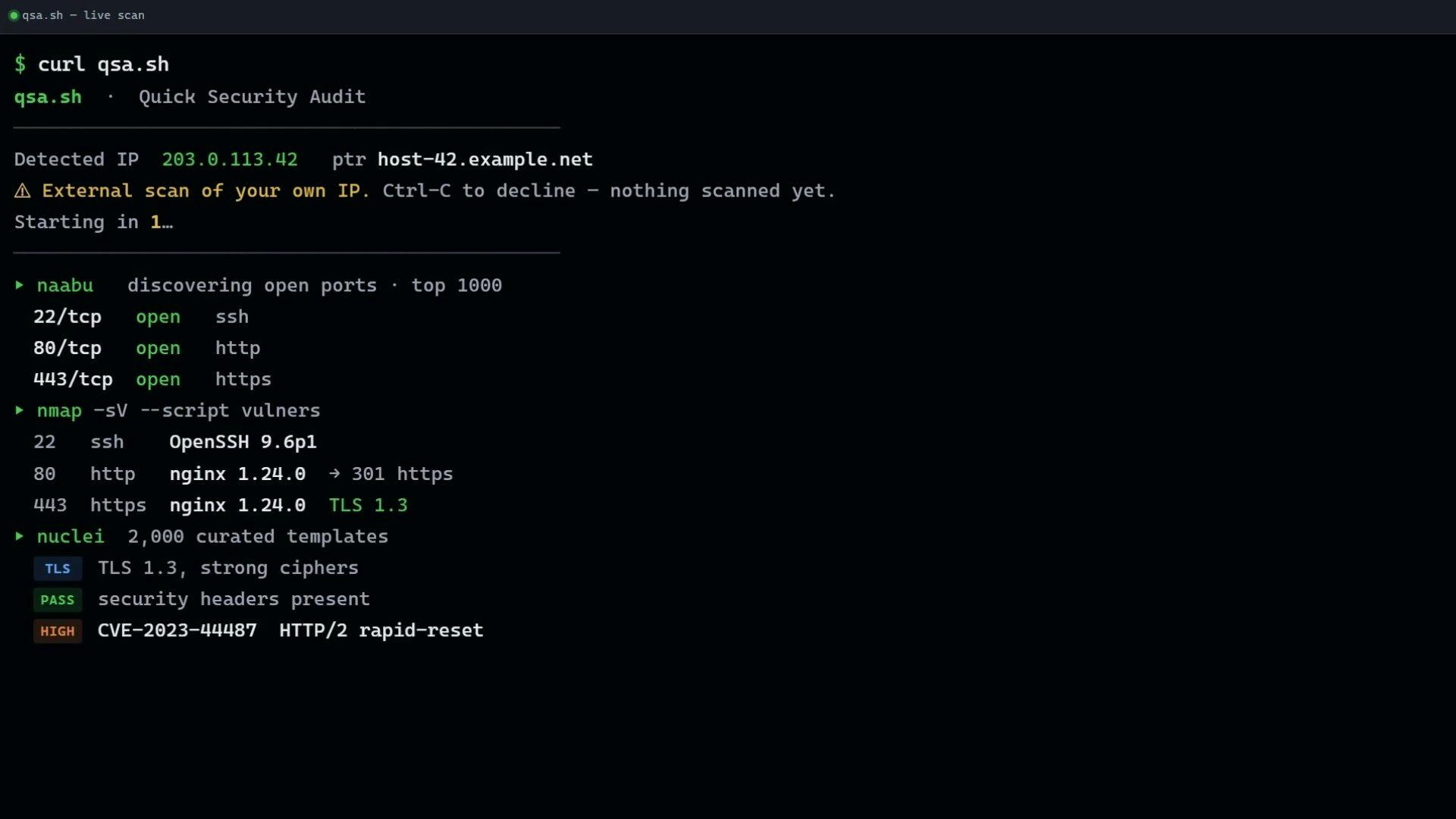
Automated External Security Audits in Your Terminal
The security landscape for applications and services is constantly evolving, and staying ahead requires continuous vigilance. For developers, performing regular security checks on their deployed assets is crucial but can often be a time-consuming process. Traditional security scanning tools frequently involve web interfaces, complex configurations, and a steep learning curve, creating a barrier to entry for quick, ad-hoc assessments. Recognizing this gap, qsa.sh emerges as a new tool designed to integrate external security auditing directly into the developer's workflow, accessible entirely from the command line.
qsa.sh focuses on providing an external perspective. This means it scans your public-facing IP addresses, mimicking how an attacker might view your network perimeter. It's not intended for internal network scanning or deep vulnerability analysis of application code itself, but rather for an initial, quick check of your external attack surface. The tool aims to simplify the process of identifying potential misconfigurations or exposed services that could be leveraged by malicious actors.
The core value proposition of qsa.sh lies in its simplicity and accessibility. By operating within the terminal, it allows developers to initiate scans without leaving their familiar development environment. This immediacy is key; instead of navigating to a separate portal and waiting for reports, a developer can run a command, get results, and potentially make immediate adjustments. Think of it less like a full-blown penetration testing suite and more like a smoke detector for your network's exterior – it alerts you to obvious issues quickly.
How qsa.sh Works
While the specifics of every tool's internal workings can be proprietary, qsa.sh's approach is centered on leveraging common external scanning techniques. Users typically provide their public IP address, and the tool then initiates a series of probes against that IP. These probes can include:
- Port Scanning: Identifying which TCP and UDP ports are open on the target IP address. Open ports can indicate running services, some of which might be vulnerable if not properly secured or updated.
- Service Banner Grabbing: When a port is found to be open, the tool attempts to identify the service running on that port and its version by examining the 'banner' information returned by the service. This can reveal specific software and versions, which are often associated with known vulnerabilities.
- Basic Vulnerability Checks: Based on identified open ports and service banners, qsa.sh may perform rudimentary checks for common, easily detectable vulnerabilities or misconfigurations. This is not exhaustive but aims to catch low-hanging fruit.
The output is designed to be concise and actionable, presented directly in the terminal. This format is crucial for developers who are accustomed to parsing command-line output and integrating it into scripts or automated workflows. The goal is to provide enough information for a developer to understand if there's an immediate external security concern without overwhelming them with the complexity of a full security audit report.

Target Audience and Use Cases
qsa.sh is primarily aimed at developers, DevOps engineers, and small to medium-sized businesses (SMBs) that need a straightforward way to monitor their external security posture. Its terminal-based nature makes it particularly appealing for those who:
- Deploy services frequently: Developers pushing new applications or microservices to production can quickly scan their new IP addresses to ensure no critical ports are inadvertently left open.
- Manage cloud infrastructure: For those using cloud providers, ensuring that security groups and firewalls are correctly configured for public-facing services is paramount. qsa.sh offers a quick external validation.
- Prioritize simplicity: Teams that lack dedicated security personnel or find traditional security tools too complex can use qsa.sh for basic, regular checks.
- Automate security checks: The command-line interface lends itself well to integration into CI/CD pipelines or scheduled cron jobs, enabling automated, regular scans of critical infrastructure.
It's important to understand what qsa.sh is *not*. It is not a replacement for comprehensive penetration testing, vulnerability assessments of application code, or advanced threat intelligence platforms. Its strength lies in its speed and simplicity for external surface checks, acting as an early warning system rather than a deep diagnostic tool. For instance, if qsa.sh reports an open port for an SSH service, a developer would then need to ensure that SSH is properly secured (e.g., key-based authentication, non-standard port, fail2ban) through other means, or potentially close the port if it's not needed.
The Competitive Landscape
The market for security scanning tools is vast, ranging from free open-source utilities to enterprise-grade commercial platforms. qsa.sh carves out a niche by focusing on the intersection of developer tooling and external security audits. Competitors in this space include:
- Nmap: The de facto standard for network scanning. While incredibly powerful and versatile, Nmap has a steeper learning curve and its output often requires more interpretation. qsa.sh aims to provide a more opinionated and simplified output for specific use cases.
- Online Port Scanners: Numerous websites offer free port scanning services. However, these typically require users to visit a web page, enter an IP, and wait for an email or web-based report, breaking the terminal-centric workflow.
- Cloud Provider Security Tools: Services like AWS Security Hub, Azure Security Center, or GCP Security Command Center offer extensive security monitoring and compliance features. These are powerful but are platform-specific and often more complex than a simple terminal tool.
- Commercial Vulnerability Scanners: Tools like Nessus, Qualys, or Rapid7 provide deep vulnerability assessment capabilities, often including authenticated scans and compliance reporting. These are typically aimed at security professionals and enterprises with larger budgets.
qsa.sh differentiates itself by offering a focused, developer-first experience for external IP audits. Its success will likely depend on its ability to provide reliable, actionable information quickly and integrate seamlessly into existing developer workflows. The surprising detail here is not the existence of external scanning tools, but the specific design choice to embed this functionality so directly into the developer's terminal environment, treating security auditing as another command to be run alongside build or deploy commands.
Future Implications and Open Questions
As more applications and services are deployed in dynamic cloud environments, the need for continuous, accessible security checks grows. qsa.sh addresses a clear pain point for developers who are often on the front lines of deployment and need immediate feedback on their external posture. The tool's success could pave the way for further integration of security primitives into developer workflows, moving security checks from an afterthought to an inherent part of the development lifecycle.
What nobody has addressed yet is how tools like qsa.sh will evolve to handle the complexities of modern cloud-native architectures. For example, dynamically assigned IP addresses, ephemeral environments, and containerized services present unique challenges for external scanning. Will qsa.sh integrate with cloud provider APIs to automatically scan newly provisioned resources? Will it offer more sophisticated checks for common cloud misconfigurations, such as overly permissive S3 buckets or public RDS instances, even if they aren't directly exposed via an open port on a specific IP?
Ultimately, qsa.sh represents a step towards democratizing basic external security auditing. By putting these capabilities directly into the hands of developers via their command line, it encourages a proactive security mindset from the earliest stages of development and deployment. If you are a developer or run a team responsible for deploying services, exploring qsa.sh could offer a quick, low-friction way to gain initial visibility into your external security footprint.