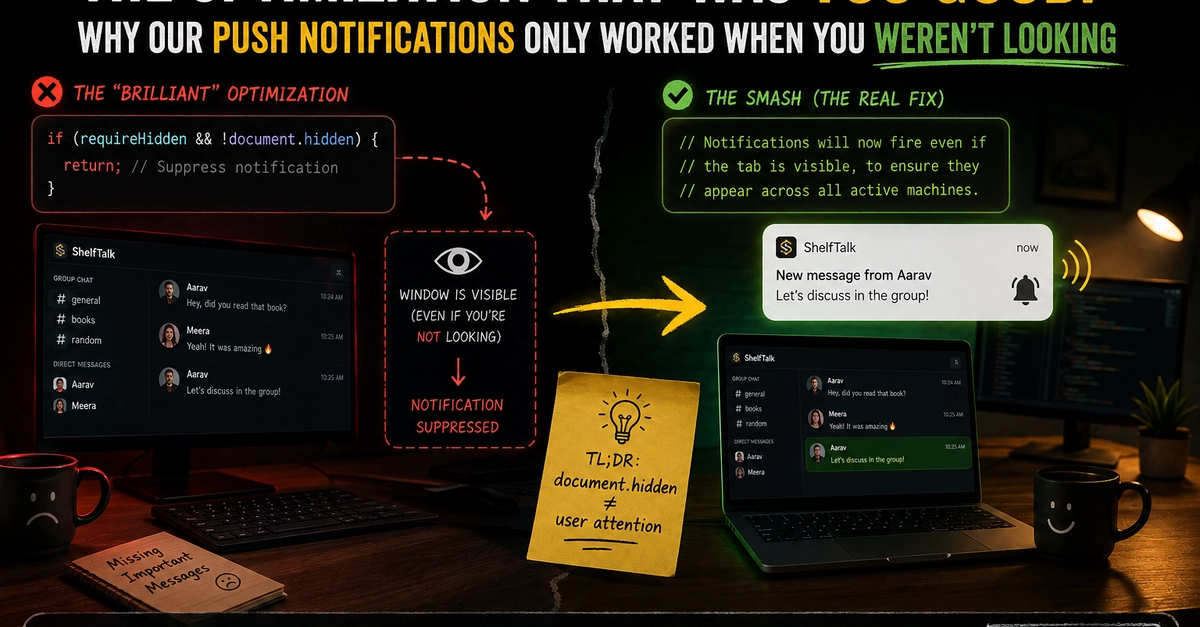
The Problem: Notifications When They Shouldn't Be
In the world of real-time applications, timely notifications are crucial. However, nobody wants their desktop pinging with an alert for a message they are actively reading within the app. This was the exact problem Jani, the developer behind ShelfTalk, a real-time social app and winner of the GitHub Finish Up A Thon Challenge, aimed to solve. The goal was to create a push notification system that was considerate of user experience, ensuring notifications only fired when the user was *not* actively engaged with the conversation in the web app.
This desire for a polished, non-intrusive user experience led to a clever, yet ultimately flawed, optimization. The core idea was to detect if the user had the relevant chat window open and visible. If they did, the notification would be suppressed. This seems like a straightforward and intelligent approach to avoid annoying users. After all, who needs a notification for something they can already see and read?
The Flawed Optimization: A Logic Loophole
The implementation of this optimization involved a specific check: the system would look for a particular DOM element (`#chat-message-list-scroller`) to determine if the user was actively viewing a chat. If this element was present, the notification would not be sent. This logic, while seemingly sound on the surface, contained a critical flaw that would eventually unravel the entire notification system.
The issue wasn't with the detection mechanism itself, but with what happened when the system *failed* to detect the element. Instead of assuming the user was *not* looking and proceeding to send the notification, the system was configured to interpret the *absence* of this DOM element as a sign that something was wrong. This misinterpretation led to a cascading failure. If the element wasn't found, the system assumed an error state and, critically, *did not send the push notification*. This meant that the very condition intended to *prevent* unwanted notifications was, in fact, preventing *all* notifications when the check failed.
The surprising detail here is not the complexity of the system, but how a seemingly robust check for user presence could be inverted to cause a total failure. It’s a potent reminder that in software development, edge cases and error handling are not mere afterthoughts but fundamental pillars of reliability.
The Unforeseen Consequence: Notifications Vanish
The result of this logic error was a system that appeared to be working perfectly under normal conditions, but would silently fail to deliver notifications when the specific DOM check didn't pass. Users would send messages, expecting their colleagues or friends to be notified, only for those notifications to never arrive. This wasn't a case of notifications being sent unnecessarily; it was a case of notifications being sent not at all. The optimization, designed to enhance user experience by reducing noise, ended up eliminating signal entirely.
The problem was particularly insidious because it likely only manifested under specific, perhaps less common, circumstances. For instance, if a user had a temporary network blip, or if the DOM element was momentarily absent due to a rendering delay, the notification would fail. The system, in its attempt to be helpful by not notifying someone who might be looking, inadvertently created a scenario where no one would be notified if the check couldn't confirm they were looking.
This situation highlights a common pitfall in software development: over-optimization or premature optimization that introduces unintended complexity and fragility. The desire to create a perfect, seamless experience can sometimes lead to logic that is too clever for its own good, creating hidden failure modes.
Debugging the Invisible Bug
Identifying this bug was a challenge. The system wasn't throwing obvious errors that would immediately flag a problem. Instead, notifications were simply not arriving. This kind of silent failure is often the most difficult to debug. It requires meticulous tracing of logic, careful examination of system states, and a deep understanding of how different components interact.
Jani's debugging process involved piecing together user reports and system behavior. The key was realizing that the absence of notifications wasn't a random occurrence but tied to the specific condition of the DOM check. When the `#chat-message-list-scroller` element was not present, the notification pipeline was effectively halted.
The fix, once the root cause was identified, was relatively straightforward. It involved adjusting the logic to correctly handle the scenario where the DOM element was not found. Instead of interpreting this as an error state, the system now correctly identifies that the user is likely not viewing the chat and proceeds to send the push notification as intended. This restored the notification functionality without sacrificing the core goal of not bothering users who are actively engaged in the chat.
Lessons Learned: The Perils of Over-Optimization
This experience offers several critical lessons for developers building real-time applications and notification systems:
- Simplicity is often best: While optimizations can seem appealing, they add complexity and potential failure points. Sometimes, a simpler approach that is easier to reason about and debug is more robust.
- Thorough error handling: Every condition, especially those related to user presence or system state, must be handled with robust error checking. Interpreting the absence of a signal as a critical error can be catastrophic.
- Test edge cases rigorously: The bug here likely manifested in edge cases where the DOM element was not present. Comprehensive testing that simulates these conditions is vital.
- User feedback is invaluable: User reports, even if initially vague, are crucial for uncovering these types of subtle bugs.
The ShelfTalk notification system's journey from a clever optimization to a bug that broke functionality serves as a powerful case study. It underscores the importance of balancing user experience enhancements with system reliability and the inherent risks of logic that becomes too clever.