Critical Next.js Security Updates Released
Next.js developers must act immediately to patch two critical vulnerabilities addressed in recent security releases: version 16.3.3 for the 16.x line and 15.5.24 for the 15.x line. These updates, released in August 2026, tackle a Windows-specific Remote Code Execution (RCE) vulnerability and a flaw in AVIF image optimization, both carrying high severity ratings.
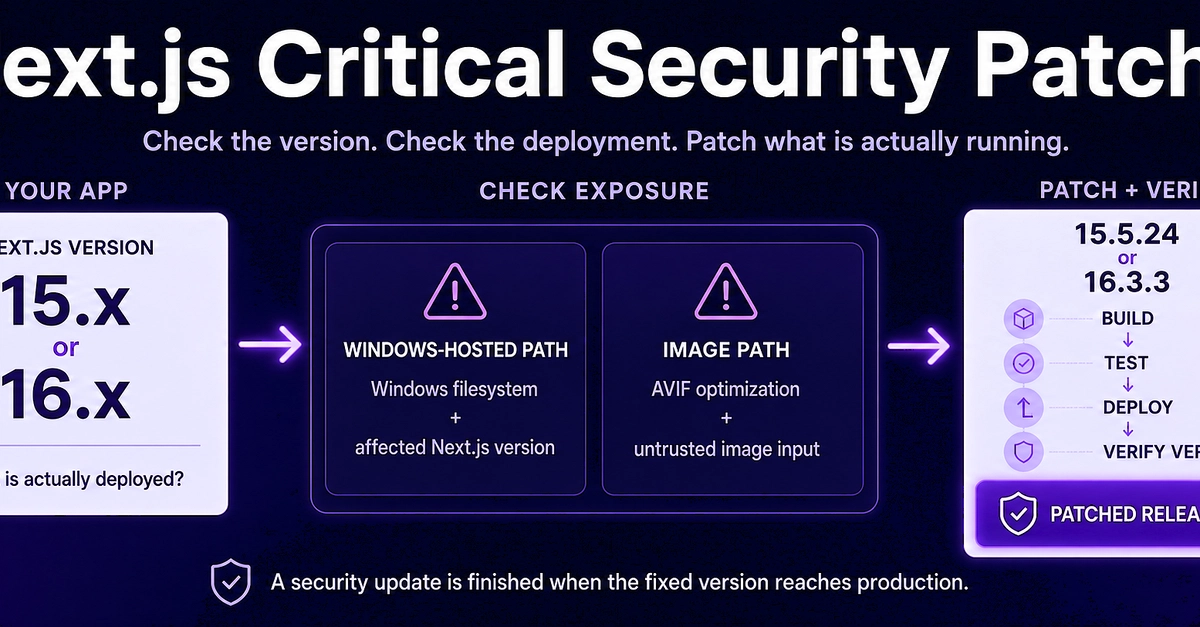
The primary directive for any application maintainer is not to get lost in the details of the vulnerabilities themselves, but to quickly ascertain their relevance and deploy the fixes. This requires answering four key questions:
- What Next.js version is currently deployed in production?
- Is the application hosted on a Windows environment, making it susceptible to the RCE vulnerability?
- Does the application process user-supplied AVIF images, potentially exposing it to the image processing RCE?
- Has the patched version been successfully deployed to production, beyond just updating the
package.jsonfile?
This guide provides the necessary steps to answer these questions and implement the patches, concluding with a robust CI/CD guard to prevent vulnerable versions from being deployed in the future.
Understanding the Vulnerabilities
The first critical issue, identified as CVE-2026-75604, is a Remote Code Execution vulnerability that specifically affects Next.js applications deployed on Windows environments. Attackers could exploit this flaw to execute arbitrary code on the server, leading to a complete compromise of the affected system. The vulnerability arises from improper handling of certain system commands or paths within the Next.js framework when running on Windows.
The second vulnerability concerns the optimization of AVIF images. Next.js includes built-in image optimization capabilities, which, when processing AVIF files, can be exploited to achieve RCE. If an application allows users to upload or process attacker-controlled AVIF images, this flaw could be leveraged to execute malicious code on the server. This is particularly concerning as AVIF is a modern, efficient image format increasingly adopted for web performance.
The Patched Versions and Deployment Status
The security release addresses these issues with the following patched versions:
Next.js 15.x → 15.5.24
Next.js 16.x → 16.3.3
It is crucial to distinguish between updating your project's dependencies in package.json and actually deploying the patched version to your production environment. A simple npm install next@latest or yarn add next@latest command only updates the dependency declaration; the new code must be built and deployed.
To verify your deployed version, you will need to inspect the running application. This typically involves checking the package.json and package-lock.json (or yarn.lock) in your deployment artifact, or by inspecting the next package version directly within the deployed Node.js modules directory.

Checking for Windows RCE Applicability
For the CVE-2026-75604 vulnerability, the critical factor is the operating system of your deployment target. If your Next.js application runs on Linux, macOS, or any non-Windows server environment, this specific RCE vulnerability does not apply. However, if your application is deployed on Windows servers (e.g., using IIS with Node.js, or directly on Windows VMs), you are directly exposed and must prioritize patching.
To confirm your deployment environment, consult your infrastructure and deployment scripts. If you utilize containerization, check the base image used for your Next.js application containers. For serverless functions, verify the underlying execution environment provided by the cloud provider.
Assessing AVIF Image Optimization Risk
The AVIF image RCE vulnerability affects any Next.js application that utilizes the built-in image optimization feature to process AVIF files. This feature is enabled by default when you use the next/image component. If your application allows users to upload images that are then processed by next/image, or if your build process generates AVIF images that are then served by Next.js, you are at risk.
To determine if your application is vulnerable:
- Check if you are using the
next/imagecomponent in your application. - If you are using
next/image, verify if AVIF optimization is enabled. This is typically controlled by thenext.config.jsfile. Look for an entry likeimages: { formats: ['image/avif', 'image/webp', 'image/png', 'image/jpeg'] }. Even if AVIF is not explicitly listed, Next.js may attempt to optimize it if the browser supports it. - Most importantly, assess whether your application handles attacker-controlled AVIF images. This is the direct vector for exploitation.
If your application does not use next/image or does not process AVIF images, this vulnerability is not applicable. However, given the prevalence of next/image for performance, many applications will need to address this.
Implementing the Patch and CI Guards
The recommended action is to upgrade to the patched versions immediately:
# For Next.js 15.x users
npm install next@15.5.24 react@^18 react-dom@^18

# For Next.js 16.x users
npm install next@16.3.3 react@^18 react-dom@^18
After updating, rebuild your application and deploy the new version. Thoroughly test your application to ensure no regressions were introduced.
To prevent future deployments of vulnerable versions, implement a CI guard in your pipeline. This guard should check the installed version of Next.js before allowing a deployment to proceed. A simple check can be added to your CI script:
#!/bin/bash

NEXT_VERSION=$(node -p "require('./node_modules/next/package.json').version")

if [[ "$NEXT_VERSION" == "15.5.24" || "$NEXT_VERSION" == "16.3.3" ]]; then
  echo "Next.js version $NEXT_VERSION is patched and safe."
  exit 0
elif [[ "$NEXT_VERSION" == "15."* || "$NEXT_VERSION" == "16."* ]]; then
  echo "Error: Detected vulnerable Next.js version $NEXT_VERSION. Please upgrade to 15.5.24 or 16.3.3."
  exit 1
else
  echo "Next.js version $NEXT_VERSION is not in the 15.x or 16.x range. Assuming safe or not applicable."
  exit 0
fi
This script, when run in your CI environment, will inspect the installed Next.js version. If it's a known vulnerable version within the 15.x or 16.x series (excluding the patched ones), the build will fail, preventing a compromised version from reaching production. This proactive measure is essential for maintaining a secure application posture.