The Hidden Cost of Self-Hosting Next.js Image Optimization
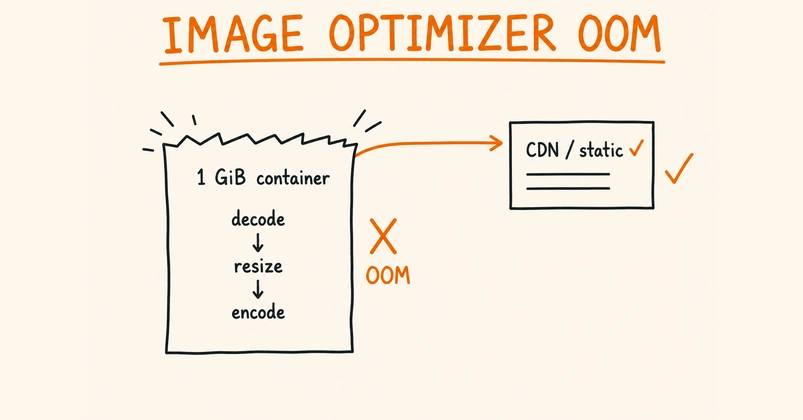
On platforms like Vercel, the next/image optimizer operates seamlessly in the background. It's Vercel's responsibility to manage its infrastructure, scaling, and any performance hiccups. This abstraction is a significant benefit, often overlooked when developers consider migrating to self-hosted solutions for cost savings or greater control. However, moving a Next.js application to a self-hosted Virtual Private Server (VPS), especially within a constrained environment like a 1 GiB Docker container, reveals a critical hidden cost: the next/image optimizer itself.
This optimizer performs computationally intensive tasks: decoding source images, resizing them to specific dimensions, re-encoding them into modern formats like WebP or AVIF, and holding these operations in memory. While these processes are invisible on managed platforms, they directly compete for RAM within a fixed memory ceiling on a self-hosted VPS. Image decoding, in particular, is notoriously memory-hungry. Without careful management, the optimizer is a prime candidate for causing Out-Of-Memory (OOM) kills, crashing your Node.js process and rendering your application inaccessible.
This is not a bug in Next.js; it's a consequence of how the optimizer works and the constraints of a limited environment. The common narrative around self-hosting often focuses on infrastructure costs, neglecting the operational overhead and resource demands of core features like image optimization. When your application runs in a tightly managed container, every megabyte counts, and the optimizer's appetite for RAM can quickly become the single point of failure.
Strategies for Taming the Optimizer's Memory Footprint
Keeping the next/image optimizer within a strict memory budget requires a multi-pronged approach. The primary goal is to reduce the demand the optimizer places on the container's limited RAM. This involves both configuring the optimizer more conservatively and, in some cases, offloading the optimization work entirely.
1. Configuring the Next.js Image Optimizer
Next.js provides configuration options that can influence the optimizer's behavior. While direct memory limits for the optimizer process are not exposed in a granular way, certain settings can indirectly reduce its resource consumption.
- Disabling Unused Image Formats: If your target audience primarily uses browsers that support JPEG and PNG, or perhaps only WebP, you might consider disabling AVIF support. AVIF encoding can be more CPU and memory intensive. This can be configured within your
next.config.jsfile. - Image Quality Settings: Lowering the default image quality setting for encoded images can reduce the size of the output files, which may slightly decrease the memory needed during re-encoding.
However, these configuration tweaks often provide only marginal benefits when dealing with severely limited memory. The core issue remains the decoding and re-encoding process itself.
2. Externalizing Image Optimization
For applications running in highly constrained environments, the most effective strategy is to move image optimization outside the Node.js process and the container altogether. This effectively removes the optimizer's memory demands from the critical path of your application.
a. Using a Dedicated Image Optimization Service
Several third-party services specialize in image optimization. These services typically offer APIs that allow you to upload images or specify URLs, and they return optimized versions. Examples include Cloudinary, Imgix, or even services built on platforms like AWS Lambda. By integrating one of these services, your Next.js application would request optimized images from the external provider, rather than performing the optimization itself. This requires a change in how images are referenced in your application, typically by using the external service's URL structure.
b. Leveraging a Reverse Proxy with Image Optimization Capabilities
Another powerful approach involves using a reverse proxy, such as Nginx with specific modules, or specialized proxies like Thumbor or ImageKit. When a request for an image comes into your server, the reverse proxy intercepts it. If the image is not already optimized or cached, the proxy can fetch the original, optimize it, cache the result, and serve it to the client. This offloads the entire optimization workload from your Node.js application and its container. For a self-hosted VPS, setting up Nginx with caching and potentially a module for on-the-fly resizing (though less common for advanced formats like AVIF) is a viable, albeit complex, option.
c. Pre-optimization for Static Exports
If your Next.js application is deployed using static export (next export), you can pre-optimize all your images during the build process. Tools like imagemin can be integrated into your build pipeline to compress and convert images to WebP or AVIF. The resulting optimized images are then served directly, bypassing the need for a runtime optimizer. This approach is only suitable for static sites or parts of an application where content does not change dynamically at runtime, requiring images to be optimized on demand.
3. Monitoring and Alerting
Regardless of the chosen strategy, continuous monitoring of your container's memory usage is paramount. Set up alerts for when memory consumption approaches the 1 GiB limit. Tools like Prometheus with Node Exporter, or simpler container monitoring solutions provided by your orchestration platform (like Coolify, if used), are essential. Understanding peak memory usage during image requests will help you identify if your current strategy is sufficient or if further adjustments are needed.
4. Incremental Migration and Load Testing
If you are migrating an existing application, do so incrementally. Deploy the changes to a staging environment that mirrors your production constraints. Perform rigorous load testing, specifically simulating traffic patterns that involve frequent image requests. This will expose memory bottlenecks before they impact your production users. Gradually increase the load to determine the breaking point and validate the effectiveness of your optimization strategy.
When to Take the Optimizer Out of the Container
The decision to externalize the next/image optimizer hinges on several factors:
- Memory Constraints: If your container is consistently hitting memory limits (e.g., 1 GiB or less) and other memory-intensive processes are also running, the optimizer is a prime candidate for removal.
- Traffic Volume: High traffic with frequent image requests will exacerbate memory pressure. Even with optimizations, a busy site may struggle to keep the optimizer contained.
- Image Complexity: Applications serving a large number of high-resolution images, or requiring dynamic resizing of very large source files, will naturally demand more resources.
- Development Effort vs. Cost: Evaluating the engineering time required to implement and maintain an external optimization solution against the cost of a managed service or a larger VPS is crucial.
For many, the simplicity of next/image on Vercel is a trade-off for managing these complexities. When self-hosting, understanding and actively managing the optimizer's resource demands is not optional; it's a prerequisite for a stable application. If your container's memory is perpetually under siege, consider it a clear signal that the optimizer needs its own, less constrained, environment.